
DNS(BIND)の検証環境を用意し、Dynamic DNS(DDNS)の設定および動作の確認を行います。
※ここでは実際に設定、動作したものを掲載していますが、内容について保証するものではありません。流用される場合は各自の責任でお願いします。
DDNS の検証に際し、ゾーンデータ更新用の DNS パケットについて調べたことを「DNS UPDATE のパケットについて」にまとめました。よろしければご参照ください。
検証環境の構成
本検証ではローカルに用意した、DNS 環境を使用します。
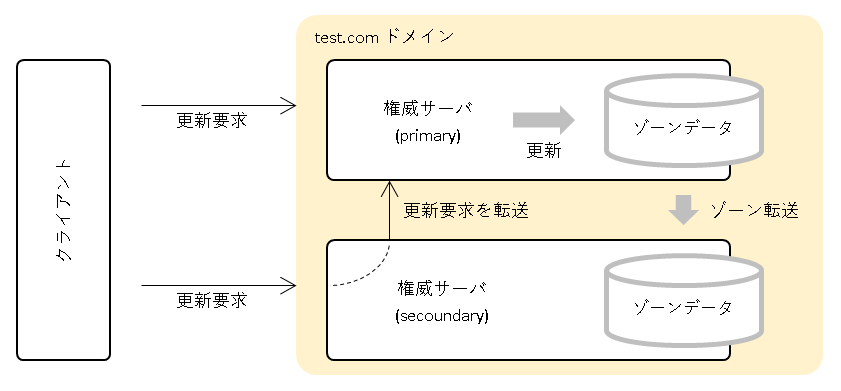
論理構成は下図のとおりです。
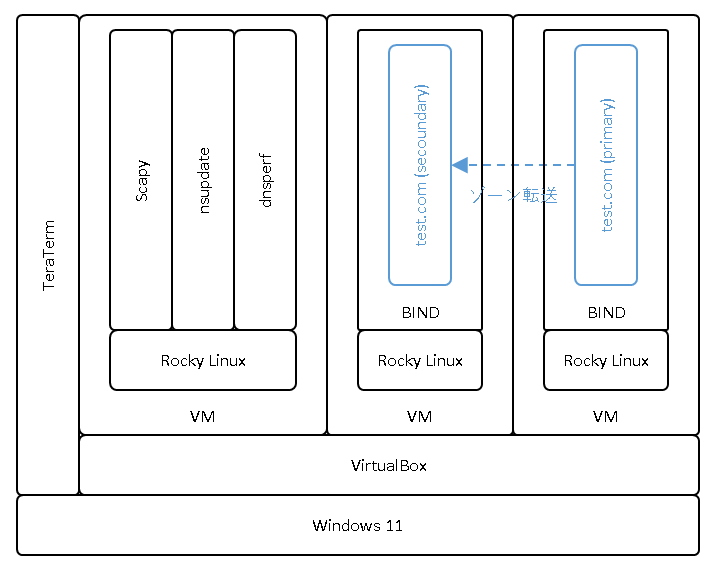
物理構成およびソフトウェアのスタックは下図のとおりです。
- 本検証では test.com のゾーンデータを DDNS での更新対象とします。
- プライマリサーバは更新要求を受け付け、test.com の ゾーンデータを更新します。
- セカンダリサーバは更新要求を受け付け、同更新要求をプライマリサーバに転送します。
- test.com ではプライマリサーバからセカンダリサーバへのゾーンデータの同期が行われており、ゾーンデータ更新に伴いゾーン転送が発生します。
- DNS サーバには BIND を使用します。
- 更新要求を行うツールとして、DNS サーバとは別のノードに scapy、nsupdate、dnsperf を用意します。
使用しているソフトウェアのバージョンは以下のとおりです。
- Windows 11 home [10.0.26200]
- VirtualBox 7.1.6(仮想環境)
- Rocky Linux 8.10(仮想マシンの OS)
- BIND 9.11.36(DNS サーバ)
- scapy 2.7.0
- nsupdate 9.11.36
- dnsperf 2.12.0
参考:Tshark のインストールについて
検証でパケットキャプチャを行うため、TShark(Wireshark)をインストールしています。インストール手順は以下のとおりです。
TShark(Wireshark)がインストールされていないことを確認します。(インストールされている場合は、リポジトリの先頭に @ が付きます。)
[root@dns-client ~]# dnf list | grep wireshark
libvirt-wireshark.x86_64       8.0.0-23.5.module+el8.10.0+40076+c1171059         appstream
wireshark.x86_64               1:2.6.2-17.el8                                    appstream
wireshark-cli.i686             1:2.6.2-17.el8                                    appstream
wireshark-cli.x86_64           1:2.6.2-17.el8                                    appstream
[root@dns-client ~]#
インストールします。
[root@dns-client ~]# dnf install wireshark -y
 ~
インストール済み:
  alsa-lib-1.2.10-2.el8.x86_64                         desktop-file-utils-0.26-1.el8.x86_64             emacs-filesystem-1:26.1-15.el8_10.noarch
  flac-libs-1.3.2-11.el8.x86_64                        gsm-1.0.17-5.el8.x86_64                          gstreamer1-1.16.1-2.el8.x86_64
  gstreamer1-plugins-bad-free-1.16.1-5.el8_10.x86_64   gstreamer1-plugins-base-1.16.1-5.el8_10.x86_64   hicolor-icon-theme-0.17-2.el8.noarch
  iso-codes-3.79-2.el8.noarch                          lcms2-2.9-2.el8.x86_64                           libXi-1.7.10-1.el8.x86_64
  libXtst-1.2.3-7.el8.x86_64                           libXv-1.0.11-7.el8.x86_64                        libasyncns-0.8-14.el8.x86_64
  libatomic-8.5.0-28.el8_10.x86_64                     libdvdnav-5.0.3-8.el8.x86_64                     libdvdread-5.0.3-9.el8.x86_64
  libglvnd-gles-1:1.3.4-2.el8.x86_64                   libmetalink-0.1.3-7.el8.x86_64                   libogg-2:1.3.2-10.el8.x86_64
  librsvg2-2.42.7-5.el8.x86_64                         libsmi-0.4.8-23.el8.x86_64                       libsndfile-1.0.28-16.el8_10.x86_64
  libsrtp-1.5.4-8.el8.x86_64                           libtheora-1:1.1.1-21.el8.x86_64                  libvisual-1:0.4.0-25.el8.x86_64
  libvorbis-1:1.3.6-2.el8.x86_64                       libwayland-cursor-1.21.0-1.el8.x86_64            libwayland-egl-1.21.0-1.el8.x86_64
  openal-soft-1.18.2-7.el8.x86_64                      opus-1.3-0.4.beta.el8.x86_64                     orc-0.4.28-4.el8_10.x86_64
  pulseaudio-libs-14.0-4.el8.x86_64                    pulseaudio-libs-glib2-14.0-4.el8.x86_64          qt5-qtdeclarative-5.15.3-2.el8.x86_64
  qt5-qtmultimedia-5.15.3-1.el8.x86_64                 soundtouch-2.0.0-3.el8.x86_64                    webrtc-audio-processing-0.3-10.el8.x86_64
  wget-1.19.5-12.el8_10.x86_64                         wireshark-1:2.6.2-17.el8.x86_64                  wireshark-cli-1:2.6.2-17.el8.x86_64
  xdg-utils-1.1.2-5.el8.noarch                         xml-common-0.6.3-50.el8.noarch

完了しました!
[root@dns-client ~]#
インストール済み(リポジトリの先頭に @ が付いていること)を確認します。
[root@dns-client ~]# dnf list | grep wireshark
wireshark.x86_64               1:2.6.2-17.el8                                    @appstream
wireshark-cli.x86_64           1:2.6.2-17.el8                                    @appstream
libvirt-wireshark.x86_64       8.0.0-23.5.module+el8.10.0+40076+c1171059         appstream
wireshark-cli.i686             1:2.6.2-17.el8                                    appstream
[root@dns-client ~]#
バージョンを確認します。
[root@dns-client ~]# tshark -v | head -2
Running as user "root" and group "root". This could be dangerous.
TShark (Wireshark) 2.6.2 (v2.6.2)

[root@dns-client ~]#
参考:nsupdate について
nsupdate は dig と同じパッケージ(bind-utils)に含まれています。必要に応じてインストールしてください。
[root@dns-client ~]# rpm -qf `which nsupdate`
bind-utils-9.11.36-16.el8_10.6.x86_64
[root@dns-client ~]#
[root@dns-client ~]# nsupdate -V
nsupdate 9.11.36-RedHat-9.11.36-16.el8_10.6
[root@dns-client ~]#
参考:dnsperf のインストールについて
dnsperf は EPEL リポジトリからインストールできます。EPEL リポジトリが有効になっていない場合はまずそちらからインストールします。
EPEL リポジトリをインストールします。
[root@dns-client ~]# dnf install epel-release -y
~
インストール済み:
  epel-release-8-22.el8.noarch

完了しました!
[root@dns-client ~]#
dnsperf をインストールします。
[root@dns-client ~]# dnf install dnsperf -y
~
インストール済み:
  ~ dnsperf-2.12.0-1.el8.x86_64
  ~

完了しました!
[root@dns-client ~]#
バージョンを確認します。
[root@dns-client ~]# dnsperf -h
DNS Performance Testing Tool
Version 2.12.0
~
[root@dns-client ~]#
scapy のインストールについては「scapy のインストール」をご参照ください。
Dynamic DNS(DDNS)のための BIND の設定
検証に先立ち、BIND のコンフィグ(named.conf)について、DDNS に関係がありそうな箇所について説明いたします。
プライマリサーバの設定
test.com ドメインは Hidden Master 構成(*1)を想定しているため、セカンダリと DDNS 用クライアントからの通信のみを受け付けるために、allow-query ステートメントにアドレス(acl)を指定します。
*1 プライマリはゾーンデータの管理に徹し、不特定リゾルバからのクエリには応じない構成です。
また、クライアントおよびセカンダリからの更新要求を受け付けるため、別途 allow-update ステートメントにアドレス(acl)を指定します。セカンダリからの直接の更新要求は想定していませんが、セカンダリがクライアントから受け取った更新要求をプライマリに転送するため、セカンダリのアドレス指定も必要となります。
以下のコードは named.conf から DDNS に関係する設定箇所を説明用に抜粋したものです。
acl testcom_sec_ip4 { 10.0.2.89/32; }; // test.comドメインのセカンダリサーバ
acl ddns_client_ip4 { 10.0.2.70/32; }; // DDNSの更新要求を送信するクライアント
 ~
options {
   ~
  allow-query { 127.0.0.1; testcom_sec_ip4; ddns_client_ip4; };
   ~
};

zone "test.com" IN {
  type master;
   ~
  allow-update { testcom_sec_ip4; ddns_client_ip4; };
};
プライマリの BIND コンフィグ(named.conf)の詳細につきましては、以下をご参照ください。
/etc/named.conf
// ACLの定義
acl testcom_pri_ip4 { 10.0.2.88/32; }; // test.comドメインのプライマリサーバ
acl testcom_sec_ip4 { 10.0.2.89/32; }; // test.comドメインのセカンダリサーバ
acl ddns_client_ip4 { 10.0.2.70/32; }; // DDNSの更新要求を送信するクライアント

// also-notify指定用(aclを指定した際、named-checkconfで警告メッセージが出たため、mastersの定義に変更)
masters testcom_sec { 10.0.2.89; };

options {
  // listen対象のポートとアドレスを指定
  listen-on port 53 { 127.0.0.1; testcom_pri_ip4; };
//  listen-on-v6 port 53 { ::1; };

  directory          "/var/named";
  dump-file          "/var/named/data/cache_dump.db";
  statistics-file    "/var/named/data/named_stats.txt";
  memstatistics-file "/var/named/data/named_mem_stats.txt";

  // クエリの送信元を指定(セカンダリとDDNS用クライアントのクエリを受け付ける)
  allow-query { 127.0.0.1; testcom_sec_ip4; ddns_client_ip4; };

  // 非再帰問合せ(反復問い合わせ)の指定(権威サーバのため対応しない)
  recursion       no;
  allow-recursion { none; };

  // キャッシュ応答の指定(権威サーバのため対応しない)
  allow-query-cache { none; };

  // DNSSECの指定(本検証環境では無効とする)
  dnssec-enable     no;
  dnssec-validation no;

  /* Path to ISC DLV key */
  bindkeys-file "/etc/named.iscdlv.key";

  managed-keys-directory "/var/named/dynamic";

  pid-file "/run/named/named.pid";
  session-keyfile "/run/named/session.key";
};

zone "test.com" IN {
  type master;

  // ゾーンファイルの指定(directoryからの相対パス)
  file "test.com.zone";

  // ゾーン転送を許可するノードの指定
  allow-transfer { testcom_sec_ip4; };

  // NOTIFY(ゾーンデータの更新通知)通知のルールを指定
  // = explicit : also-notifyに指定したNSサーバだけに通知
  // = yes      : also-notifyに指定したNSサーバ + ゾーンデータのNSレコードに定義されているNSサーバへ通知
  notify explicit;

  // NOTIFYの通知先の指定
  also-notify { testcom_sec; };

  // NOTIFYの通知がどのアドレスから送信されているかの指定(プライマリからの送信であることを指定)
  // インターフェースに複数のアドレスが設定されている場合、想定外のアドレスから送信されてしまう可能性があるための指定
  // ※ ACLでの指定ができなかったためアドレスを直接指定している
  notify-source 10.0.2.88;

  // ゾーンデータの更新要求を許可するノードの指定
  allow-update { testcom_sec_ip4; ddns_client_ip4; };
};

include "/etc/named.rfc1912.zones";
//include "/etc/named.root.key";
セカンダリサーバの設定
クライアントからの更新要求を受け付けるため、allow-update-forwarding ステートメントにアドレス(acl)を指定します。
allow-update-forwarding ステートメントで更新要求を受け付けた場合、更新要求は別のサーバへ転送されますが、転送先は masters ステートメントで指定された宛先となります。masters ステートメントにはプライマリのアドレスが指定されていますが、これは元々ゾーン転送のために指定していたものです。更新要求の転送でも masters ステートメントの指定アドレスが使用されます。
transfer-source ステートメントもゾーン転送用に設定していたものですが、これについても更新要求の転送でも使用されます。
以下のコードは named.conf から DDNS に関係する設定箇所を説明用に抜粋したものです。
acl testcom_pri_ip4 { 10.0.2.88/32; }; // test.comドメインのプライマリサーバ
acl ddns_client_ip4 { 10.0.2.70/32; }; // DDNSの更新要求を送信するクライアント
 ~
masters testcom_pri { 10.0.2.88; };
 ~
zone "test.com" IN {
  type slave;
   ~
  masters { testcom_pri; };
   ~
  transfer-source 10.0.2.89;
   ~
  allow-update-forwarding { ddns_client_ip4; };
};
セカンダリの BIND コンフィグ(named.conf)の詳細につきましては、以下をご参照ください。
/etc/named.conf
// ACLの定義
acl testcom_pri_ip4 { 10.0.2.88/32; }; // test.comドメインのプライマリサーバ
acl testcom_sec_ip4 { 10.0.2.89/32; }; // test.comドメインのセカンダリサーバ
acl ddns_client_ip4 { 10.0.2.70/32; }; // DDNSの更新要求を送信するクライアント

// masters(zone内)指定用(aclを指定した際、named-checkconfで警告メッセージが出たため、mastersの定義に変更)
masters testcom_pri { 10.0.2.88; };

options {
  // listen対象のポートとアドレスを指定
  listen-on port 53 { 127.0.0.1; testcom_sec_ip4; };
//  listen-on-v6 port 53 { ::1; };

  directory          "/var/named";
  dump-file          "/var/named/data/cache_dump.db";
  statistics-file    "/var/named/data/named_stats.txt";
  memstatistics-file "/var/named/data/named_mem_stats.txt";

  // クエリの送信元を指定(全てのクエリを受け付ける)
  allow-query { any; };

  // 非再帰問合せ(反復問い合わせ)の指定(権威サーバのため対応しない)
  recursion       no;
  allow-recursion { none; };

  // キャッシュ応答の指定(権威サーバのため対応しない)
  allow-query-cache { none; };

  // DNSSECの指定(本検証環境では無効とする)
  dnssec-enable     no;
  dnssec-validation no;

  /* Path to ISC DLV key */
  bindkeys-file "/etc/named.iscdlv.key";

  managed-keys-directory "/var/named/dynamic";

  pid-file "/run/named/named.pid";
  session-keyfile "/run/named/session.key";
};

zone "test.com" IN {
  // ゾーン転送における受信側であるため slave
  type slave;

  // ゾーンファイルの指定(directoryからの相対パス)
  // ゾーン転送で勝手に作られるので手動で編集することはない
  file "slaves/test.com.zone";

  // ゾーン転送のマスタを指定
  // この設定は allow-update-forwarding のフォワード先としても使用される
  masters { testcom_pri; };

  // NOTIFY(ゾーンデータの更新通知)通知の送信元を指定
  allow-notify { testcom_pri_ip4; };

  // ゾーン転送の要求がどのアドレスから送信されているかの指定(セカンダリからの送信であることを指定)
  // インターフェースに複数のアドレスが設定されている場合、想定外のアドレスから送信されてしまう可能性があるための指定
  // この設定は allow-update-forwarding のフォワード元としても使用される
  // ※ ACLでの指定ができなかったためアドレスを直接指定している
  transfer-source 10.0.2.89;

  // ゾーン転送で受け取るゾーンファイルの形式を指定
  // default : RAW 形式(バイナリ)で受信
  // = text  : テキスト形式で受信
  // ※ RAW 形式に比べテキスト形式はパフォーマンスが落ちるらしい
  masterfile-format text;

  // ゾーンデータの更新要求を許可するノードの指定
  // 受け取った更新要求は masters で指定されている宛先へ転送される
  allow-update-forwarding { ddns_client_ip4; };
};

include "/etc/named.rfc1912.zones";
//include "/etc/named.root.key";
検証
検証は以下の観点で行いたいと思います。
・更新要求からの処理の流れを確認
更新要求からゾーン転送発生までの一連の流れを確認します。プライマリへ更新要求を送信した場合と、セカンダリへ更新要求を送信した場合のそれぞれで動作を確認します。
・リソースレコード(RR)の追加を確認
追加になるか更新になるかは、ゾーンデータの状況次第です。RR 追加の更新要求を送信し、その動作を確認します。
・リソースレコード(RR)の削除を確認
削除パターンは3とおりあります。RR 削除の更新要求を送信し、その動作を確認します。
・更新要求時に指定できる条件を確認
更新要求の際に指定できる条件として、指定するデータがゾーンに存在していないこと、指定するデータがゾーンに存在していること、などを指定できます。ここでは条件を指定した場合の動作を確認します。
補足:更新要求時の追加/削除および条件指定について
今回の検証では更新要求を送信するツールに、scapy、nsupdate、dnsperf を使用しています。いずれも DNS UPDATE(RFC2136 参照)の規定に従い、DNS パケットを組み立てて送信していますが、DNS パケットには動的更新の要求を示す Opcode = 5 以外に、追加(更新)や削除を明確に示すフラグ等の指定はありません。
nsupdate と dnsperf では、追加(更新)と削除のコマンド(*1)が用意され、それらのコマンドに従い内部で DNS パケットが組み立てられているため、利用者が DNS パケットを意識する必要はありませんが、scapy では利用者が DNS パケットの構成を意識して組み立てる必要があります。
DNS パケットではどのように追加(更新)や削除を表現しているかというと、Update Section(名前解決時には Authority Section として使用されている領域)の属性(NAME、TYPE、CLASS 等)への指定の仕方で決まります。例えば、CLASS=IN ならば追加(更新)、CLASS=ANY or NONE ならば削除といった具合です。
条件の指定についても同様で、nsupdate と dnsperf では、条件指定用のコマンド(*2)が用意されていますが、scapy では DNS パケットの Prerequisite Section(同 Answer Section)の属性への指定の仕方を意識する必要があります。
※ DNS パケットレベルでの追加/削除および条件指定については「DNS UPDATE のパケットについて」をご参照ください。
*1 nsupdate では update add/update delete コマンド、dnsperf では add/delete コマンドを使用します。
*2 nsupdate では prereq nxrrset コマンド等、dnsperf では require/prohibit コマンドを使用します。
更新要求からの処理の流れを確認
プライマリサーバへの更新要求
クライアントから test.com ドメインのプライマリサーバへ、リソースレコード(RR)の追加するための更新要求を送信します。ゾーンデータの更新に伴い、ゾーン転送が発生します。
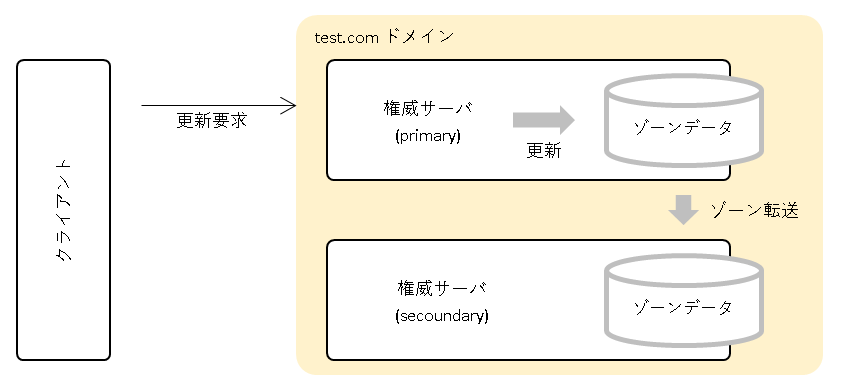
検証の詳細
更新要求前のプライマリとセカンダリのゾーンファイルを確認します。
[root@dns-testcom-pri ~]# cat /var/named/test.com.zone
$ORIGIN .
$TTL 604800     ; 1 week
test.com                IN SOA  ns.test.com. admin.test.com. (
                                1          ; serial
                                86400      ; refresh (1 day)
                                3600       ; retry (1 hour)
                                604800     ; expire (1 week)
                                2000000    ; minimum (3 weeks 2 days 3 hours 33 minutes 20 seconds)
                                )
                        NS      ns.test.com.
$ORIGIN test.com.
ns                      A       10.0.2.89
                        AAAA    fd00::59
[root@dns-testcom-pri ~]#
[root@dns-testcom-sec ~]# cat /var/named/slaves/test.com.zone
$ORIGIN .
$TTL 604800 ; 1 week
test.com IN SOA ns.test.com. admin.test.com. (
1 ; serial
86400 ; refresh (1 day)
3600 ; retry (1 hour)
604800 ; expire (1 week)
2000000 ; minimum (3 weeks 2 days 3 hours 33 minutes 20 seconds)
)
NS ns.test.com.
$ORIGIN test.com.
ns A 10.0.2.89
AAAA fd00::59
[root@dns-testcom-sec ~]#更新要求を scapy で送信します。
[root@dns-client ~]# scapy -H
WARNING: No alternative Python interpreters found ! Using standard Python shell instead.
Welcome to Scapy (2.7.0)
>>>
>>> # 権威サーバ
>>> TESTCOM_PRIMARY = '10.0.2.88'
>>>
>>> # OPCODE
>>> OPCODE_UPDATE = 5
>>>
>>> # TYPE
>>> TYPE_A = 1
>>> TYPE_SOA = 6
>>>
>>> # CLASS
>>> CLASS_IN = 1
>>> CLASS_NONE = 254
>>>
>>> # 更新対象のゾーン
>>> zone_section = DNSQR(qname='test.com.', qtype=TYPE_SOA, qclass=CLASS_IN)
>>>
>>> # 追加する RR
>>> update_section = [
... DNSRR(rrname='www2.test.com.', rclass=CLASS_IN, type=TYPE_A, ttl=1000, rdata='2.3.4.5'),
... DNSRR(rrname='www3.test.com.', rclass=CLASS_IN, type=TYPE_A, ttl=1000, rdata='3.4.5.6')
... ]
>>>
>>> # 更新要求のパケット作成
>>> pkt = IP(src=get_if_addr(conf.iface), dst=TESTCOM_PRIMARY)
>>> pkt /= UDP(sport=RandShort(), dport=53)
>>> pkt /= DNS(opcode=OPCODE_UPDATE, qd=zone_section, ns=update_section)
>>>
>>> # 更新要求
>>> sr1(pkt, timeout=5)[DNS].show()
Begin emission
Finished sending 1 packets
Received 3 packets, got 1 answers, remaining 0 packets
###[ DNS ]###
id = 0
qr = 1
opcode = 5
aa = 0
tc = 0
rd = 0
ra = 0
z = 0
ad = 0
cd = 0
rcode = ok
qdcount = 1
ancount = 0
nscount = 0
arcount = 0
\qd \
|###[ DNS Question Record ]###
| qname = b'test.com.'
| qtype = SOA
| unicastresponse= 0
| qclass = IN
\an \
\ns \
\ar \
>>>(Ctrl+D で scapy の Interactive Console 終了)scapy では更新要求用のパケットを組み立て、プライマリサーバへ送信しています。
DNS パケットには、更新であることを示す Opcode = 5(UPDATE)、更新対象のゾーン情報、追加する RR のデータ(2件)を設定しています。
IP パケットに指定している get_if_addr(conf.iface) ですが、クライアントのデフォルトのインターフェース(enp0s3)から IP アドレスを取得しています。
>>> conf.iface
<NetworkInterface enp0s3 [UP+BROADCAST+RUNNING+MULTICAST+LOWER_UP]>
>>> get_if_addr(conf.iface)
'10.0.2.70'
>>>以下は更新要求中にクライアントでパケットをキャプチャしたものです。
※ VM のプロミスキャスモードを許可にしているため、権威サーバ間のパケットについてもまとめてキャプチャしています。
[root@dns-client ~]# tshark -i 1 -f "port 53" -w /tmp/test.pcap
Running as user "root" and group "root". This could be dangerous.
Capturing on 'enp0s3'
16 ^C
[root@dns-client ~]# tshark -t a -r /tmp/test.pcap
Running as user "root" and group "root". This could be dangerous.
1 19:58:49.613440839 10.0.2.70 → 10.0.2.88 DNS 126 Dynamic update 0x0000 SOA test.com A 2.3.4.5 A 3.4.5.6
2 19:58:49.648360339 10.0.2.88 → 10.0.2.70 DNS 68 Dynamic update response 0x0000 SOA test.com
3 19:58:49.648561401 10.0.2.88 → 10.0.2.89 DNS 113 Zone change notification 0x6a3b SOA test.com SOA ns.test.com
4 19:58:49.651363122 10.0.2.89 → 10.0.2.88 DNS 68 Zone change notification response 0x6a3b SOA test.com
5 19:58:49.651372652 10.0.2.89 → 10.0.2.88 DNS 83 Standard query 0xecc4 SOA test.com OPT
6 19:58:49.652659673 10.0.2.88 → 10.0.2.89 DNS 190 Standard query response 0xecc4 SOA test.com SOA ns.test.com NS ns.test.com A 10.0.2.89 AAAA fd00::59 OPT
7 19:58:49.655349046 10.0.2.89 → 10.0.2.88 TCP 74 55695 → 53 [SYN] Seq=0 Win=29200 Len=0 MSS=1460 SACK_PERM=1 TSval=1727832691 TSecr=0 WS=128
8 19:58:49.657992552 10.0.2.88 → 10.0.2.89 TCP 74 53 → 55695 [SYN, ACK] Seq=0 Ack=1 Win=28960 Len=0 MSS=1460 SACK_PERM=1 TSval=401931253 TSecr=1727832691 WS=128
9 19:58:49.657997682 10.0.2.89 → 10.0.2.88 TCP 66 55695 → 53 [ACK] Seq=1 Ack=1 Win=29312 Len=0 TSval=1727832693 TSecr=401931253
10 19:58:49.658000501 10.0.2.89 → 10.0.2.88 DNS 139 Standard query 0x88ba IXFR test.com SOA ns.test.com
11 19:58:49.658001584 10.0.2.88 → 10.0.2.89 TCP 66 53 → 55695 [ACK] Seq=1 Ack=74 Win=29056 Len=0 TSval=401931256 TSecr=1727832694
12 19:58:49.659823436 10.0.2.88 → 10.0.2.89 DNS 289 Standard query response 0x88ba IXFR test.com SOA ns.test.com SOA ns.test.com SOA ns.test.com A 2.3.4.5 A 3.4.5.6 SOA ns.test.com
13 19:58:49.659826111 10.0.2.89 → 10.0.2.88 TCP 66 55695 → 53 [ACK] Seq=74 Ack=224 Win=30336 Len=0 TSval=1727832696 TSecr=401931257
14 19:58:49.672156732 10.0.2.89 → 10.0.2.88 TCP 66 55695 → 53 [FIN, ACK] Seq=74 Ack=224 Win=30336 Len=0 TSval=1727832709 TSecr=401931257
15 19:58:49.673559094 10.0.2.88 → 10.0.2.89 TCP 66 53 → 55695 [FIN, ACK] Seq=224 Ack=75 Win=29056 Len=0 TSval=401931271 TSecr=1727832709
16 19:58:49.674169264 10.0.2.89 → 10.0.2.88 TCP 66 55695 → 53 [ACK] Seq=75 Ack=225 Win=30336 Len=0 TSval=1727832711 TSecr=401931271
[root@dns-client ~]#
10.0.2.70 : client
10.0.2.88 : primary
10.0.2.89 : secoundary#1 はクライアントからの更新要求(Dynamic Update)送信のパケットで、#2 はそのレスポンス。
#3 はゾーンデータ更新に伴う、プライマリからセカンダリへの NOTIFY 通知、#4 はそのレスポンス。
#5 は serial を確認するためにセカンダリへからプライマリへ SOA を要求、#6 はそのレスポンス。
#7 以降はゾーン転送(IXFR)のやりとりです。ゾーン転送は TCP で行われます。
以下は #1(Dynamic Update)と #2(Dynamic Update Response)の DNS パケットの詳細です。
[root@dns-client ~]# tshark -nn -r /tmp/test.pcap -Y '(frame.number==1)' -V | grep ^Domain -A100 | cat -n
Running as user "root" and group "root". This could be dangerous.
1 Domain Name System (query)
2 Transaction ID: 0x0000
3 Flags: 0x2900 Dynamic update
4 0... .... .... .... = Response: Message is a query
5 .010 1... .... .... = Opcode: Dynamic update (5)
6 .... ..0. .... .... = Truncated: Message is not truncated
7 .... ...1 .... .... = Recursion desired: Do query recursively
8 .... .... .0.. .... = Z: reserved (0)
9 .... .... ...0 .... = Non-authenticated data: Unacceptable
10 Zones: 1
11 Prerequisites: 0
12 Updates: 2
13 Additional RRs: 0
14 Zone
15 test.com: type SOA, class IN
16 Name: test.com
17 [Name Length: 8]
18 [Label Count: 2]
19 Type: SOA (Start Of a zone of Authority) (6)
20 Class: IN (0x0001)
21 Updates
22 www2.test.com: type A, class IN, addr 2.3.4.5
23 Name: www2.test.com
24 Type: A (Host Address) (1)
25 Class: IN (0x0001)
26 Time to live: 1000
27 Data length: 4
28 Address: 2.3.4.5
29 www3.test.com: type A, class IN, addr 3.4.5.6
30 Name: www3.test.com
31 Type: A (Host Address) (1)
32 Class: IN (0x0001)
33 Time to live: 1000
34 Data length: 4
35 Address: 3.4.5.6
36
[root@dns-client ~]#[root@dns-client ~]# tshark -nn -r /tmp/test.pcap -Y '(frame.number==2)' -V | grep ^Domain -A100 | cat -n
Running as user "root" and group "root". This could be dangerous.
1 Domain Name System (response)
2 Transaction ID: 0x0000
3 Flags: 0xa800 Dynamic update response, No error
4 1... .... .... .... = Response: Message is a response
5 .010 1... .... .... = Opcode: Dynamic update (5)
6 .... .0.. .... .... = Authoritative: Server is not an authority for domain
7 .... ..0. .... .... = Truncated: Message is not truncated
8 .... ...0 .... .... = Recursion desired: Don't do query recursively
9 .... .... 0... .... = Recursion available: Server can't do recursive queries
10 .... .... .0.. .... = Z: reserved (0)
11 .... .... ..0. .... = Answer authenticated: Answer/authority portion was not authenticated by the server
12 .... .... ...0 .... = Non-authenticated data: Unacceptable
13 .... .... .... 0000 = Reply code: No error (0)
14 Zones: 1
15 Prerequisites: 0
16 Updates: 0
17 Additional RRs: 0
18 Zone
19 test.com: type SOA, class IN
20 Name: test.com
21 [Name Length: 8]
22 [Label Count: 2]
23 Type: SOA (Start Of a zone of Authority) (6)
24 Class: IN (0x0001)
25 [Request In: 1]
26 [Time: 0.020541847 seconds]
27
[root@dns-client ~]#クライアントから test.com ドメインの権威サーバ宛てに dig を実行し、追加した RR が問い合わせ可能であることを確認します。
[root@dns-client ~]# grep testcom /etc/hosts
10.0.2.88 testcom_primary
10.0.2.89 testcom_secoundary
[root@dns-client ~]# dig @testcom_primary www2.test.com A +norec +noall +answer
www2.test.com. 1000 IN A 2.3.4.5
[root@dns-client ~]# dig @testcom_primary www3.test.com A +norec +noall +answer
www3.test.com. 1000 IN A 3.4.5.6
[root@dns-client ~]# dig @testcom_secoundary www2.test.com A +norec +noall +answer
www2.test.com. 1000 IN A 2.3.4.5
[root@dns-client ~]# dig @testcom_secoundary www3.test.com A +norec +noall +answer
www3.test.com. 1000 IN A 3.4.5.6
[root@dns-client ~]#以下はプライマリサーバ(named サービス)のログです。
RR の追加に続き、セカンダリへの NOTIFY 通知およびゾーン転送(IXFR)のログが記録されています。
[root@dns-testcom-pri ~]# journalctl -f -u named
~
4月 19 20:13:43 dns-testcom-pri.mydomain named[1618]: client @0x7f97a80bfbb0 10.0.2.70#34456: updating zone 'test.com/IN': adding an RR at 'www2.test.com' A 2.3.4.5
4月 19 20:13:43 dns-testcom-pri.mydomain named[1618]: client @0x7f97a80bfbb0 10.0.2.70#34456: updating zone 'test.com/IN': adding an RR at 'www3.test.com' A 3.4.5.6
4月 19 20:13:43 dns-testcom-pri.mydomain named[1618]: zone test.com/IN: sending notifies (serial 2)
4月 19 20:13:43 dns-testcom-pri.mydomain named[1618]: client @0x7f97a002da90 10.0.2.89#52001 (test.com): transfer of 'test.com/IN': IXFR started (serial 1 -> 2)
4月 19 20:13:43 dns-testcom-pri.mydomain named[1618]: client @0x7f97a002da90 10.0.2.89#52001 (test.com): transfer of 'test.com/IN': IXFR ended
^C
[root@dns-testcom-pri ~]#以下はセカンダリサーバ(named サービス)のログです。
NOTIFY 通知を受けてのゾーン転送(IXFR)のログが記録されています。
[root@dns-testcom-sec ~]# journalctl -f -u named
~
4月 19 20:13:43 dns-testcom-sec.mydomain named[1619]: client @0x7fcc600bfbb0 10.0.2.88#46660: received notify for zone 'test.com'
4月 19 20:13:43 dns-testcom-sec.mydomain named[1619]: zone test.com/IN: notify from 10.0.2.88#46660: serial 2
4月 19 20:13:43 dns-testcom-sec.mydomain named[1619]: zone test.com/IN: Transfer started.
4月 19 20:13:43 dns-testcom-sec.mydomain named[1619]: transfer of 'test.com/IN' from 10.0.2.88#53: connected using 10.0.2.89#52001
4月 19 20:13:43 dns-testcom-sec.mydomain named[1619]: zone test.com/IN: transferred serial 2
4月 19 20:13:43 dns-testcom-sec.mydomain named[1619]: transfer of 'test.com/IN' from 10.0.2.88#53: Transfer status: success
4月 19 20:13:43 dns-testcom-sec.mydomain named[1619]: transfer of 'test.com/IN' from 10.0.2.88#53: Transfer completed: 1 messages, 6 records, 221 bytes, 0.014 secs (15785 bytes/sec)
^C
[root@dns-testcom-sec ~]#以下は更新要求後のプライマリのゾーンファイル(test.com.zone)です。
この時点では更新データはジャーナル(.jnl)に保存され、ゾーンファイルには反映されていません。(www2、www3 の RR は無く、serial は最初に設定した 1 のままです。)
[root@dns-testcom-pri ~]# ll /var/named/test.com.*
-rw-r--r--. 1 named named 350 4月 19 20:01 /var/named/test.com.zone
-rw-r--r--. 1 named named 736 4月 19 20:13 /var/named/test.com.zone.jnl
[root@dns-testcom-pri ~]# cat /var/named/test.com.zone
$ORIGIN .
$TTL 604800 ; 1 week
test.com IN SOA ns.test.com. admin.test.com. (
1 ; serial
86400 ; refresh (1 day)
3600 ; retry (1 hour)
604800 ; expire (1 week)
2000000 ; minimum (3 weeks 2 days 3 hours 33 minutes 20 seconds)
)
NS ns.test.com.
$ORIGIN test.com.
ns A 10.0.2.89
AAAA fd00::59
[root@dns-testcom-pri ~]#セカンダリのゾーンファイル(test.com.zone)についても同様です。
[root@dns-testcom-sec ~]# ll /var/named/slaves/test.com.*
-rw-r--r--. 1 named named 350 4月 19 20:01 /var/named/slaves/test.com.zone
-rw-r--r--. 1 named named 736 4月 19 20:13 /var/named/slaves/test.com.zone.jnl
[root@dns-testcom-sec ~]# cat /var/named/slaves/test.com.zone
$ORIGIN .
$TTL 604800     ; 1 week
test.com                IN SOA  ns.test.com. admin.test.com. (
                                1          ; serial
                                86400      ; refresh (1 day)
                                3600       ; retry (1 hour)
                                604800     ; expire (1 week)
                                2000000    ; minimum (3 weeks 2 days 3 hours 33 minutes 20 seconds)
                                )
                        NS      ns.test.com.
$ORIGIN test.com.
ns                      A       10.0.2.89
                        AAAA    fd00::59
[root@dns-testcom-sec ~]#ジャーナル(.jnl)はバイナリなので strings コマンドでテキストを拾います。www2、www3 が保存されていることが確認できます。
[root@dns-testcom-pri ~]# file /var/named/test.com.zone.jnl
/var/named/test.com.zone.jnl: data
[root@dns-testcom-pri ~]# strings /var/named/test.com.zone.jnl | grep -E "www2|www3"
www2
www3
[root@dns-testcom-pri ~]#
プライマリのジャーナル(test.com.zone.jnl)をゾーンファイルにマージします。(時間経過とともに自動的にマージされるようですが、ここは強制的にマージします。)
ジャーナルがなくなり、ゾーンファイルが更新されていることが確認できます。(www2、www3 の RR が追加され、serial が 2 になっています。)
[root@dns-testcom-pri ~]# rndc sync -clean test.com.
[root@dns-testcom-pri ~]# ll /var/named/test.com.*
-rw-r--r--. 1 named named 418  4月 19 20:16 /var/named/test.com.zone
[root@dns-testcom-pri ~]# cat /var/named/test.com.zone
$ORIGIN .
$TTL 604800     ; 1 week
test.com                IN SOA  ns.test.com. admin.test.com. (
                                2          ; serial
                                86400      ; refresh (1 day)
                                3600       ; retry (1 hour)
                                604800     ; expire (1 week)
                                2000000    ; minimum (3 weeks 2 days 3 hours 33 minutes 20 seconds)
                                )
                        NS      ns.test.com.
$ORIGIN test.com.
ns                      A       10.0.2.89
                        AAAA    fd00::59
$TTL 1000       ; 16 minutes 40 seconds
www2                    A       2.3.4.5
www3                    A       3.4.5.6
[root@dns-testcom-pri ~]#
セカンダリについても同様です。
[root@dns-testcom-sec ~]# rndc sync -clean test.com.
[root@dns-testcom-sec ~]# ll /var/named/slaves/test.com.*
-rw-r--r--. 1 named named 418  4月 19 20:16 /var/named/slaves/test.com.zone
[root@dns-testcom-sec ~]# cat /var/named/slaves/test.com.zone
$ORIGIN .
$TTL 604800     ; 1 week
test.com                IN SOA  ns.test.com. admin.test.com. (
                                2          ; serial
                                86400      ; refresh (1 day)
                                3600       ; retry (1 hour)
                                604800     ; expire (1 week)
                                2000000    ; minimum (3 weeks 2 days 3 hours 33 minutes 20 seconds)
                                )
                        NS      ns.test.com.
$ORIGIN test.com.
ns                      A       10.0.2.89
                        AAAA    fd00::59
$TTL 1000       ; 16 minutes 40 seconds
www2                    A       2.3.4.5
www3                    A       3.4.5.6
[root@dns-testcom-sec ~]#
セカンダリサーバへの更新要求
クライアントから test.com ドメインのセカンダリサーバへ、リソースレコード(RR)の追加するための更新要求を送信します。更新要求はプライマリへ転送され、ゾーンデータが更新されたのち、セカンダリへのゾーン転送が行われます。
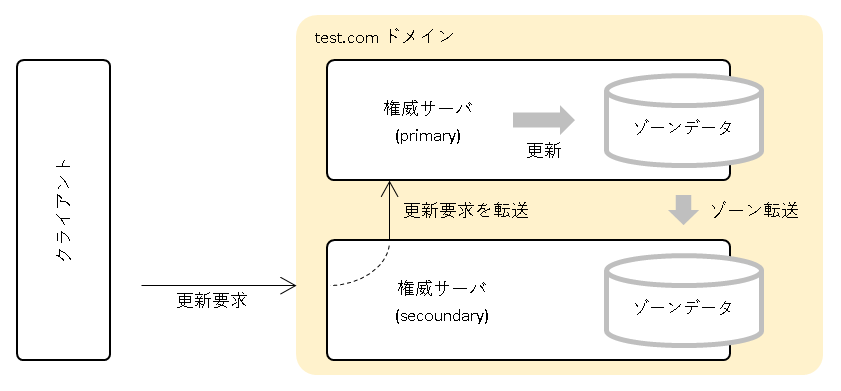
検証の詳細
更新要求前のプライマリとセカンダリのゾーンファイルを確認します。
[root@dns-testcom-pri ~]# cat /var/named/test.com.zone
$ORIGIN .
$TTL 604800     ; 1 week
test.com                IN SOA  ns.test.com. admin.test.com. (
                                2          ; serial
                                86400      ; refresh (1 day)
                                3600       ; retry (1 hour)
                                604800     ; expire (1 week)
                                2000000    ; minimum (3 weeks 2 days 3 hours 33 minutes 20 seconds)
                                )
                        NS      ns.test.com.
$ORIGIN test.com.
ns                      A       10.0.2.89
                        AAAA    fd00::59
$TTL 1000       ; 16 minutes 40 seconds
www2                    A       2.3.4.5
www3                    A       3.4.5.6
[root@dns-testcom-pri ~]#
[root@dns-testcom-sec ~]# cat /var/named/slaves/test.com.zone
$ORIGIN .
$TTL 604800 ; 1 week
test.com IN SOA ns.test.com. admin.test.com. (
2 ; serial
86400 ; refresh (1 day)
3600 ; retry (1 hour)
604800 ; expire (1 week)
2000000 ; minimum (3 weeks 2 days 3 hours 33 minutes 20 seconds)
)
NS ns.test.com.
$ORIGIN test.com.
ns A 10.0.2.89
AAAA fd00::59
$TTL 1000 ; 16 minutes 40 seconds
www2 A 2.3.4.5
www3 A 3.4.5.6
[root@dns-testcom-sec ~]#更新要求を scapy で送信します。
[root@dns-client ~]# scapy -H
WARNING: No alternative Python interpreters found ! Using standard Python shell instead.
Welcome to Scapy (2.7.0)
>>>
>>> # 権威サーバ
>>> TESTCOM_SECOUNDARY = '10.0.2.89'
>>>
>>> # OPCODE
>>> OPCODE_UPDATE = 5
>>>
>>> # TYPE
>>> TYPE_A = 1
>>> TYPE_SOA = 6
>>>
>>> # CLASS
>>> CLASS_IN = 1
>>> CLASS_NONE = 254
>>>
>>> # 更新対象のゾーン
>>> zone_section = DNSQR(qname='test.com.', qtype=TYPE_SOA, qclass=CLASS_IN)
>>>
>>> # 追加する RR
>>> update_section = [
... DNSRR(rrname='www4.test.com.', rclass=CLASS_IN, type=TYPE_A, ttl=1000, rdata='4.5.6.7'),
... DNSRR(rrname='www5.test.com.', rclass=CLASS_IN, type=TYPE_A, ttl=1000, rdata='5.6.7.8')
... ]
>>>
>>> # 更新要求のパケット作成
>>> pkt = IP(src=get_if_addr(conf.iface), dst=TESTCOM_SECOUNDARY)
>>> pkt /= UDP(sport=RandShort(), dport=53)
>>> pkt /= DNS(opcode=OPCODE_UPDATE, qd=zone_section, ns=update_section)
>>>
>>> # 更新要求
>>> sr1(pkt, timeout=5)[DNS].show()
Begin emission
Finished sending 1 packets
Received 13 packets, got 1 answers, remaining 0 packets
###[ DNS ]###
id = 0
qr = 1
opcode = 5
aa = 0
tc = 0
rd = 0
ra = 0
z = 0
ad = 0
cd = 0
rcode = ok
qdcount = 1
ancount = 0
nscount = 0
arcount = 0
\qd \
|###[ DNS Question Record ]###
| qname = b'test.com.'
| qtype = SOA
| unicastresponse= 0
| qclass = IN
\an \
\ns \
\ar \
>>>(Ctrl+D で scapy の Interactive Console 終了)以下は更新要求中にクライアントでパケットをキャプチャしたものです。
※ VM のプロミスキャスモードを許可にしているため、権威サーバ間のパケットについてもまとめてキャプチャしています。
[root@dns-client ~]# tshark -i 1 -f "port 53" -w /tmp/test.pcap
Running as user "root" and group "root". This could be dangerous.
Capturing on 'enp0s3'
26 ^C
[root@dns-client ~]# tshark -t a -r /tmp/test.pcap
Running as user "root" and group "root". This could be dangerous.
1 17:01:48.920596828 10.0.2.70 → 10.0.2.89 DNS 126 Dynamic update 0x0000 SOA test.com A 4.5.6.7 A 5.6.7.8
2 17:01:48.925324668 10.0.2.89 → 10.0.2.88 TCP 74 43591 → 53 [SYN] Seq=0 Win=29200 Len=0 MSS=1460 SACK_PERM=1 TSval=4186539091 TSecr=0 WS=128
3 17:01:48.929330185 10.0.2.88 → 10.0.2.89 TCP 74 53 → 43591 [SYN, ACK] Seq=0 Ack=1 Win=28960 Len=0 MSS=1460 SACK_PERM=1 TSval=1066933984 TSecr=4186539091 WS=128
4 17:01:48.929341140 10.0.2.89 → 10.0.2.88 TCP 66 43591 → 53 [ACK] Seq=1 Ack=1 Win=29312 Len=0 TSval=4186539094 TSecr=1066933984
5 17:01:48.929343654 10.0.2.89 → 10.0.2.88 DNS 152 Dynamic update 0x0031 SOA test.com A 4.5.6.7 A 5.6.7.8
6 17:01:48.929345940 10.0.2.88 → 10.0.2.89 TCP 66 53 → 43591 [ACK] Seq=1 Ack=87 Win=29056 Len=0 TSval=1066933987 TSecr=4186539094
7 17:01:48.956911526 10.0.2.88 → 10.0.2.89 DNS 94 Dynamic update response 0x0031 SOA test.com
8 17:01:48.956931509 10.0.2.88 → 10.0.2.89 DNS 113 Zone change notification 0x6225 SOA test.com SOA ns.test.com
9 17:01:48.958126543 10.0.2.89 → 10.0.2.88 TCP 66 43591 → 53 [ACK] Seq=87 Ack=29 Win=29312 Len=0 TSval=4186539124 TSecr=1066934015
10 17:01:48.958132913 10.0.2.89 → 10.0.2.88 DNS 68 Zone change notification response 0x6225 SOA test.com
11 17:01:48.958134458 10.0.2.89 → 10.0.2.88 DNS 83 Standard query 0xa452 SOA test.com OPT
12 17:01:48.958136318 10.0.2.89 → 10.0.2.70 DNS 68 Dynamic update response 0x0000 SOA test.com
13 17:01:48.959185784 10.0.2.89 → 10.0.2.88 TCP 66 43591 → 53 [FIN, ACK] Seq=87 Ack=29 Win=29312 Len=0 TSval=4186539125 TSecr=1066934015
14 17:01:48.959193659 10.0.2.88 → 10.0.2.89 DNS 190 Standard query response 0xa452 SOA test.com SOA ns.test.com NS ns.test.com A 10.0.2.89 AAAA fd00::59 OPT
15 17:01:48.959195612 10.0.2.88 → 10.0.2.89 TCP 66 53 → 43591 [FIN, ACK] Seq=29 Ack=88 Win=29056 Len=0 TSval=1066934017 TSecr=4186539125
16 17:01:48.959971062 10.0.2.89 → 10.0.2.88 TCP 66 43591 → 53 [ACK] Seq=88 Ack=30 Win=29312 Len=0 TSval=4186539126 TSecr=1066934017
17 17:01:48.959975112 10.0.2.89 → 10.0.2.88 TCP 74 54583 → 53 [SYN] Seq=0 Win=29200 Len=0 MSS=1460 SACK_PERM=1 TSval=4186539126 TSecr=0 WS=128
18 17:01:48.960596765 10.0.2.88 → 10.0.2.89 TCP 74 53 → 54583 [SYN, ACK] Seq=0 Ack=1 Win=28960 Len=0 MSS=1460 SACK_PERM=1 TSval=1066934018 TSecr=4186539126 WS=128
19 17:01:48.961071205 10.0.2.89 → 10.0.2.88 TCP 66 54583 → 53 [ACK] Seq=1 Ack=1 Win=29312 Len=0 TSval=4186539127 TSecr=1066934018
20 17:01:48.961569654 10.0.2.89 → 10.0.2.88 DNS 139 Standard query 0x5a75 IXFR test.com SOA ns.test.com
21 17:01:48.962127229 10.0.2.88 → 10.0.2.89 TCP 66 53 → 54583 [ACK] Seq=1 Ack=74 Win=29056 Len=0 TSval=1066934020 TSecr=4186539128
22 17:01:48.962441047 10.0.2.88 → 10.0.2.89 DNS 289 Standard query response 0x5a75 IXFR test.com SOA ns.test.com SOA ns.test.com SOA ns.test.com A 4.5.6.7 A 5.6.7.8 SOA ns.test.com
23 17:01:48.962444220 10.0.2.89 → 10.0.2.88 TCP 66 54583 → 53 [ACK] Seq=74 Ack=224 Win=30336 Len=0 TSval=4186539129 TSecr=1066934020
24 17:01:48.983080831 10.0.2.89 → 10.0.2.88 TCP 66 54583 → 53 [FIN, ACK] Seq=74 Ack=224 Win=30336 Len=0 TSval=4186539149 TSecr=1066934020
25 17:01:48.984273707 10.0.2.88 → 10.0.2.89 TCP 66 53 → 54583 [FIN, ACK] Seq=224 Ack=75 Win=29056 Len=0 TSval=1066934041 TSecr=4186539149
26 17:01:48.984276630 10.0.2.89 → 10.0.2.88 TCP 66 54583 → 53 [ACK] Seq=75 Ack=225 Win=30336 Len=0 TSval=4186539150 TSecr=1066934041
[root@dns-client ~]#
10.0.2.70 : client
10.0.2.88 : primary
10.0.2.89 : secoundary#1 はクライアントからの更新要求(Dynamic Update)送信のパケットで、そのレスポンスは #12 になります。
#2 ~ #7、#9 では、セカンダリからプライマリへ更新要求(Dynamic Update)の転送とそのレスポンスが TCP でやりとりされています。(*1)
#8 はゾーンデータ更新に伴う、プライマリからセカンダリへの NOTIFY 通知、#10 はそのレスポンス。
#11 は serial を確認するためにセカンダリへからプライマリへ SOA を要求、#14 はそのレスポンス。
#17 以降はゾーン転送(IXFR)のやりとりです。ゾーン転送は TCP で行われます。
*1 更新要求の転送が TCP で行われることを今回の検証で初めて知りました。どうやら DNS Update のメッセージサイズが UDP の制限を超える可能性があるため TCP を使うようです。本来、クライアントからも TCP で更新要求を出すべきということでしょうか。
以下にクライアントからセカンダリへの Dynamic Update のパケット(#1)と、セカンダリからプライマリへの Dynamic Update 転送のパケット(#5)の詳細を示します。#5 では TCP が使われています。
[root@dns-client ~]# tshark -nn -r /tmp/test.pcap -Y '(frame.number==1)' -V | cat -n
Running as user "root" and group "root". This could be dangerous.
~
27 Internet Protocol Version 4, Src: 10.0.2.70, Dst: 10.0.2.89
~
44 Source: 10.0.2.70
45 Destination: 10.0.2.89
46 User Datagram Protocol, Src Port: 57769, Dst Port: 53
~
53 Domain Name System (query)
54 Transaction ID: 0x0000
55 Flags: 0x2900 Dynamic update
56 0... .... .... .... = Response: Message is a query
57 .010 1... .... .... = Opcode: Dynamic update (5)
58 .... ..0. .... .... = Truncated: Message is not truncated
59 .... ...1 .... .... = Recursion desired: Do query recursively
60 .... .... .0.. .... = Z: reserved (0)
61 .... .... ...0 .... = Non-authenticated data: Unacceptable
62 Zones: 1
63 Prerequisites: 0
64 Updates: 2
65 Additional RRs: 0
66 Zone
67 test.com: type SOA, class IN
68 Name: test.com
69 [Name Length: 8]
70 [Label Count: 2]
71 Type: SOA (Start Of a zone of Authority) (6)
72 Class: IN (0x0001)
73 Updates
74 www4.test.com: type A, class IN, addr 4.5.6.7
75 Name: www4.test.com
76 Type: A (Host Address) (1)
77 Class: IN (0x0001)
78 Time to live: 1000
79 Data length: 4
80 Address: 4.5.6.7
81 www5.test.com: type A, class IN, addr 5.6.7.8
82 Name: www5.test.com
83 Type: A (Host Address) (1)
84 Class: IN (0x0001)
85 Time to live: 1000
86 Data length: 4
87 Address: 5.6.7.8
88
[root@dns-client ~]#[root@dns-client ~]# tshark -nn -r /tmp/test.pcap -Y '(frame.number==5)' -V | cat -n
Running as user "root" and group "root". This could be dangerous.
~
27 Internet Protocol Version 4, Src: 10.0.2.89, Dst: 10.0.2.88
~
44 Source: 10.0.2.89
45 Destination: 10.0.2.88
46 Transmission Control Protocol, Src Port: 43591, Dst Port: 53, Seq: 1, Ack: 1, Len: 86
~
92 Domain Name System (query)
93 Length: 84
94 Transaction ID: 0x0031
95 Flags: 0x2900 Dynamic update
96 0... .... .... .... = Response: Message is a query
97 .010 1... .... .... = Opcode: Dynamic update (5)
98 .... ..0. .... .... = Truncated: Message is not truncated
99 .... ...1 .... .... = Recursion desired: Do query recursively
100 .... .... .0.. .... = Z: reserved (0)
101 .... .... ...0 .... = Non-authenticated data: Unacceptable
102 Zones: 1
103 Prerequisites: 0
104 Updates: 2
105 Additional RRs: 0
106 Zone
107 test.com: type SOA, class IN
108 Name: test.com
109 [Name Length: 8]
110 [Label Count: 2]
111 Type: SOA (Start Of a zone of Authority) (6)
112 Class: IN (0x0001)
113 Updates
114 www4.test.com: type A, class IN, addr 4.5.6.7
115 Name: www4.test.com
116 Type: A (Host Address) (1)
117 Class: IN (0x0001)
118 Time to live: 1000
119 Data length: 4
120 Address: 4.5.6.7
121 www5.test.com: type A, class IN, addr 5.6.7.8
122 Name: www5.test.com
123 Type: A (Host Address) (1)
124 Class: IN (0x0001)
125 Time to live: 1000
126 Data length: 4
127 Address: 5.6.7.8
128
[root@dns-client ~]#クライアントから test.com ドメインの権威サーバ宛てに dig を実行し、追加した RR が問い合わせ可能であることを確認します。
[root@dns-client ~]# grep testcom /etc/hosts
10.0.2.88 testcom_primary
10.0.2.89 testcom_secoundary
[root@dns-client ~]# dig @testcom_primary www4.test.com A +norec +noall +answer
www4.test.com. 1000 IN A 4.5.6.7
[root@dns-client ~]# dig @testcom_primary www5.test.com A +norec +noall +answer
www5.test.com. 1000 IN A 5.6.7.8
[root@dns-client ~]# dig @testcom_secoundary www4.test.com A +norec +noall +answer
www4.test.com. 1000 IN A 4.5.6.7
[root@dns-client ~]# dig @testcom_secoundary www5.test.com A +norec +noall +answer
www5.test.com. 1000 IN A 5.6.7.8
[root@dns-client ~]#以下はプライマリサーバ(named サービス)のログです。
RR の追加に続き、セカンダリへの NOTIFY 通知およびゾーン転送(IXFR)のログが記録されています。
[root@dns-testcom-pri ~]# journalctl -f -u named
~
4月 20 17:01:49 dns-testcom-pri.mydomain named[1637]: client @0x7f8ac0044e50 10.0.2.89#43591: updating zone 'test.com/IN': adding an RR at 'www4.test.com' A 4.5.6.7
4月 20 17:01:49 dns-testcom-pri.mydomain named[1637]: client @0x7f8ac0044e50 10.0.2.89#43591: updating zone 'test.com/IN': adding an RR at 'www5.test.com' A 5.6.7.8
4月 20 17:01:49 dns-testcom-pri.mydomain named[1637]: zone test.com/IN: sending notifies (serial 3)
4月 20 17:01:49 dns-testcom-pri.mydomain named[1637]: client @0x7f8ac00ce7a0 10.0.2.89#54583 (test.com): transfer of 'test.com/IN': IXFR started (serial 2 -> 3)
4月 20 17:01:49 dns-testcom-pri.mydomain named[1637]: client @0x7f8ac00ce7a0 10.0.2.89#54583 (test.com): transfer of 'test.com/IN': IXFR ended
^C
[root@dns-testcom-pri ~]#以下はセカンダリサーバ(named サービス)のログです。
クライアントからの更新要求(forwarding update)、および NOTIFY 通知を受けてのゾーン転送(IXFR)のログが記録されています。
[root@dns-testcom-sec ~]# journalctl -f -u named
~
4月 20 17:01:49 dns-testcom-sec.mydomain named[1592]: client @0x7fae400bfbb0 10.0.2.70#57769: forwarding update for zone 'test.com/IN'
4月 20 17:01:49 dns-testcom-sec.mydomain named[1592]: client @0x7fae40044e50 10.0.2.88#50946: received notify for zone 'test.com'
4月 20 17:01:49 dns-testcom-sec.mydomain named[1592]: zone test.com/IN: notify from 10.0.2.88#50946: serial 3
4月 20 17:01:49 dns-testcom-sec.mydomain named[1592]: zone test.com/IN: forwarded dynamic update: master 10.0.2.88#53 returned: NOERROR
4月 20 17:01:49 dns-testcom-sec.mydomain named[1592]: zone test.com/IN: Transfer started.
4月 20 17:01:49 dns-testcom-sec.mydomain named[1592]: transfer of 'test.com/IN' from 10.0.2.88#53: connected using 10.0.2.89#54583
4月 20 17:01:49 dns-testcom-sec.mydomain named[1592]: zone test.com/IN: transferred serial 3
4月 20 17:01:49 dns-testcom-sec.mydomain named[1592]: transfer of 'test.com/IN' from 10.0.2.88#53: Transfer status: success
4月 20 17:01:49 dns-testcom-sec.mydomain named[1592]: transfer of 'test.com/IN' from 10.0.2.88#53: Transfer completed: 1 messages, 6 records, 221 bytes, 0.021 secs (10523 bytes/sec)
^C
[root@dns-testcom-sec ~]#以下は更新要求後のプライマリのゾーンファイル(test.com.zone)です。
この時点では更新データはジャーナル(.jnl)に保存され、ゾーンファイルには反映されていません。(www4、www5 の RR は無く、serial は前回更新後の 2 のままです。)
[root@dns-testcom-pri ~]# ll /var/named/test.com.*
-rw-r--r--. 1 named named 418 4月 20 16:59 /var/named/test.com.zone
-rw-r--r--. 1 named named 736 4月 20 17:01 /var/named/test.com.zone.jnl
[root@dns-testcom-pri ~]# cat /var/named/test.com.zone
$ORIGIN .
$TTL 604800 ; 1 week
test.com IN SOA ns.test.com. admin.test.com. (
2 ; serial
86400 ; refresh (1 day)
3600 ; retry (1 hour)
604800 ; expire (1 week)
2000000 ; minimum (3 weeks 2 days 3 hours 33 minutes 20 seconds)
)
NS ns.test.com.
$ORIGIN test.com.
ns A 10.0.2.89
AAAA fd00::59
$TTL 1000 ; 16 minutes 40 seconds
www2 A 2.3.4.5
www3 A 3.4.5.6
[root@dns-testcom-pri ~]#セカンダリのゾーンファイル(test.com.zone)についても同様です。
[root@dns-testcom-sec ~]# ll /var/named/slaves/test.com.*
-rw-r--r--. 1 named named 418 4月 20 16:59 /var/named/slaves/test.com.zone
-rw-r--r--. 1 named named 736 4月 20 17:01 /var/named/slaves/test.com.zone.jnl
[root@dns-testcom-sec ~]# cat  /var/named/slaves/test.com.zone
$ORIGIN .
$TTL 604800     ; 1 week
test.com                IN SOA  ns.test.com. admin.test.com. (
                                2          ; serial
                                86400      ; refresh (1 day)
                                3600       ; retry (1 hour)
                                604800     ; expire (1 week)
                                2000000    ; minimum (3 weeks 2 days 3 hours 33 minutes 20 seconds)
                                )
                        NS      ns.test.com.
$ORIGIN test.com.
ns                      A       10.0.2.89
                        AAAA    fd00::59
$TTL 1000       ; 16 minutes 40 seconds
www2                    A       2.3.4.5
www3                    A       3.4.5.6
[root@dns-testcom-sec ~]#ジャーナル(.jnl)はバイナリなので strings コマンドでテキストを拾います。www4、www5 が保存されていることが確認できます。
[root@dns-testcom-pri ~]# file /var/named/test.com.zone.jnl
/var/named/test.com.zone.jnl: data
[root@dns-testcom-pri ~]# strings /var/named/test.com.zone.jnl | grep -E "www4|www5"
www4
www5
[root@dns-testcom-pri ~]#
プライマリのジャーナル(test.com.zone.jnl)をゾーンファイルにマージします。(時間経過とともに自動的にマージされるようですが、ここは強制的にマージします。)
ジャーナルがなくなり、ゾーンファイルが更新されていることが確認できます。(www4、www5 の RR が追加され、serial が 3 になっています。)
[root@dns-testcom-pri ~]# rndc sync -clean test.com.
[root@dns-testcom-pri ~]# ll /var/named/test.com.*
-rw-r--r--. 1 named named 452  4月 20 17:03 /var/named/test.com.zone
[root@dns-testcom-pri ~]# cat /var/named/test.com.zone
$ORIGIN .
$TTL 604800     ; 1 week
test.com                IN SOA  ns.test.com. admin.test.com. (
                                3          ; serial
                                86400      ; refresh (1 day)
                                3600       ; retry (1 hour)
                                604800     ; expire (1 week)
                                2000000    ; minimum (3 weeks 2 days 3 hours 33 minutes 20 seconds)
                                )
                        NS      ns.test.com.
$ORIGIN test.com.
ns                      A       10.0.2.89
                        AAAA    fd00::59
$TTL 1000       ; 16 minutes 40 seconds
www2                    A       2.3.4.5
www3                    A       3.4.5.6
www4                    A       4.5.6.7
www5                    A       5.6.7.8
[root@dns-testcom-pri ~]#
セカンダリについても同様です。
[root@dns-testcom-sec ~]# rndc sync -clean test.com.
[root@dns-testcom-sec ~]# ll /var/named/slaves/test.com.*
-rw-r--r--. 1 named named 452  4月 20 17:03 /var/named/slaves/test.com.zone
[root@dns-testcom-sec ~]# cat /var/named/slaves/test.com.zone
$ORIGIN .
$TTL 604800     ; 1 week
test.com                IN SOA  ns.test.com. admin.test.com. (
                                3          ; serial
                                86400      ; refresh (1 day)
                                3600       ; retry (1 hour)
                                604800     ; expire (1 week)
                                2000000    ; minimum (3 weeks 2 days 3 hours 33 minutes 20 seconds)
                                )
                        NS      ns.test.com.
$ORIGIN test.com.
ns                      A       10.0.2.89
                        AAAA    fd00::59
$TTL 1000       ; 16 minutes 40 seconds
www2                    A       2.3.4.5
www3                    A       3.4.5.6
www4                    A       4.5.6.7
www5                    A       5.6.7.8
[root@dns-testcom-sec ~]#
リソースレコード(RR)の追加を確認
単純な追加については前項で実施済みのため省略させていただきます。ここでは、更新データを3パターン用意し一度にまとめて送信します。下表に検証で使用した更新データとゾーンデータの状態をパターン毎に示します。
| パターン | 更新データ | ゾーンの RR(更新前) | ゾーンの RR(更新後)(*1*2) |
|---|---|---|---|
| TTL のみ変更 | www2 A 2000 2.3.4.5 | www2 A 1000 2.3.4.5 | www2 A 2000 2.3.4.5 |
| データのみ変更 | www3 A 1000 6.5.4.3 | www3 A 1000 3.4.5.6 | www3 A 1000 3.4.5.6 www3 A 1000 6.5.4.3 |
| TTL とデータを変更 | www4 A 2000 7.6.5.4 | www4 A 1000 4.5.6.7 | www4 A 2000 4.5.6.7 www4 A 2000 7.6.5.4 |
*1 青字は変更もしくは追加されたデータです。
*2 BIND での結果です。他の DNS 製品でも同様の結果になるかは確認していません。
上記のとおり、データが上書きされるか追加されるかは、ゾーンデータに対しどのような更新用データを送信するかによります。以下にツール毎の検証結果を示します。(結果に違いはありません。)
検証の詳細(scapy)
更新要求前のゾーンファイルを確認します。
[root@dns-testcom-pri ~]# cat /var/named/test.com.zone
$ORIGIN .
$TTL 604800     ; 1 week
test.com                IN SOA  ns.test.com. admin.test.com. (
                                3          ; serial
                                86400      ; refresh (1 day)
                                3600       ; retry (1 hour)
                                604800     ; expire (1 week)
                                2000000    ; minimum (3 weeks 2 days 3 hours 33 minutes 20 seconds)
                                )
                        NS      ns.test.com.
$ORIGIN test.com.
ns                      A       10.0.2.89
                        AAAA    fd00::59
$TTL 1000       ; 16 minutes 40 seconds
www2                    A       2.3.4.5
www3                    A       3.4.5.6
www4                    A       4.5.6.7
www5                    A       5.6.7.8
[root@dns-testcom-pri ~]#
更新要求を scapy で送信します。
[root@dns-client ~]# scapy -H
WARNING: No alternative Python interpreters found ! Using standard Python shell instead.
Welcome to Scapy (2.7.0)
>>>
>>> # 権威サーバ
>>> TESTCOM_PRIMARY = '10.0.2.88'
>>>
>>> # OPCODE
>>> OPCODE_UPDATE = 5
>>>
>>> # TYPE
>>> TYPE_A   = 1
>>> TYPE_SOA = 6
>>>
>>> # CLASS
>>> CLASS_IN   = 1
>>> CLASS_NONE = 254
>>>
>>> # 更新対象のゾーン
>>> zone_section = DNSQR(qname='test.com.', qtype=TYPE_SOA, qclass=CLASS_IN)
>>>
>>> # 追加(更新)する RR
>>> update_section = [
...   DNSRR(rrname='www2.test.com.', rclass=CLASS_IN, type=TYPE_A, ttl=2000, rdata='2.3.4.5'),
...   DNSRR(rrname='www3.test.com.', rclass=CLASS_IN, type=TYPE_A, ttl=1000, rdata='6.5.4.3'),
...   DNSRR(rrname='www4.test.com.', rclass=CLASS_IN, type=TYPE_A, ttl=2000, rdata='7.6.5.4')
... ]
>>>
>>> # 更新要求のパケット作成
>>> pkt = IP(src=get_if_addr(conf.iface), dst=TESTCOM_PRIMARY)
>>> pkt /= UDP(sport=RandShort(), dport=53)
>>> pkt /= DNS(opcode=OPCODE_UPDATE, qd=zone_section, ns=update_section)
>>>
>>> # 更新要求
>>> sr1(pkt, timeout=5)[DNS].show()
Begin emission

Finished sending 1 packets

Received 3 packets, got 1 answers, remaining 0 packets
###[ DNS ]###
  id        = 0
  qr        = 1
  opcode    = 5
  aa        = 0
  tc        = 0
  rd        = 0
  ra        = 0
  z         = 0
  ad        = 0
  cd        = 0
  rcode     = ok
  qdcount   = 1
  ancount   = 0
  nscount   = 0
  arcount   = 0
  \qd        \
   |###[ DNS Question Record ]###
   |  qname     = b'test.com.'
   |  qtype     = SOA
   |  unicastresponse= 0
   |  qclass    = IN
  \an        \
  \ns        \
  \ar        \

>>>(Ctrl+D で scapy の Interactive Console 終了)
以下は更新要求中にクライアントでパケットをキャプチャしたものです。
※ VM のプロミスキャスモードを許可にしているため、権威サーバ間のパケットについてもまとめてキャプチャしています。
[root@dns-client ~]# tshark -i 1 -f "port 53" -w /tmp/test.pcap
Running as user "root" and group "root". This could be dangerous.
Capturing on 'enp0s3'
16 ^C
[root@dns-client ~]# tshark -t a -r /tmp/test.pcap
Running as user "root" and group "root". This could be dangerous.
    1 18:29:46.154980834    10.0.2.70 → 10.0.2.88    DNS 155 Dynamic update 0x0000 SOA test.com A 2.3.4.5 A 6.5.4.3 A 7.6.5.4
    2 18:29:46.176516928    10.0.2.88 → 10.0.2.70    DNS 68 Dynamic update response 0x0000 SOA test.com
    3 18:29:46.179714017    10.0.2.88 → 10.0.2.89    DNS 113 Zone change notification 0x6ae3 SOA test.com SOA ns.test.com
    4 18:29:46.186203405    10.0.2.89 → 10.0.2.88    DNS 68 Zone change notification response 0x6ae3 SOA test.com
    5 18:29:46.186209353    10.0.2.89 → 10.0.2.88    DNS 83 Standard query 0x23cf SOA test.com OPT
    6 18:29:46.186965060    10.0.2.88 → 10.0.2.89    DNS 190 Standard query response 0x23cf SOA test.com SOA ns.test.com NS ns.test.com A 10.0.2.89 AAAA fd00::59 OPT
    7 18:29:46.188479311    10.0.2.89 → 10.0.2.88    TCP 74 58257 → 53 [SYN] Seq=0 Win=29200 Len=0 MSS=1460 SACK_PERM=1 TSval=4191816355 TSecr=0 WS=128
    8 18:29:46.188910106    10.0.2.88 → 10.0.2.89    TCP 74 53 → 58257 [SYN, ACK] Seq=0 Ack=1 Win=28960 Len=0 MSS=1460 SACK_PERM=1 TSval=1072211247 TSecr=4191816355 WS=128
    9 18:29:46.189288216    10.0.2.89 → 10.0.2.88    TCP 66 58257 → 53 [ACK] Seq=1 Ack=1 Win=29312 Len=0 TSval=4191816356 TSecr=1072211247
   10 18:29:46.190024195    10.0.2.89 → 10.0.2.88    DNS 139 Standard query 0x9b25 IXFR test.com SOA ns.test.com
   11 18:29:46.190784425    10.0.2.88 → 10.0.2.89    TCP 66 53 → 58257 [ACK] Seq=1 Ack=74 Win=29056 Len=0 TSval=1072211248 TSecr=4191816356
   12 18:29:46.191963725    10.0.2.88 → 10.0.2.89    DNS 358 Standard query response 0x9b25 IXFR test.com SOA ns.test.com SOA ns.test.com A 2.3.4.5 A 4.5.6.7 SOA ns.test.com A 2.3.4.5 A 6.5.4.3 A 4.5.6.7 A 7.6.5.4 SOA ns.test.com
   13 18:29:46.192895020    10.0.2.89 → 10.0.2.88    TCP 66 58257 → 53 [ACK] Seq=74 Ack=293 Win=30336 Len=0 TSval=4191816359 TSecr=1072211250
   14 18:29:46.200001665    10.0.2.89 → 10.0.2.88    TCP 66 58257 → 53 [FIN, ACK] Seq=74 Ack=293 Win=30336 Len=0 TSval=4191816366 TSecr=1072211250
   15 18:29:46.201474404    10.0.2.88 → 10.0.2.89    TCP 66 53 → 58257 [FIN, ACK] Seq=293 Ack=75 Win=29056 Len=0 TSval=1072211259 TSecr=4191816366
   16 18:29:46.208003313    10.0.2.89 → 10.0.2.88    TCP 66 58257 → 53 [ACK] Seq=75 Ack=294 Win=30336 Len=0 TSval=4191816368 TSecr=1072211259
[root@dns-client ~]#

10.0.2.70 : client
10.0.2.88 : primary
10.0.2.89 : secoundary
#1 はクライアントからの更新要求(Dynamic Update)送信のパケットで、#2 はそのレスポンス。
#3 はゾーンデータ更新に伴う、プライマリからセカンダリへの NOTIFY 通知、#4 はそのレスポンス。
#5 は serial を確認するためにセカンダリへからプライマリへ SOA を要求、#6 はそのレスポンス。
#7 以降はゾーン転送(IXFR)のやりとりです。ゾーン転送は TCP で行われます。
以下は #1(Dynamic Update)の DNS パケットの詳細です。
[root@dns-client ~]# tshark -nn -r /tmp/test.pcap  -Y '(frame.number==1)' -V | grep ^Domain -A100 | cat -n
Running as user "root" and group "root". This could be dangerous.
     1  Domain Name System (query)
     2      Transaction ID: 0x0000
     3      Flags: 0x2900 Dynamic update
     4          0... .... .... .... = Response: Message is a query
     5          .010 1... .... .... = Opcode: Dynamic update (5)
     6          .... ..0. .... .... = Truncated: Message is not truncated
     7          .... ...1 .... .... = Recursion desired: Do query recursively
     8          .... .... .0.. .... = Z: reserved (0)
     9          .... .... ...0 .... = Non-authenticated data: Unacceptable
    10      Zones: 1
    11      Prerequisites: 0
    12      Updates: 3
    13      Additional RRs: 0
    14      Zone
    15          test.com: type SOA, class IN
    16              Name: test.com
    17              [Name Length: 8]
    18              [Label Count: 2]
    19              Type: SOA (Start Of a zone of Authority) (6)
    20              Class: IN (0x0001)
    21      Updates
    22          www2.test.com: type A, class IN, addr 2.3.4.5
    23              Name: www2.test.com
    24              Type: A (Host Address) (1)
    25              Class: IN (0x0001)
    26              Time to live: 2000
    27              Data length: 4
    28              Address: 2.3.4.5
    29          www3.test.com: type A, class IN, addr 6.5.4.3
    30              Name: www3.test.com
    31              Type: A (Host Address) (1)
    32              Class: IN (0x0001)
    33              Time to live: 1000
    34              Data length: 4
    35              Address: 6.5.4.3
    36          www4.test.com: type A, class IN, addr 7.6.5.4
    37              Name: www4.test.com
    38              Type: A (Host Address) (1)
    39              Class: IN (0x0001)
    40              Time to live: 2000
    41              Data length: 4
    42              Address: 7.6.5.4
    43
[root@dns-client ~]#
クライアントからの dig の結果は以下のとおりです。
[root@dns-client ~]# grep testcom /etc/hosts
10.0.2.88 testcom_primary
10.0.2.89 testcom_secoundary
[root@dns-client ~]# dig @testcom_primary www2.test.com A +norec +noall +answer
www2.test.com.          2000    IN      A       2.3.4.5
[root@dns-client ~]# dig @testcom_primary www3.test.com A +norec +noall +answer
www3.test.com.          1000    IN      A       3.4.5.6
www3.test.com.          1000    IN      A       6.5.4.3
[root@dns-client ~]# dig @testcom_primary www4.test.com A +norec +noall +answer
www4.test.com.          2000    IN      A       7.6.5.4
www4.test.com.          2000    IN      A       4.5.6.7
[root@dns-client ~]#
以下はプライマリサーバ(named サービス)のログです。
RR の更新に続き、セカンダリへの NOTIFY 通知およびゾーン転送(IXFR)のログが記録されています。
[root@dns-testcom-pri ~]# journalctl -f -u named
 ~
 4月 20 18:29:46 dns-testcom-pri.mydomain named[1637]: client @0x7f8ac00bfbb0 10.0.2.70#59337: updating zone 'test.com/IN': adding an RR at 'www2.test.com' A 2.3.4.5
 4月 20 18:29:46 dns-testcom-pri.mydomain named[1637]: client @0x7f8ac00bfbb0 10.0.2.70#59337: updating zone 'test.com/IN': adding an RR at 'www3.test.com' A 6.5.4.3
 4月 20 18:29:46 dns-testcom-pri.mydomain named[1637]: client @0x7f8ac00bfbb0 10.0.2.70#59337: updating zone 'test.com/IN': adding an RR at 'www4.test.com' A 7.6.5.4
 4月 20 18:29:46 dns-testcom-pri.mydomain named[1637]: zone test.com/IN: sending notifies (serial 4)
 4月 20 18:29:46 dns-testcom-pri.mydomain named[1637]: client @0x7f8ac0783850 10.0.2.89#58257 (test.com): transfer of 'test.com/IN': IXFR started (serial 3 -> 4)
 4月 20 18:29:46 dns-testcom-pri.mydomain named[1637]: client @0x7f8ac0783850 10.0.2.89#58257 (test.com): transfer of 'test.com/IN': IXFR ended
^C
[root@dns-testcom-pri ~]#
更新要求後のゾーンファイルを以下に示します。(rndc sync はジャーナル(.jnl)のマージ処理です。)
[root@dns-testcom-pri ~]# rndc sync -clean test.com.
[root@dns-testcom-pri ~]# ll /var/named/test.com.*
-rw-r--r--. 1 named named 580  4月 20 18:30 /var/named/test.com.zone
[root@dns-testcom-pri ~]# cat /var/named/test.com.zone
$ORIGIN .
$TTL 604800     ; 1 week
test.com                IN SOA  ns.test.com. admin.test.com. (
                                4          ; serial
                                86400      ; refresh (1 day)
                                3600       ; retry (1 hour)
                                604800     ; expire (1 week)
                                2000000    ; minimum (3 weeks 2 days 3 hours 33 minutes 20 seconds)
                                )
                        NS      ns.test.com.
$ORIGIN test.com.
ns                      A       10.0.2.89
                        AAAA    fd00::59
$TTL 2000       ; 33 minutes 20 seconds
www2                    A       2.3.4.5
$TTL 1000       ; 16 minutes 40 seconds
www3                    A       3.4.5.6
                        A       6.5.4.3
$TTL 2000       ; 33 minutes 20 seconds
www4                    A       4.5.6.7
                        A       7.6.5.4
$TTL 1000       ; 16 minutes 40 seconds
www5                    A       5.6.7.8
[root@dns-testcom-pri ~]#
検証の詳細(nsupdate)
更新要求前のゾーンファイルを確認します。
[root@dns-testcom-pri ~]# cat /var/named/test.com.zone
$ORIGIN .
$TTL 604800     ; 1 week
test.com                IN SOA  ns.test.com. admin.test.com. (
                                3          ; serial
                                86400      ; refresh (1 day)
                                3600       ; retry (1 hour)
                                604800     ; expire (1 week)
                                2000000    ; minimum (3 weeks 2 days 3 hours 33 minutes 20 seconds)
                                )
                        NS      ns.test.com.
$ORIGIN test.com.
ns                      A       10.0.2.89
                        AAAA    fd00::59
$TTL 1000       ; 16 minutes 40 seconds
www2                    A       2.3.4.5
www3                    A       3.4.5.6
www4                    A       4.5.6.7
www5                    A       5.6.7.8
[root@dns-testcom-pri ~]#
更新要求を nsupdate(Debug Mode)で送信します。
[root@dns-client ~]# nsupdate -d
> ;
> ; プライマリサーバ
> server 10.0.2.88
> ;
> ; 対象ゾーン
> zone test.com
> ;
> ; RR の追加(更新)
> update add www2.test.com. 2000 IN A 2.3.4.5
> update add www3.test.com. 1000 IN A 6.5.4.3
> update add www4.test.com. 2000 IN A 7.6.5.4
> ;
> ; 送信前確認
> show
Outgoing update query:
;; ->>HEADER<<- opcode: UPDATE, status: NOERROR, id:      0
;; flags:; ZONE: 0, PREREQ: 0, UPDATE: 0, ADDITIONAL: 0
;; ZONE SECTION:
;test.com.                      IN      SOA

;; UPDATE SECTION:
www2.test.com.          2000    IN      A       2.3.4.5
www3.test.com.          1000    IN      A       6.5.4.3
www4.test.com.          2000    IN      A       7.6.5.4

> ;
> ; 要求送信(send を入力せずにEnterキーだけでもOK)
> send
Sending update to 10.0.2.88#53
Outgoing update query:
;; ->>HEADER<<- opcode: UPDATE, status: NOERROR, id:  52708
;; flags:; ZONE: 1, PREREQ: 0, UPDATE: 3, ADDITIONAL: 0
;; ZONE SECTION:
;test.com.                      IN      SOA

;; UPDATE SECTION:
www2.test.com.          2000    IN      A       2.3.4.5
www3.test.com.          1000    IN      A       6.5.4.3
www4.test.com.          2000    IN      A       7.6.5.4


Reply from update query:
;; ->>HEADER<<- opcode: UPDATE, status: NOERROR, id:  52708
;; flags: qr; ZONE: 1, PREREQ: 0, UPDATE: 0, ADDITIONAL: 0
;; ZONE SECTION:
;test.com.                      IN      SOA

>(Ctrl+D で nsupdate の Debug Mode 終了)
補足:ゾーンの指定について
nsupdate の Debug Mode で対象ゾーンを指定(zone コマンド)していますが、この指定はなくても更新要求は出せます。その場合、Dynamic Update のパケットを送信する前に、SOA レコードを取得します。
ゾーン(zone コマンド)を指定しなかった場合のパケットキャプチャを以下に示します。
    1 16:41:40.353084913    10.0.2.70 → 10.0.2.88    DNS 73 Standard query 0xd63e SOA www2.test.com
    2 16:41:40.354417392    10.0.2.88 → 10.0.2.70    DNS 118 Standard query response 0xd63e SOA www2.test.com SOA ns.test.com
    3 16:41:40.355108560    10.0.2.70 → 10.0.2.88    DNS 131 Dynamic update 0x08ac SOA test.com A 2.3.4.5 A 6.5.4.3 A 7.6.5.4
    4 16:41:40.379958514    10.0.2.88 → 10.0.2.70    DNS 68 Dynamic update response 0x08ac SOA test.com
    ~

10.0.2.70 : client
10.0.2.88 : primary
nsupdate の Debug Mode の表示でも、update query の前に SOA query が行われていることがわかります。
[root@dns-client ~]# nsupdate -d
~
> send
Reply from SOA query:
;; ->>HEADER<<- opcode: QUERY, status: NOERROR, id:  54846
;; flags: qr aa; QUESTION: 1, ANSWER: 0, AUTHORITY: 1, ADDITIONAL: 0
;; QUESTION SECTION:
;www2.test.com.                 IN      SOA

;; AUTHORITY SECTION:
test.com.               604800  IN      SOA     ns.test.com. admin.test.com. 3 86400 3600 604800 2000000

Found zone name: test.com
The master is: ns.test.com
Sending update to 10.0.2.88#53
Outgoing update query:
;; ->>HEADER<<- opcode: UPDATE, status: NOERROR, id:   2220
;; flags:; ZONE: 1, PREREQ: 0, UPDATE: 3, ADDITIONAL: 0
;; UPDATE SECTION:
www2.test.com.          2000    IN      A       2.3.4.5
www3.test.com.          1000    IN      A       6.5.4.3
www4.test.com.          2000    IN      A       7.6.5.4
~
これは、Dynamic Update パケットの送信先として SOA の MNAME に登録されている NS サーバを使用するためと認識していました。
実は、SOA に登録されている NS サーバ(ns.test.com)にはセカンダリサーバのアドレス(10.0.2.89)が指定されています(*1)が、nsupdate は SOA 取得後、迷いなくプライマリ(10.0.2.88)へ更新要求のパケットを送信しています。どうやら server コマンドで宛先のサーバが指定されている場合はそちらが優先されるようです。
*1 Hidden Master 構成のためプライマリサーバの情報はゾーンには登録していません。
補足:更新要求の別法
Debug Mode ではなく、ファイルから読み込んで実行する方法についても記載しておきます。
[root@dns-client ~]# vi nsupdate_add.txt
[root@dns-client ~]# cat nsupdate_add.txt
server 10.0.2.88
zone test.com
update add www2.test.com. 2000 IN A 2.3.4.5
update add www3.test.com. 1000 IN A 6.5.4.3
update add www4.test.com. 2000 IN A 7.6.5.4
show
send
[root@dns-client ~]# nsupdate nsupdate_add.txt
Outgoing update query:
;; ->>HEADER<<- opcode: UPDATE, status: NOERROR, id:      0
;; flags:; ZONE: 0, PREREQ: 0, UPDATE: 0, ADDITIONAL: 0
;; ZONE SECTION:
;test.com.                      IN      SOA

;; UPDATE SECTION:
www2.test.com.          2000    IN      A       2.3.4.5
www3.test.com.          1000    IN      A       6.5.4.3
www4.test.com.          2000    IN      A       7.6.5.4

[root@dns-client ~]#
以下は更新要求中にクライアントでパケットをキャプチャしたものです。
※ VM のプロミスキャスモードを許可にしているため、権威サーバ間のパケットについてもまとめてキャプチャしています。
[root@dns-client ~]# tshark -i 1 -f "port 53" -w /tmp/test.pcap
Running as user "root" and group "root". This could be dangerous.
Capturing on 'enp0s3'
16 ^C
[root@dns-client ~]# tshark -t a -r /tmp/test.pcap
Running as user "root" and group "root". This could be dangerous.
    1 17:32:40.327050480    10.0.2.70 → 10.0.2.88    DNS 131 Dynamic update 0xcde4 SOA test.com A 2.3.4.5 A 6.5.4.3 A 7.6.5.4
    2 17:32:40.395501985    10.0.2.88 → 10.0.2.70    DNS 68 Dynamic update response 0xcde4 SOA test.com
    3 17:32:40.397200405    10.0.2.88 → 10.0.2.89    DNS 113 Zone change notification 0x3209 SOA test.com SOA ns.test.com
    4 17:32:40.399393626    10.0.2.89 → 10.0.2.88    DNS 68 Zone change notification response 0x3209 SOA test.com
    5 17:32:40.401544649    10.0.2.89 → 10.0.2.88    DNS 83 Standard query 0x4918 SOA test.com OPT
    6 17:32:40.406971303    10.0.2.88 → 10.0.2.89    DNS 190 Standard query response 0x4918 SOA test.com SOA ns.test.com NS ns.test.com A 10.0.2.89 AAAA fd00::59 OPT
    7 17:32:40.409252226    10.0.2.89 → 10.0.2.88    TCP 74 35331 → 53 [SYN] Seq=0 Win=29200 Len=0 MSS=1460 SACK_PERM=1 TSval=2452371435 TSecr=0 WS=128
    8 17:32:40.411992212    10.0.2.88 → 10.0.2.89    TCP 74 53 → 35331 [SYN, ACK] Seq=0 Ack=1 Win=28960 Len=0 MSS=1460 SACK_PERM=1 TSval=1425162089 TSecr=2452371435 WS=128
    9 17:32:40.411998881    10.0.2.89 → 10.0.2.88    TCP 66 35331 → 53 [ACK] Seq=1 Ack=1 Win=29312 Len=0 TSval=2452371438 TSecr=1425162089
   10 17:32:40.413478061    10.0.2.89 → 10.0.2.88    DNS 139 Standard query 0x861b IXFR test.com SOA ns.test.com
   11 17:32:40.413486255    10.0.2.88 → 10.0.2.89    TCP 66 53 → 35331 [ACK] Seq=1 Ack=74 Win=29056 Len=0 TSval=1425162093 TSecr=2452371439
   12 17:32:40.416331401    10.0.2.88 → 10.0.2.89    DNS 358 Standard query response 0x861b IXFR test.com SOA ns.test.com SOA ns.test.com A 2.3.4.5 A 4.5.6.7 SOA ns.test.com A 2.3.4.5 A 6.5.4.3 A 4.5.6.7 A 7.6.5.4 SOA ns.test.com
   13 17:32:40.417498299    10.0.2.89 → 10.0.2.88    TCP 66 35331 → 53 [ACK] Seq=74 Ack=293 Win=30336 Len=0 TSval=2452371443 TSecr=1425162095
   14 17:32:40.434603447    10.0.2.89 → 10.0.2.88    TCP 66 35331 → 53 [FIN, ACK] Seq=74 Ack=293 Win=30336 Len=0 TSval=2452371461 TSecr=1425162095
   15 17:32:40.436189488    10.0.2.88 → 10.0.2.89    TCP 66 53 → 35331 [FIN, ACK] Seq=293 Ack=75 Win=29056 Len=0 TSval=1425162116 TSecr=2452371461
   16 17:32:40.436590879    10.0.2.89 → 10.0.2.88    TCP 66 35331 → 53 [ACK] Seq=75 Ack=294 Win=30336 Len=0 TSval=2452371463 TSecr=1425162116
[root@dns-client ~]#

10.0.2.70 : client
10.0.2.88 : primary
10.0.2.89 : secoundary
#1 はクライアントからの更新要求(Dynamic Update)送信のパケットで、#2 はそのレスポンス。
#3 はゾーンデータ更新に伴う、プライマリからセカンダリへの NOTIFY 通知、#4 はそのレスポンス。
#5 は serial を確認するためにセカンダリへからプライマリへ SOA を要求、#6 はそのレスポンス。
#7 以降はゾーン転送(IXFR)のやりとりです。ゾーン転送は TCP で行われます。
以下は #1(Dynamic Update)の DNS パケットの詳細です。
[root@dns-client ~]# tshark -nn -r /tmp/test.pcap  -Y '(frame.number==1)' -V | grep ^Domain -A100 | cat -n
Running as user "root" and group "root". This could be dangerous.
     1  Domain Name System (query)
     2      Transaction ID: 0xcde4
     3      Flags: 0x2800 Dynamic update
     4          0... .... .... .... = Response: Message is a query
     5          .010 1... .... .... = Opcode: Dynamic update (5)
     6          .... ..0. .... .... = Truncated: Message is not truncated
     7          .... ...0 .... .... = Recursion desired: Don't do query recursively
     8          .... .... .0.. .... = Z: reserved (0)
     9          .... .... ...0 .... = Non-authenticated data: Unacceptable
    10      Zones: 1
    11      Prerequisites: 0
    12      Updates: 3
    13      Additional RRs: 0
    14      Zone
    15          test.com: type SOA, class IN
    16              Name: test.com
    17              [Name Length: 8]
    18              [Label Count: 2]
    19              Type: SOA (Start Of a zone of Authority) (6)
    20              Class: IN (0x0001)
    21      Updates
    22          www2.test.com: type A, class IN, addr 2.3.4.5
    23              Name: www2.test.com
    24              Type: A (Host Address) (1)
    25              Class: IN (0x0001)
    26              Time to live: 2000
    27              Data length: 4
    28              Address: 2.3.4.5
    29          www3.test.com: type A, class IN, addr 6.5.4.3
    30              Name: www3.test.com
    31              Type: A (Host Address) (1)
    32              Class: IN (0x0001)
    33              Time to live: 1000
    34              Data length: 4
    35              Address: 6.5.4.3
    36          www4.test.com: type A, class IN, addr 7.6.5.4
    37              Name: www4.test.com
    38              Type: A (Host Address) (1)
    39              Class: IN (0x0001)
    40              Time to live: 2000
    41              Data length: 4
    42              Address: 7.6.5.4
    43
[root@dns-client ~]#
クライアントからの dig の結果は以下のとおりです。
[root@dns-client ~]# grep testcom /etc/hosts
10.0.2.88 testcom_primary
10.0.2.89 testcom_secoundary
[root@dns-client ~]# dig @testcom_primary www2.test.com A +norec +noall +answer
www2.test.com.          2000    IN      A       2.3.4.5
[root@dns-client ~]# dig @testcom_primary www3.test.com A +norec +noall +answer
www3.test.com.          1000    IN      A       6.5.4.3
www3.test.com.          1000    IN      A       3.4.5.6
[root@dns-client ~]# dig @testcom_primary www4.test.com A +norec +noall +answer
www4.test.com.          2000    IN      A       4.5.6.7
www4.test.com.          2000    IN      A       7.6.5.4
[root@dns-client ~]#
以下はプライマリサーバ(named サービス)のログです。
RR の更新に続き、セカンダリへの NOTIFY 通知およびゾーン転送(IXFR)のログが記録されています。
[root@dns-testcom-pri ~]# journalctl -f -u named
 ~
 4月 21 16:41:39 dns-testcom-pri.mydomain named[1601]: client @0x7fdfd40bfbb0 10.0.2.70#44912: updating zone 'test.com/IN': adding an RR at 'www2.test.com' A 2.3.4.5
 4月 21 16:41:39 dns-testcom-pri.mydomain named[1601]: client @0x7fdfd40bfbb0 10.0.2.70#44912: updating zone 'test.com/IN': adding an RR at 'www3.test.com' A 6.5.4.3
 4月 21 16:41:39 dns-testcom-pri.mydomain named[1601]: client @0x7fdfd40bfbb0 10.0.2.70#44912: updating zone 'test.com/IN': adding an RR at 'www4.test.com' A 7.6.5.4
 4月 21 16:41:39 dns-testcom-pri.mydomain named[1601]: zone test.com/IN: sending notifies (serial 4)
 4月 21 16:41:39 dns-testcom-pri.mydomain named[1601]: client @0x7fdfd4775c90 10.0.2.89#38431 (test.com): transfer of 'test.com/IN': IXFR started (serial 3 -> 4)
 4月 21 16:41:39 dns-testcom-pri.mydomain named[1601]: client @0x7fdfd4775c90 10.0.2.89#38431 (test.com): transfer of 'test.com/IN': IXFR ended
^C
[root@dns-testcom-pri ~]#
更新要求後のゾーンファイルを以下に示します。(rndc sync はジャーナル(.jnl)のマージ処理です。)
[root@dns-testcom-pri ~]# rndc sync -clean test.com.
[root@dns-testcom-pri ~]# ll /var/named/test.com.*
-rw-r--r--. 1 named named 580  4月 21 16:42 /var/named/test.com.zone
[root@dns-testcom-pri ~]# cat /var/named/test.com.zone
$ORIGIN .
$TTL 604800     ; 1 week
test.com                IN SOA  ns.test.com. admin.test.com. (
                                4          ; serial
                                86400      ; refresh (1 day)
                                3600       ; retry (1 hour)
                                604800     ; expire (1 week)
                                2000000    ; minimum (3 weeks 2 days 3 hours 33 minutes 20 seconds)
                                )
                        NS      ns.test.com.
$ORIGIN test.com.
ns                      A       10.0.2.89
                        AAAA    fd00::59
$TTL 2000       ; 33 minutes 20 seconds
www2                    A       2.3.4.5
$TTL 1000       ; 16 minutes 40 seconds
www3                    A       3.4.5.6
                        A       6.5.4.3
$TTL 2000       ; 33 minutes 20 seconds
www4                    A       4.5.6.7
                        A       7.6.5.4
$TTL 1000       ; 16 minutes 40 seconds
www5                    A       5.6.7.8
[root@dns-testcom-pri ~]#
検証の詳細(dnsperf)
更新要求前のゾーンファイルを確認します。
[root@dns-testcom-pri ~]# cat /var/named/test.com.zone
$ORIGIN .
$TTL 604800     ; 1 week
test.com                IN SOA  ns.test.com. admin.test.com. (
                                3          ; serial
                                86400      ; refresh (1 day)
                                3600       ; retry (1 hour)
                                604800     ; expire (1 week)
                                2000000    ; minimum (3 weeks 2 days 3 hours 33 minutes 20 seconds)
                                )
                        NS      ns.test.com.
$ORIGIN test.com.
ns                      A       10.0.2.89
                        AAAA    fd00::59
$TTL 1000       ; 16 minutes 40 seconds
www2                    A       2.3.4.5
www3                    A       3.4.5.6
www4                    A       4.5.6.7
www5                    A       5.6.7.8
[root@dns-testcom-pri ~]#
更新要求を dnsperf で送信します。
[root@dns-client ~]# vi dnsperf_add.txt
[root@dns-client ~]# cat dnsperf_add.txt
;
; 対象ゾーン
test.com
;
; RR の追加(更新)
add www2 2000 A 2.3.4.5
add www3 1000 A 6.5.4.3
add www4 2000 A 7.6.5.4
;
; 要求送信
send
[root@dns-client ~]#
[root@dns-client ~]# dnsperf -d ./dnsperf_add.txt -u -s 10.0.2.88 -t 1
DNS Performance Testing Tool
Version 2.12.0

[Status] Command line: dnsperf -d ./dnsperf_add.txt -u -s 10.0.2.88 -t 1
[Status] Sending updates (to 10.0.2.88:53)
[Status] Started at: Wed Apr 22 20:30:35 2026
[Status] Stopping after 1 run through file
[Status] Testing complete (end of file)

Statistics:

  Updates sent:         1
  Updates completed:    1 (100.00%)
  Updates lost:         0 (0.00%)

  Response codes:       NOERROR 1 (100.00%)
  Average packet size:  request 89, response 26
  Run time (s):         0.015125
  Updates per second:   66.115702

  Average Latency (s):  0.014947 (min 0.014947, max 0.014947)

[root@dns-client ~]#

dnsperf オプション補足
-d : input data file
-u : DDNSオペレーションであることの指定
-s : DNSサーバ指定
-t : timeout
以下は更新要求中にクライアントでパケットをキャプチャしたものです。
※ VM のプロミスキャスモードを許可にしているため、権威サーバ間のパケットについてもまとめてキャプチャしています。
[root@dns-client ~]# tshark -i 1 -f "port 53" -w /tmp/test.pcap
Running as user "root" and group "root". This could be dangerous.
Capturing on 'enp0s3'
16 ^C
[root@dns-client ~]# tshark -t a -r /tmp/test.pcap
Running as user "root" and group "root". This could be dangerous.
    1 20:30:35.563608916    10.0.2.70 → 10.0.2.88    DNS 131 Dynamic update 0x0000 SOA test.com A 2.3.4.5 A 6.5.4.3 A 7.6.5.4
    2 20:30:35.578264108    10.0.2.88 → 10.0.2.70    DNS 68 Dynamic update response 0x0000 SOA test.com
    3 20:30:35.579688658    10.0.2.88 → 10.0.2.89    DNS 113 Zone change notification 0x357c SOA test.com SOA ns.test.com
    4 20:30:35.580687537    10.0.2.89 → 10.0.2.88    DNS 68 Zone change notification response 0x357c SOA test.com
    5 20:30:35.580689948    10.0.2.89 → 10.0.2.88    DNS 83 Standard query 0x63bc SOA test.com OPT
    6 20:30:35.580690888    10.0.2.88 → 10.0.2.89    DNS 190 Standard query response 0x63bc SOA test.com SOA ns.test.com NS ns.test.com A 10.0.2.89 AAAA fd00::59 OPT
    7 20:30:35.581510196    10.0.2.89 → 10.0.2.88    TCP 74 53193 → 53 [SYN] Seq=0 Win=29200 Len=0 MSS=1460 SACK_PERM=1 TSval=3939465172 TSecr=0 WS=128
    8 20:30:35.581917373    10.0.2.88 → 10.0.2.89    TCP 74 53 → 53193 [SYN, ACK] Seq=0 Ack=1 Win=28960 Len=0 MSS=1460 SACK_PERM=1 TSval=1716665664 TSecr=3939465172 WS=128
    9 20:30:35.582220702    10.0.2.89 → 10.0.2.88    TCP 66 53193 → 53 [ACK] Seq=1 Ack=1 Win=29312 Len=0 TSval=3939465173 TSecr=1716665664
   10 20:30:35.583123829    10.0.2.89 → 10.0.2.88    DNS 139 Standard query 0x39d8 IXFR test.com SOA ns.test.com
   11 20:30:35.583125921    10.0.2.88 → 10.0.2.89    TCP 66 53 → 53193 [ACK] Seq=1 Ack=74 Win=29056 Len=0 TSval=1716665665 TSecr=3939465174
   12 20:30:35.583648994    10.0.2.88 → 10.0.2.89    DNS 358 Standard query response 0x39d8 IXFR test.com SOA ns.test.com SOA ns.test.com A 2.3.4.5 A 4.5.6.7 SOA ns.test.com A 2.3.4.5 A 6.5.4.3 A 4.5.6.7 A 7.6.5.4 SOA ns.test.com
   13 20:30:35.583650611    10.0.2.89 → 10.0.2.88    TCP 66 53193 → 53 [ACK] Seq=74 Ack=293 Win=30336 Len=0 TSval=3939465175 TSecr=1716665665
   14 20:30:35.594083312    10.0.2.89 → 10.0.2.88    TCP 66 53193 → 53 [FIN, ACK] Seq=74 Ack=293 Win=30336 Len=0 TSval=3939465185 TSecr=1716665665
   15 20:30:35.594534061    10.0.2.88 → 10.0.2.89    TCP 66 53 → 53193 [FIN, ACK] Seq=293 Ack=75 Win=29056 Len=0 TSval=1716665676 TSecr=3939465185
   16 20:30:35.594840055    10.0.2.89 → 10.0.2.88    TCP 66 53193 → 53 [ACK] Seq=75 Ack=294 Win=30336 Len=0 TSval=3939465186 TSecr=1716665676
[root@dns-client ~]#

10.0.2.70 : client
10.0.2.88 : primary
10.0.2.89 : secoundary
#1 はクライアントからの更新要求(Dynamic Update)送信のパケットで、#2 はそのレスポンス。
#3 はゾーンデータ更新に伴う、プライマリからセカンダリへの NOTIFY 通知、#4 はそのレスポンス。
#5 は serial を確認するためにセカンダリへからプライマリへ SOA を要求、#6 はそのレスポンス。
#7 以降はゾーン転送(IXFR)のやりとりです。ゾーン転送は TCP で行われます。
以下は #1(Dynamic Update)の DNS パケットの詳細です。
[root@dns-client ~]# tshark -nn -r /tmp/test.pcap  -Y '(frame.number==1)' -V | grep ^Domain -A100 | cat -n
Running as user "root" and group "root". This could be dangerous.
     1  Domain Name System (query)
     2      Transaction ID: 0x0000
     3      Flags: 0x2800 Dynamic update
     4          0... .... .... .... = Response: Message is a query
     5          .010 1... .... .... = Opcode: Dynamic update (5)
     6          .... ..0. .... .... = Truncated: Message is not truncated
     7          .... ...0 .... .... = Recursion desired: Don't do query recursively
     8          .... .... .0.. .... = Z: reserved (0)
     9          .... .... ...0 .... = Non-authenticated data: Unacceptable
    10      Zones: 1
    11      Prerequisites: 0
    12      Updates: 3
    13      Additional RRs: 0
    14      Zone
    15          test.com: type SOA, class IN
    16              Name: test.com
    17              [Name Length: 8]
    18              [Label Count: 2]
    19              Type: SOA (Start Of a zone of Authority) (6)
    20              Class: IN (0x0001)
    21      Updates
    22          www2.test.com: type A, class IN, addr 2.3.4.5
    23              Name: www2.test.com
    24              Type: A (Host Address) (1)
    25              Class: IN (0x0001)
    26              Time to live: 2000
    27              Data length: 4
    28              Address: 2.3.4.5
    29          www3.test.com: type A, class IN, addr 6.5.4.3
    30              Name: www3.test.com
    31              Type: A (Host Address) (1)
    32              Class: IN (0x0001)
    33              Time to live: 1000
    34              Data length: 4
    35              Address: 6.5.4.3
    36          www4.test.com: type A, class IN, addr 7.6.5.4
    37              Name: www4.test.com
    38              Type: A (Host Address) (1)
    39              Class: IN (0x0001)
    40              Time to live: 2000
    41              Data length: 4
    42              Address: 7.6.5.4
    43
[root@dns-client ~]#
クライアントからの dig の結果は以下のとおりです。
[root@dns-client ~]# grep testcom /etc/hosts
10.0.2.88 testcom_primary
10.0.2.89 testcom_secoundary
[root@dns-client ~]# dig @testcom_primary www2.test.com A +norec +noall +answer
www2.test.com.          2000    IN      A       2.3.4.5
[root@dns-client ~]# dig @testcom_primary www3.test.com A +norec +noall +answer
www3.test.com.          1000    IN      A       6.5.4.3
www3.test.com.          1000    IN      A       3.4.5.6
[root@dns-client ~]# dig @testcom_primary www4.test.com A +norec +noall +answer
www4.test.com.          2000    IN      A       7.6.5.4
www4.test.com.          2000    IN      A       4.5.6.7
[root@dns-client ~]#
以下はプライマリサーバ(named サービス)のログです。
RR の更新に続き、セカンダリへの NOTIFY 通知およびゾーン転送(IXFR)のログが記録されています。
[root@dns-testcom-pri ~]# journalctl -f -u named
 ~
 4月 22 20:30:35 dns-testcom-pri.mydomain named[1652]: client @0x7fdb100bfbb0 10.0.2.70#50769: updating zone 'test.com/IN': adding an RR at 'www2.test.com' A 2.3.4.5
 4月 22 20:30:35 dns-testcom-pri.mydomain named[1652]: client @0x7fdb100bfbb0 10.0.2.70#50769: updating zone 'test.com/IN': adding an RR at 'www3.test.com' A 6.5.4.3
 4月 22 20:30:35 dns-testcom-pri.mydomain named[1652]: client @0x7fdb100bfbb0 10.0.2.70#50769: updating zone 'test.com/IN': adding an RR at 'www4.test.com' A 7.6.5.4
 4月 22 20:30:35 dns-testcom-pri.mydomain named[1652]: zone test.com/IN: sending notifies (serial 4)
 4月 22 20:30:35 dns-testcom-pri.mydomain named[1652]: client @0x7fdb0800c580 10.0.2.89#53193 (test.com): transfer of 'test.com/IN': IXFR started (serial 3 -> 4)
 4月 22 20:30:35 dns-testcom-pri.mydomain named[1652]: client @0x7fdb0800c580 10.0.2.89#53193 (test.com): transfer of 'test.com/IN': IXFR ended
^C
[root@dns-testcom-pri ~]#
更新要求後のゾーンファイルを以下に示します。(rndc sync はジャーナル(.jnl)のマージ処理です。)
[root@dns-testcom-pri ~]# rndc sync -clean test.com.
[root@dns-testcom-pri ~]# ll /var/named/test.com.*
-rw-r--r--. 1 named named 580  4月 22 20:31 /var/named/test.com.zone
[root@dns-testcom-pri ~]# cat /var/named/test.com.zone
$ORIGIN .
$TTL 604800     ; 1 week
test.com                IN SOA  ns.test.com. admin.test.com. (
                                4          ; serial
                                86400      ; refresh (1 day)
                                3600       ; retry (1 hour)
                                604800     ; expire (1 week)
                                2000000    ; minimum (3 weeks 2 days 3 hours 33 minutes 20 seconds)
                                )
                        NS      ns.test.com.
$ORIGIN test.com.
ns                      A       10.0.2.89
                        AAAA    fd00::59
$TTL 2000       ; 33 minutes 20 seconds
www2                    A       2.3.4.5
$TTL 1000       ; 16 minutes 40 seconds
www3                    A       3.4.5.6
                        A       6.5.4.3
$TTL 2000       ; 33 minutes 20 seconds
www4                    A       4.5.6.7
                        A       7.6.5.4
$TTL 1000       ; 16 minutes 40 seconds
www5                    A       5.6.7.8
[root@dns-testcom-pri ~]#
リソースレコード(RR)の削除を確認
RFC2136 では3つの削除パターンが規定されています。
- NAME、TYPE、RDATA が一致する RR の削除。
- NAME、TYPE が一致する RR の削除。
- NAME が一致する RR の削除。
下表に検証で使用した更新データとゾーンデータの状態をパターン毎に示します。
| パターン | 更新データ(*1) | ゾーンの RR(更新前) | ゾーンの RR(更新後) |
|---|---|---|---|
| NAME、TYPE、RDATA が一致 | www2 A 2.3.4.5 | www2 A 2.3.4.5 www2 A 5.4.3.2 www2 AAAA fd00::f2 | www2 A 5.4.3.2 www2 AAAA fd00::f2 |
| NAME、TYPE が一致 | www3 A | www3 A 3.4.5.6 www3 A 6.5.4.3 www3 AAAA fd00::f3 | www3 AAAA fd00::f3 |
| NAME が一致 | www4 | www4 A 4.5.6.7 www4 A 7.6.5.4 www4 AAAA fd00::f4 |
*1 DNS パケットレベルでは、CLASS、TTL、RDLEN、RDATA にも RFC2136 で規定されている値が指定されている必要があります。
上記のとおり、パターンにより削除の範囲が変わります。以下にツール毎の検証結果を示します。(結果に違いはありません。)
検証の詳細(scapy)
更新要求前のゾーンファイルを確認します。
[root@dns-testcom-pri ~]# cat /var/named/test.com.zone
$ORIGIN .
$TTL 604800     ; 1 week
test.com                IN SOA  ns.test.com. admin.test.com. (
                                3          ; serial
                                86400      ; refresh (1 day)
                                3600       ; retry (1 hour)
                                604800     ; expire (1 week)
                                2000000    ; minimum (3 weeks 2 days 3 hours 33 minutes 20 seconds)
                                )
                        NS      ns.test.com.
$ORIGIN test.com.
ns                      A       10.0.2.89
                        AAAA    fd00::59
$TTL 1000       ; 16 minutes 40 seconds
www2                    A       2.3.4.5
                        A       5.4.3.2
                        AAAA    fd00::f2
www3                    A       3.4.5.6
                        A       6.5.4.3
                        AAAA    fd00::f3
www4                    A       4.5.6.7
                        A       7.6.5.4
                        AAAA    fd00::f4
www5                    A       5.6.7.8
[root@dns-testcom-pri ~]#
更新要求を scapy で送信します。
[root@dns-client ~]# scapy -H
WARNING: No alternative Python interpreters found ! Using standard Python shell instead.
Welcome to Scapy (2.7.0)
>>>
>>> # 権威サーバ
>>> TESTCOM_PRIMARY = '10.0.2.88'
>>>
>>> # OPCODE
>>> OPCODE_UPDATE = 5
>>>
>>> # TYPE
>>> TYPE_A   = 1
>>> TYPE_SOA = 6
>>>
>>> # CLASS
>>> CLASS_IN   = 1
>>> CLASS_NONE = 254
>>>
>>> # 更新対象のゾーン
>>> zone_section = DNSQR(qname='test.com.', qtype=TYPE_SOA, qclass=CLASS_IN)
>>>
>>> # 削除する RR
>>>
>>> # www2 A 2.3.4.5 を削除(RFC2136 の Delete An RR From An RRset に該当)
>>> del_www2 = DNSRR(rrname='www2.test.com.', rclass=CLASS_NONE, type=TYPE_A, ttl=0, rdata='2.3.4.5')
>>>
>>> # www3 A を削除(RFC2136 の Delete An RRset に該当)
>>> name_raw  = b'\x04www3\x04test\x03com\x00' # name  = 'www3.test.com'
>>> type_raw  = b'\x00\x01'                    # type  = A(1)
>>> class_raw = b'\x00\xff'                    # class = ANY(255)
>>> ttl_raw   = b'\x00\x00\x00\x00'            # ttl   = 0
>>> rdlen_raw = b'\x00\x00'                    # rdlen = 0
>>>                                            # rdata = 未指定
>>> del_www3_raw = name_raw + type_raw + class_raw + ttl_raw + rdlen_raw
>>>
>>> # www4 を削除(RFC2136 の Delete All RRsets From A Name に該当)
>>> name_raw  = b'\x04www4\x04test\x03com\x00' # name  = 'www4.test.com'
>>> type_raw  = b'\x00\xff'                    # type  = ANY(255)
>>> class_raw = b'\x00\xff'                    # class = ANY(255)
>>> ttl_raw   = b'\x00\x00\x00\x00'            # ttl   = 0
>>> rdlen_raw = b'\x00\x00'                    # rdlen = 0
>>>                                            # rdata = 未指定
>>> del_www4_raw = name_raw + type_raw + class_raw + ttl_raw + rdlen_raw
>>>
>>> update_section = [
...   del_www2,
...   del_www3_raw,
...   del_www4_raw
... ]
>>>
>>> # 更新要求のパケット作成
>>> pkt = IP(src=get_if_addr(conf.iface), dst=TESTCOM_PRIMARY)
>>> pkt /= UDP(sport=RandShort(), dport=53)
>>> pkt /= DNS(opcode=OPCODE_UPDATE, qd=zone_section, ns=update_section)
>>>
>>> # 更新要求
>>> sr1(pkt, timeout=5)[DNS].show()
Begin emission

Finished sending 1 packets

Received 8 packets, got 1 answers, remaining 0 packets
###[ DNS ]###
  id        = 0
  qr        = 1
  opcode    = 5
  aa        = 0
  tc        = 0
  rd        = 0
  ra        = 0
  z         = 0
  ad        = 0
  cd        = 0
  rcode     = ok
  qdcount   = 1
  ancount   = 0
  nscount   = 0
  arcount   = 0
  \qd        \
   |###[ DNS Question Record ]###
   |  qname     = b'test.com.'
   |  qtype     = SOA
   |  unicastresponse= 0
   |  qclass    = IN
  \an        \
  \ns        \
  \ar        \

>>>(Ctrl+D で scapy の Interactive Console 終了)
Update セクションですが、DNSRR クラスでは対応できない指定箇所があるためバイナリで設定しています。
RFC2136 の規定で(単独の RR ではなく)RRSet を削除する場合は、rdata を空にし、rdlen を 0 にする必要がありますが、DNSRR クラスでは rdata、rdlen の指定を省略すると、送信時 rddata=0.0.0.0、rdlen=4 となります。(いろいろ試してみましたが、プリコンパイルでエラーになるか、送信時にフォーマットエラーとなります。)
調べたところ、バイナリで rdlen=0 とし、rdata のフィールドを確保しないことでうまくいくとの情報を得て、試したところ動作しました。
補足ですが、name をバイナリで表現するには、.(ドット)区切りごとに文字数と文字を並べ、最後を 0 で締めます。
例)
'www3.test.com'
 ↓
4 www3 4 test 3 com 0
 ↓
b'\x04www3\x04test\x03com\x00'
以下は更新要求中にクライアントでパケットをキャプチャしたものです。
※ VM のプロミスキャスモードを許可にしているため、権威サーバ間のパケットについてもまとめてキャプチャしています。
[root@dns-client ~]# tshark -i 1 -f "port 53" -w /tmp/test.pcap
Running as user "root" and group "root". This could be dangerous.
Capturing on 'enp0s3'
16 ^C
[root@dns-client ~]# tshark -t a -r /tmp/test.pcap
Running as user "root" and group "root". This could be dangerous.
    1 20:26:13.998100070    10.0.2.70 → 10.0.2.88    DNS 147 Dynamic update 0x0000 SOA test.com A 2.3.4.5 A ANY
    2 20:26:14.026513351    10.0.2.88 → 10.0.2.70    DNS 68 Dynamic update response 0x0000 SOA test.com
    3 20:26:14.028606514    10.0.2.88 → 10.0.2.89    DNS 113 Zone change notification 0x26ef SOA test.com SOA ns.test.com
    4 20:26:14.033343134    10.0.2.89 → 10.0.2.88    DNS 68 Zone change notification response 0x26ef SOA test.com
    5 20:26:14.033360088    10.0.2.89 → 10.0.2.88    DNS 83 Standard query 0x8569 SOA test.com OPT
    6 20:26:14.037099976    10.0.2.88 → 10.0.2.89    DNS 190 Standard query response 0x8569 SOA test.com SOA ns.test.com NS ns.test.com A 10.0.2.89 AAAA fd00::59 OPT
    7 20:26:14.041022506    10.0.2.89 → 10.0.2.88    TCP 74 35775 → 53 [SYN] Seq=0 Win=29200 Len=0 MSS=1460 SACK_PERM=1 TSval=2009541439 TSecr=0 WS=128
    8 20:26:14.044163869    10.0.2.88 → 10.0.2.89    TCP 74 53 → 35775 [SYN, ACK] Seq=0 Ack=1 Win=28960 Len=0 MSS=1460 SACK_PERM=1 TSval=2933122597 TSecr=2009541439 WS=128
    9 20:26:14.048147941    10.0.2.89 → 10.0.2.88    TCP 66 35775 → 53 [ACK] Seq=1 Ack=1 Win=29312 Len=0 TSval=2009541443 TSecr=2933122597
   10 20:26:14.048157818    10.0.2.89 → 10.0.2.88    DNS 139 Standard query 0x1fe8 IXFR test.com SOA ns.test.com
   11 20:26:14.053053270    10.0.2.88 → 10.0.2.89    TCP 66 53 → 35775 [ACK] Seq=1 Ack=74 Win=29056 Len=0 TSval=2933122603 TSecr=2009541446
   12 20:26:14.053060239    10.0.2.88 → 10.0.2.89    DNS 370 Standard query response 0x1fe8 IXFR test.com SOA ns.test.com SOA ns.test.com A 2.3.4.5 A 3.4.5.6 A 6.5.4.3 A 4.5.6.7 A 7.6.5.4 AAAA fd00::f4 SOA ns.test.com SOA ns.test.com
   13 20:26:14.053061205    10.0.2.89 → 10.0.2.88    TCP 66 35775 → 53 [ACK] Seq=74 Ack=305 Win=30336 Len=0 TSval=2009541449 TSecr=2933122604
   14 20:26:14.063783920    10.0.2.89 → 10.0.2.88    TCP 66 35775 → 53 [FIN, ACK] Seq=74 Ack=305 Win=30336 Len=0 TSval=2009541462 TSecr=2933122604
   15 20:26:14.064459888    10.0.2.88 → 10.0.2.89    TCP 66 53 → 35775 [FIN, ACK] Seq=305 Ack=75 Win=29056 Len=0 TSval=2933122618 TSecr=2009541462
   16 20:26:14.064462483    10.0.2.89 → 10.0.2.88    TCP 66 35775 → 53 [ACK] Seq=75 Ack=306 Win=30336 Len=0 TSval=2009541463 TSecr=2933122618
[root@dns-client ~]#

10.0.2.70 : client
10.0.2.88 : primary
10.0.2.89 : secoundary
#1 はクライアントからの更新要求(Dynamic Update)送信のパケットで、#2 はそのレスポンス。
#3 はゾーンデータ更新に伴う、プライマリからセカンダリへの NOTIFY 通知、#4 はそのレスポンス。
#5 は serial を確認するためにセカンダリへからプライマリへ SOA を要求、#6 はそのレスポンス。
#7 以降はゾーン転送(IXFR)のやりとりです。ゾーン転送は TCP で行われます。
以下は #1(Dynamic Update)の DNS パケットの詳細です。
[root@dns-client ~]# tshark -nn -r /tmp/test.pcap  -Y '(frame.number==1)' -V | grep ^Domain -A100 | cat -n
Running as user "root" and group "root". This could be dangerous.
     1  Domain Name System (query)
     2      Transaction ID: 0x0000
     3      Flags: 0x2900 Dynamic update
     4          0... .... .... .... = Response: Message is a query
     5          .010 1... .... .... = Opcode: Dynamic update (5)
     6          .... ..0. .... .... = Truncated: Message is not truncated
     7          .... ...1 .... .... = Recursion desired: Do query recursively
     8          .... .... .0.. .... = Z: reserved (0)
     9          .... .... ...0 .... = Non-authenticated data: Unacceptable
    10      Zones: 1
    11      Prerequisites: 0
    12      Updates: 3
    13      Additional RRs: 0
    14      Zone
    15          test.com: type SOA, class IN
    16              Name: test.com
    17              [Name Length: 8]
    18              [Label Count: 2]
    19              Type: SOA (Start Of a zone of Authority) (6)
    20              Class: IN (0x0001)
    21      Updates
    22          www2.test.com: type A, class NONE, addr 2.3.4.5
    23              Name: www2.test.com
    24              Type: A (Host Address) (1)
    25              Class: NONE (0x00fe)
    26              Time to live: 0
    27              Data length: 4
    28              Address: 2.3.4.5
    29          www3.test.com: type A, class ANY
    30              Name: www3.test.com
    31              Type: A (Host Address) (1)
    32              Class: ANY (0x00ff)
    33              Time to live: 0
    34              Data length: 0
    35          www4.test.com: type ANY, class ANY
    36              Name: www4.test.com
    37              Type: * (A request for all records the server/cache has available) (255)
    38              Class: ANY (0x00ff)
    39              Time to live: 0
    40              Data length: 0
    41
[root@dns-client ~]#
クライアントからの dig 結果は以下のとおりです。
[root@dns-client ~]# grep testcom_primary /etc/hosts
10.0.2.88 testcom_primary
[root@dns-client ~]# dig @testcom_primary www2.test.com ANY +norec +noall +answer
www2.test.com.          1000    IN      A       5.4.3.2
www2.test.com.          1000    IN      AAAA    fd00::f2
[root@dns-client ~]# dig @testcom_primary www3.test.com ANY +norec +noall +answer
www3.test.com.          1000    IN      AAAA    fd00::f3
[root@dns-client ~]# dig @testcom_primary www4.test.com ANY +norec +noall +answer
[root@dns-client ~]#
以下はプライマリサーバ(named サービス)のログです。
RR の更新に続き、セカンダリへの NOTIFY 通知およびゾーン転送(IXFR)のログが記録されています。
[root@dns-testcom-pri ~]# journalctl -f -u named
 ~
 4月 29 20:26:14 dns-testcom-pri.mydomain named[1607]: client @0x7fa9600bfbb0 10.0.2.70#31977: updating zone 'test.com/IN': deleting an RR at www2.test.com A
 4月 29 20:26:14 dns-testcom-pri.mydomain named[1607]: client @0x7fa9600bfbb0 10.0.2.70#31977: updating zone 'test.com/IN': deleting rrset at 'www3.test.com' A
 4月 29 20:26:14 dns-testcom-pri.mydomain named[1607]: client @0x7fa9600bfbb0 10.0.2.70#31977: updating zone 'test.com/IN': delete all rrsets from name 'www4.test.com'
 4月 29 20:26:14 dns-testcom-pri.mydomain named[1607]: zone test.com/IN: sending notifies (serial 4)
 4月 29 20:26:14 dns-testcom-pri.mydomain named[1607]: client @0x7fa960043e40 10.0.2.89#35775 (test.com): transfer of 'test.com/IN': IXFR started (serial 3 -> 4)
 4月 29 20:26:14 dns-testcom-pri.mydomain named[1607]: client @0x7fa960043e40 10.0.2.89#35775 (test.com): transfer of 'test.com/IN': IXFR ended
^C
[root@dns-testcom-pri ~]#
更新要求後のゾーンファイルを以下に示します。(rndc sync はジャーナル(.jnl)のマージ処理です。)
[root@dns-testcom-pri ~]# rndc sync -clean test.com.
[root@dns-testcom-pri ~]# ll /var/named/test.com.*
-rw-r--r--. 1 named named 456  4月 29 20:27 /var/named/test.com.zone
[root@dns-testcom-pri ~]# cat /var/named/test.com.zone
$ORIGIN .
$TTL 604800     ; 1 week
test.com                IN SOA  ns.test.com. admin.test.com. (
                                4          ; serial
                                86400      ; refresh (1 day)
                                3600       ; retry (1 hour)
                                604800     ; expire (1 week)
                                2000000    ; minimum (3 weeks 2 days 3 hours 33 minutes 20 seconds)
                                )
                        NS      ns.test.com.
$ORIGIN test.com.
ns                      A       10.0.2.89
                        AAAA    fd00::59
$TTL 1000       ; 16 minutes 40 seconds
www2                    A       5.4.3.2
                        AAAA    fd00::f2
www3                    AAAA    fd00::f3
www5                    A       5.6.7.8
[root@dns-testcom-pri ~]#
検証の詳細(nsupdate)
更新要求前のゾーンファイルを確認します。
[root@dns-testcom-pri ~]# cat /var/named/test.com.zone
$ORIGIN .
$TTL 604800     ; 1 week
test.com                IN SOA  ns.test.com. admin.test.com. (
                                3          ; serial
                                86400      ; refresh (1 day)
                                3600       ; retry (1 hour)
                                604800     ; expire (1 week)
                                2000000    ; minimum (3 weeks 2 days 3 hours 33 minutes 20 seconds)
                                )
                        NS      ns.test.com.
$ORIGIN test.com.
ns                      A       10.0.2.89
                        AAAA    fd00::59
$TTL 1000       ; 16 minutes 40 seconds
www2                    A       2.3.4.5
                        A       5.4.3.2
                        AAAA    fd00::f2
www3                    A       3.4.5.6
                        A       6.5.4.3
                        AAAA    fd00::f3
www4                    A       4.5.6.7
                        A       7.6.5.4
                        AAAA    fd00::f4
www5                    A       5.6.7.8
[root@dns-testcom-pri ~]#
更新要求を nsupdate(Debug Mode)で送信します。
[root@dns-client ~]# nsupdate -d
> ;
> ; プライマリサーバ
> server 10.0.2.88
> ;
> ; 対象ゾーン
> zone test.com
> ;
> ; RR の削除
> update delete www2.test.com. IN A 2.3.4.5
> update delete www3.test.com. IN A
> update delete www4.test.com. IN
> ;
> ; 送信前確認
> show
Outgoing update query:
;; ->>HEADER<<- opcode: UPDATE, status: NOERROR, id:      0
;; flags:; ZONE: 0, PREREQ: 0, UPDATE: 0, ADDITIONAL: 0
;; ZONE SECTION:
;test.com.                      IN      SOA

;; UPDATE SECTION:
www2.test.com.          0       NONE    A       2.3.4.5
www3.test.com.          0       ANY     A
www4.test.com.          0       ANY     ANY

> ;
> ; 要求送信
> send
Sending update to 10.0.2.88#53
Outgoing update query:
;; ->>HEADER<<- opcode: UPDATE, status: NOERROR, id:  17353
;; flags:; ZONE: 1, PREREQ: 0, UPDATE: 3, ADDITIONAL: 0
;; ZONE SECTION:
;test.com.                      IN      SOA

;; UPDATE SECTION:
www2.test.com.          0       NONE    A       2.3.4.5
www3.test.com.          0       ANY     A
www4.test.com.          0       ANY     ANY


Reply from update query:
;; ->>HEADER<<- opcode: UPDATE, status: NOERROR, id:  17353
;; flags: qr; ZONE: 1, PREREQ: 0, UPDATE: 0, ADDITIONAL: 0
;; ZONE SECTION:
;test.com.                      IN      SOA

>(Ctrl+D で nsupdate の Debug Mode 終了)
以下は更新要求中にクライアントでパケットをキャプチャしたものです。
※ VM のプロミスキャスモードを許可にしているため、権威サーバ間のパケットについてもまとめてキャプチャしています。
[root@dns-client ~]# tshark -i 1 -f "port 53" -w /tmp/test.pcap
Running as user "root" and group "root". This could be dangerous.
Capturing on 'enp0s3'
16 ^C
[root@dns-client ~]# tshark -t a -r /tmp/test.pcap
Running as user "root" and group "root". This could be dangerous.
    1 18:53:11.129005920    10.0.2.70 → 10.0.2.88    DNS 123 Dynamic update 0x43c9 SOA test.com A 2.3.4.5 A ANY
    2 18:53:11.154842032    10.0.2.88 → 10.0.2.70    DNS 68 Dynamic update response 0x43c9 SOA test.com
    3 18:53:11.155525605    10.0.2.88 → 10.0.2.89    DNS 113 Zone change notification 0x082e SOA test.com SOA ns.test.com
    4 18:53:11.157705885    10.0.2.89 → 10.0.2.88    DNS 68 Zone change notification response 0x082e SOA test.com
    5 18:53:11.157708126    10.0.2.89 → 10.0.2.88    DNS 83 Standard query 0x64fc SOA test.com OPT
    6 18:53:11.158866247    10.0.2.88 → 10.0.2.89    DNS 190 Standard query response 0x64fc SOA test.com SOA ns.test.com NS ns.test.com A 10.0.2.89 AAAA fd00::59 OPT
    7 18:53:11.160696340    10.0.2.89 → 10.0.2.88    TCP 74 54629 → 53 [SYN] Seq=0 Win=29200 Len=0 MSS=1460 SACK_PERM=1 TSval=3408966363 TSecr=0 WS=128
    8 18:53:11.160702838    10.0.2.88 → 10.0.2.89    TCP 74 53 → 54629 [SYN, ACK] Seq=0 Ack=1 Win=28960 Len=0 MSS=1460 SACK_PERM=1 TSval=1255370380 TSecr=3408966363 WS=128
    9 18:53:11.161788185    10.0.2.89 → 10.0.2.88    TCP 66 54629 → 53 [ACK] Seq=1 Ack=1 Win=29312 Len=0 TSval=3408966364 TSecr=1255370380
   10 18:53:11.161791105    10.0.2.89 → 10.0.2.88    DNS 139 Standard query 0xdcd7 IXFR test.com SOA ns.test.com
   11 18:53:11.162680775    10.0.2.88 → 10.0.2.89    TCP 66 53 → 54629 [ACK] Seq=1 Ack=74 Win=29056 Len=0 TSval=1255370382 TSecr=3408966365
   12 18:53:11.163481685    10.0.2.88 → 10.0.2.89    DNS 370 Standard query response 0xdcd7 IXFR test.com SOA ns.test.com SOA ns.test.com A 2.3.4.5 A 3.4.5.6 A 6.5.4.3 A 4.5.6.7 A 7.6.5.4 AAAA fd00::f4 SOA ns.test.com SOA ns.test.com
   13 18:53:11.164139377    10.0.2.89 → 10.0.2.88    TCP 66 54629 → 53 [ACK] Seq=74 Ack=305 Win=30336 Len=0 TSval=3408966367 TSecr=1255370383
   14 18:53:11.174021857    10.0.2.89 → 10.0.2.88    TCP 66 54629 → 53 [FIN, ACK] Seq=74 Ack=305 Win=30336 Len=0 TSval=3408966377 TSecr=1255370383
   15 18:53:11.174820128    10.0.2.88 → 10.0.2.89    TCP 66 53 → 54629 [FIN, ACK] Seq=305 Ack=75 Win=29056 Len=0 TSval=1255370394 TSecr=3408966377
   16 18:53:11.175254169    10.0.2.89 → 10.0.2.88    TCP 66 54629 → 53 [ACK] Seq=75 Ack=306 Win=30336 Len=0 TSval=3408966379 TSecr=1255370394
[root@dns-client ~]#

10.0.2.70 : client
10.0.2.88 : primary
10.0.2.89 : secoundary
#1 はクライアントからの更新要求(Dynamic Update)送信のパケットで、#2 はそのレスポンス。
#3 はゾーンデータ更新に伴う、プライマリからセカンダリへの NOTIFY 通知、#4 はそのレスポンス。
#5 は serial を確認するためにセカンダリへからプライマリへ SOA を要求、#6 はそのレスポンス。
#7 以降はゾーン転送(IXFR)のやりとりです。ゾーン転送は TCP で行われます。
以下は #1(Dynamic Update)の DNS パケットの詳細です。
[root@dns-client ~]# tshark -nn -r /tmp/test.pcap  -Y '(frame.number==1)' -V | grep ^Domain -A100 | cat -n
Running as user "root" and group "root". This could be dangerous.
     1  Domain Name System (query)
     2      Transaction ID: 0x43c9
     3      Flags: 0x2800 Dynamic update
     4          0... .... .... .... = Response: Message is a query
     5          .010 1... .... .... = Opcode: Dynamic update (5)
     6          .... ..0. .... .... = Truncated: Message is not truncated
     7          .... ...0 .... .... = Recursion desired: Don't do query recursively
     8          .... .... .0.. .... = Z: reserved (0)
     9          .... .... ...0 .... = Non-authenticated data: Unacceptable
    10      Zones: 1
    11      Prerequisites: 0
    12      Updates: 3
    13      Additional RRs: 0
    14      Zone
    15          test.com: type SOA, class IN
    16              Name: test.com
    17              [Name Length: 8]
    18              [Label Count: 2]
    19              Type: SOA (Start Of a zone of Authority) (6)
    20              Class: IN (0x0001)
    21      Updates
    22          www2.test.com: type A, class NONE, addr 2.3.4.5
    23              Name: www2.test.com
    24              Type: A (Host Address) (1)
    25              Class: NONE (0x00fe)
    26              Time to live: 0
    27              Data length: 4
    28              Address: 2.3.4.5
    29          www3.test.com: type A, class ANY
    30              Name: www3.test.com
    31              Type: A (Host Address) (1)
    32              Class: ANY (0x00ff)
    33              Time to live: 0
    34              Data length: 0
    35          www4.test.com: type ANY, class ANY
    36              Name: www4.test.com
    37              Type: * (A request for all records the server/cache has available) (255)
    38              Class: ANY (0x00ff)
    39              Time to live: 0
    40              Data length: 0
    41
[root@dns-client ~]#
クライアントからの dig 結果は以下のとおりです。
[root@dns-client ~]# grep testcom_primary /etc/hosts
10.0.2.88 testcom_primary
[root@dns-client ~]# dig @testcom_primary www2.test.com ANY +norec +noall +answer
www2.test.com.          1000    IN      A       5.4.3.2
www2.test.com.          1000    IN      AAAA    fd00::f2
[root@dns-client ~]# dig @testcom_primary www3.test.com ANY +norec +noall +answer
www3.test.com.          1000    IN      AAAA    fd00::f3
[root@dns-client ~]# dig @testcom_primary www4.test.com ANY +norec +noall +answer
[root@dns-client ~]#
以下はプライマリサーバ(named サービス)のログです。
RR の更新に続き、セカンダリへの NOTIFY 通知およびゾーン転送(IXFR)のログが記録されています。
[root@dns-testcom-pri ~]# journalctl -f -u named
 ~
 4月 30 18:53:11 dns-testcom-pri.mydomain named[1569]: client @0x7fe9b00bfbb0 10.0.2.70#53179: updating zone 'test.com/IN': deleting an RR at www2.test.com A
 4月 30 18:53:11 dns-testcom-pri.mydomain named[1569]: client @0x7fe9b00bfbb0 10.0.2.70#53179: updating zone 'test.com/IN': deleting rrset at 'www3.test.com' A
 4月 30 18:53:11 dns-testcom-pri.mydomain named[1569]: client @0x7fe9b00bfbb0 10.0.2.70#53179: updating zone 'test.com/IN': delete all rrsets from name 'www4.test.com'
 4月 30 18:53:11 dns-testcom-pri.mydomain named[1569]: zone test.com/IN: sending notifies (serial 4)
 4月 30 18:53:11 dns-testcom-pri.mydomain named[1569]: client @0x7fe9b0043e40 10.0.2.89#54629 (test.com): transfer of 'test.com/IN': IXFR started (serial 3 -> 4)
 4月 30 18:53:11 dns-testcom-pri.mydomain named[1569]: client @0x7fe9b0043e40 10.0.2.89#54629 (test.com): transfer of 'test.com/IN': IXFR ended
^C
[root@dns-testcom-pri ~]#
更新要求後のゾーンファイルを以下に示します。(rndc sync はジャーナル(.jnl)のマージ処理です。)
[root@dns-testcom-pri ~]# rndc sync -clean test.com.
[root@dns-testcom-pri ~]# ll /var/named/test.com.*
-rw-r--r--. 1 named named 456  4月 30 18:54 /var/named/test.com.zone
[root@dns-testcom-pri ~]# cat /var/named/test.com.zone
$ORIGIN .
$TTL 604800     ; 1 week
test.com                IN SOA  ns.test.com. admin.test.com. (
                                4          ; serial
                                86400      ; refresh (1 day)
                                3600       ; retry (1 hour)
                                604800     ; expire (1 week)
                                2000000    ; minimum (3 weeks 2 days 3 hours 33 minutes 20 seconds)
                                )
                        NS      ns.test.com.
$ORIGIN test.com.
ns                      A       10.0.2.89
                        AAAA    fd00::59
$TTL 1000       ; 16 minutes 40 seconds
www2                    A       5.4.3.2
                        AAAA    fd00::f2
www3                    AAAA    fd00::f3
www5                    A       5.6.7.8
[root@dns-testcom-pri ~]#
検証の詳細(dnsperf)
更新要求前のゾーンファイルを確認します。
[root@dns-testcom-pri ~]# cat /var/named/test.com.zone
$ORIGIN .
$TTL 604800     ; 1 week
test.com                IN SOA  ns.test.com. admin.test.com. (
                                3          ; serial
                                86400      ; refresh (1 day)
                                3600       ; retry (1 hour)
                                604800     ; expire (1 week)
                                2000000    ; minimum (3 weeks 2 days 3 hours 33 minutes 20 seconds)
                                )
                        NS      ns.test.com.
$ORIGIN test.com.
ns                      A       10.0.2.89
                        AAAA    fd00::59
$TTL 1000       ; 16 minutes 40 seconds
www2                    A       2.3.4.5
                        A       5.4.3.2
                        AAAA    fd00::f2
www3                    A       3.4.5.6
                        A       6.5.4.3
                        AAAA    fd00::f3
www4                    A       4.5.6.7
                        A       7.6.5.4
                        AAAA    fd00::f4
www5                    A       5.6.7.8
[root@dns-testcom-pri ~]#
更新要求を dnsperf で送信します。
[root@dns-client ~]# vi dnsperf_del.txt
[root@dns-client ~]# cat dnsperf_del.txt
;
; 対象ゾーン
test.com
;
; RR の削除
delete www2 A 2.3.4.5
delete www3 A
delete www4
;
; 要求送信
send
[root@dns-client ~]#
[root@dns-client ~]# dnsperf -d ./dnsperf_del.txt -u -s 10.0.2.88 -t 1
DNS Performance Testing Tool
Version 2.12.0

[Status] Command line: dnsperf -d ./dnsperf_del.txt -u -s 10.0.2.88 -t 1
[Status] Sending updates (to 10.0.2.88:53)
[Status] Started at: Thu Apr 30 19:16:19 2026
[Status] Stopping after 1 run through file
[Status] Testing complete (end of file)

Statistics:

  Updates sent:         1
  Updates completed:    1 (100.00%)
  Updates lost:         0 (0.00%)

  Response codes:       NOERROR 1 (100.00%)
  Average packet size:  request 81, response 26
  Run time (s):         0.015941
  Updates per second:   62.731322

  Average Latency (s):  0.015324 (min 0.015324, max 0.015324)

[root@dns-client ~]#

dnsperf オプション補足
-d : input data file
-u : DDNSオペレーションであることの指定
-s : DNSサーバ指定
-t : timeout
以下は更新要求中にクライアントでパケットをキャプチャしたものです。
※ VM のプロミスキャスモードを許可にしているため、権威サーバ間のパケットについてもまとめてキャプチャしています。
[root@dns-client ~]# tshark -i 1 -f "port 53" -w /tmp/test.pcap
Running as user "root" and group "root". This could be dangerous.
Capturing on 'enp0s3'
16 ^C
[root@dns-client ~]# tshark -t a -r /tmp/test.pcap
Running as user "root" and group "root". This could be dangerous.
    1 19:16:19.494163440    10.0.2.70 → 10.0.2.88    DNS 123 Dynamic update 0x0000 SOA test.com A 2.3.4.5 A ANY
    2 19:16:19.509323067    10.0.2.88 → 10.0.2.70    DNS 68 Dynamic update response 0x0000 SOA test.com
    3 19:16:19.510076397    10.0.2.88 → 10.0.2.89    DNS 113 Zone change notification 0x10c9 SOA test.com SOA ns.test.com
    4 19:16:19.510763060    10.0.2.89 → 10.0.2.88    DNS 68 Zone change notification response 0x10c9 SOA test.com
    5 19:16:19.511187178    10.0.2.89 → 10.0.2.88    DNS 83 Standard query 0xc720 SOA test.com OPT
    6 19:16:19.512397661    10.0.2.88 → 10.0.2.89    DNS 190 Standard query response 0xc720 SOA test.com SOA ns.test.com NS ns.test.com A 10.0.2.89 AAAA fd00::59 OPT
    7 19:16:19.513094992    10.0.2.89 → 10.0.2.88    TCP 74 33871 → 53 [SYN] Seq=0 Win=29200 Len=0 MSS=1460 SACK_PERM=1 TSval=3410354716 TSecr=0 WS=128
    8 19:16:19.513473975    10.0.2.88 → 10.0.2.89    TCP 74 53 → 33871 [SYN, ACK] Seq=0 Ack=1 Win=28960 Len=0 MSS=1460 SACK_PERM=1 TSval=1256758733 TSecr=3410354716 WS=128
    9 19:16:19.513937302    10.0.2.89 → 10.0.2.88    TCP 66 33871 → 53 [ACK] Seq=1 Ack=1 Win=29312 Len=0 TSval=3410354717 TSecr=1256758733
   10 19:16:19.514896759    10.0.2.89 → 10.0.2.88    DNS 139 Standard query 0x3f1e IXFR test.com SOA ns.test.com
   11 19:16:19.514899472    10.0.2.88 → 10.0.2.89    TCP 66 53 → 33871 [ACK] Seq=1 Ack=74 Win=29056 Len=0 TSval=1256758735 TSecr=3410354718
   12 19:16:19.516184379    10.0.2.88 → 10.0.2.89    DNS 370 Standard query response 0x3f1e IXFR test.com SOA ns.test.com SOA ns.test.com A 2.3.4.5 A 3.4.5.6 A 6.5.4.3 A 4.5.6.7 A 7.6.5.4 AAAA fd00::f4 SOA ns.test.com SOA ns.test.com
   13 19:16:19.516485264    10.0.2.89 → 10.0.2.88    TCP 66 33871 → 53 [ACK] Seq=74 Ack=305 Win=30336 Len=0 TSval=3410354720 TSecr=1256758736
   14 19:16:19.529803622    10.0.2.89 → 10.0.2.88    TCP 66 33871 → 53 [FIN, ACK] Seq=74 Ack=305 Win=30336 Len=0 TSval=3410354733 TSecr=1256758736
   15 19:16:19.530177435    10.0.2.88 → 10.0.2.89    TCP 66 53 → 33871 [FIN, ACK] Seq=305 Ack=75 Win=29056 Len=0 TSval=1256758750 TSecr=3410354733
   16 19:16:19.530178316    10.0.2.89 → 10.0.2.88    TCP 66 33871 → 53 [ACK] Seq=75 Ack=306 Win=30336 Len=0 TSval=3410354734 TSecr=1256758750
[root@dns-client ~]#

10.0.2.70 : client
10.0.2.88 : primary
10.0.2.89 : secoundary
#1 はクライアントからの更新要求(Dynamic Update)送信のパケットで、#2 はそのレスポンス。
#3 はゾーンデータ更新に伴う、プライマリからセカンダリへの NOTIFY 通知、#4 はそのレスポンス。
#5 は serial を確認するためにセカンダリへからプライマリへ SOA を要求、#6 はそのレスポンス。
#7 以降はゾーン転送(IXFR)のやりとりです。ゾーン転送は TCP で行われます。
以下は #1(Dynamic Update)の DNS パケットの詳細です。
[root@dns-client ~]# tshark -nn -r /tmp/test.pcap  -Y '(frame.number==1)' -V | grep ^Domain -A100 | cat -n
Running as user "root" and group "root". This could be dangerous.
     1  Domain Name System (query)
     2      Transaction ID: 0x0000
     3      Flags: 0x2800 Dynamic update
     4          0... .... .... .... = Response: Message is a query
     5          .010 1... .... .... = Opcode: Dynamic update (5)
     6          .... ..0. .... .... = Truncated: Message is not truncated
     7          .... ...0 .... .... = Recursion desired: Don't do query recursively
     8          .... .... .0.. .... = Z: reserved (0)
     9          .... .... ...0 .... = Non-authenticated data: Unacceptable
    10      Zones: 1
    11      Prerequisites: 0
    12      Updates: 3
    13      Additional RRs: 0
    14      Zone
    15          test.com: type SOA, class IN
    16              Name: test.com
    17              [Name Length: 8]
    18              [Label Count: 2]
    19              Type: SOA (Start Of a zone of Authority) (6)
    20              Class: IN (0x0001)
    21      Updates
    22          www2.test.com: type A, class NONE, addr 2.3.4.5
    23              Name: www2.test.com
    24              Type: A (Host Address) (1)
    25              Class: NONE (0x00fe)
    26              Time to live: 0
    27              Data length: 4
    28              Address: 2.3.4.5
    29          www3.test.com: type A, class ANY
    30              Name: www3.test.com
    31              Type: A (Host Address) (1)
    32              Class: ANY (0x00ff)
    33              Time to live: 0
    34              Data length: 0
    35          www4.test.com: type ANY, class ANY
    36              Name: www4.test.com
    37              Type: * (A request for all records the server/cache has available) (255)
    38              Class: ANY (0x00ff)
    39              Time to live: 0
    40              Data length: 0
    41
[root@dns-client ~]#
クライアントからの dig 結果は以下のとおりです。
[root@dns-client ~]# grep testcom_primary /etc/hosts
10.0.2.88 testcom_primary
[root@dns-client ~]# dig @testcom_primary www2.test.com ANY +norec +noall +answer
www2.test.com.          1000    IN      A       5.4.3.2
www2.test.com.          1000    IN      AAAA    fd00::f2
[root@dns-client ~]# dig @testcom_primary www3.test.com ANY +norec +noall +answer
www3.test.com.          1000    IN      AAAA    fd00::f3
[root@dns-client ~]# dig @testcom_primary www4.test.com ANY +norec +noall +answer
[root@dns-client ~]#
以下はプライマリサーバ(named サービス)のログです。
RR の更新に続き、セカンダリへの NOTIFY 通知およびゾーン転送(IXFR)のログが記録されています。
[root@dns-testcom-pri ~]# journalctl -f -u named
 ~
 4月 30 19:16:19 dns-testcom-pri.mydomain named[1629]: client @0x7f4dec0bfbb0 10.0.2.70#43160: updating zone 'test.com/IN': deleting an RR at www2.test.com A
 4月 30 19:16:19 dns-testcom-pri.mydomain named[1629]: client @0x7f4dec0bfbb0 10.0.2.70#43160: updating zone 'test.com/IN': deleting rrset at 'www3.test.com' A
 4月 30 19:16:19 dns-testcom-pri.mydomain named[1629]: client @0x7f4dec0bfbb0 10.0.2.70#43160: updating zone 'test.com/IN': delete all rrsets from name 'www4.test.com'
 4月 30 19:16:19 dns-testcom-pri.mydomain named[1629]: zone test.com/IN: sending notifies (serial 4)
 4月 30 19:16:19 dns-testcom-pri.mydomain named[1629]: client @0x7f4de402c500 10.0.2.89#33871 (test.com): transfer of 'test.com/IN': IXFR started (serial 3 -> 4)
 4月 30 19:16:19 dns-testcom-pri.mydomain named[1629]: client @0x7f4de402c500 10.0.2.89#33871 (test.com): transfer of 'test.com/IN': IXFR ended
^C
[root@dns-testcom-pri ~]#
更新要求後のゾーンファイルを以下に示します。(rndc sync はジャーナル(.jnl)のマージ処理です。)
[root@dns-testcom-pri ~]# rndc sync -clean test.com.
[root@dns-testcom-pri ~]# ll /var/named/test.com.*
-rw-r--r--. 1 named named 456  4月 30 19:18 /var/named/test.com.zone
[root@dns-testcom-pri ~]# cat /var/named/test.com.zone
$ORIGIN .
$TTL 604800     ; 1 week
test.com                IN SOA  ns.test.com. admin.test.com. (
                                4          ; serial
                                86400      ; refresh (1 day)
                                3600       ; retry (1 hour)
                                604800     ; expire (1 week)
                                2000000    ; minimum (3 weeks 2 days 3 hours 33 minutes 20 seconds)
                                )
                        NS      ns.test.com.
$ORIGIN test.com.
ns                      A       10.0.2.89
                        AAAA    fd00::59
$TTL 1000       ; 16 minutes 40 seconds
www2                    A       5.4.3.2
                        AAAA    fd00::f2
www3                    AAAA    fd00::f3
www5                    A       5.6.7.8
[root@dns-testcom-pri ~]#
更新要求時に指定できる条件を確認
RFC2136 では5つの条件パターンが規定されています。
- NAME、TYPE が一致する RR がゾーンに存在しないこと。
- NAME が一致する RR がゾーンに存在しないこと。
- NAME、TYPE、RDATA が一致する RR がゾーンに存在すること。
- NAME、TYPE が一致する RR がゾーンに存在すること。
- NAME が一致する RR がゾーンに存在すること。
下表に条件および条件エラー発生時のエラーコードとログメッセージを示します。
| 条件 | エラーコード | named のログメッセージ(*1) |
|---|---|---|
| NAME、TYPE が一致する RR が存在しないこと | YXRRSET(7) | rrset does not exist |
| NAME が一致する RR が存在しないこと | YXDOMAIN(6) | name not in use |
| NAME、TYPE、RDATA が一致する RR が存在すること | NXRRSET(8) | RRset exists (value dependent) |
| NAME、TYPE が一致する RR が存在すること | NXRRSET(8) | rrset exists (value independent) |
| NAME が一致する RR が存在すること | NXDOMAIN(3) | name in use |
*1 メッセージは省略して記載しています。1行目のメッセージは正確には以下のとおりです。他のメッセージについても同様です。
updating zone 'test.com/IN': update unsuccessful: www2.test.com/A: 'rrset does not exist' prerequisite not satisfied (YXRRSET)
エラーコードは異なる条件でも同じコードが使われている場合があるため、クライアント側では判断に迷うことがありそうですが、サーバ側では RFC2136 の前提条件として定義された名前に即したメッセージが出力されているようです。以下にツール毎の検証結果を示しますが、エラーを確認するため、全件条件を満たさない状況で更新要求を送信しています。(各ツールの検証結果に違いはありません。)
検証の詳細(scapy)
更新要求前のゾーンファイルを確認します。
[root@dns-testcom-pri ~]# cat /var/named/test.com.zone
$ORIGIN .
$TTL 604800     ; 1 week
test.com                IN SOA  ns.test.com. admin.test.com. (
                                3          ; serial
                                86400      ; refresh (1 day)
                                3600       ; retry (1 hour)
                                604800     ; expire (1 week)
                                2000000    ; minimum (3 weeks 2 days 3 hours 33 minutes 20 seconds)
                                )
                        NS      ns.test.com.
$ORIGIN test.com.
ns                      A       10.0.2.89
                        AAAA    fd00::59
$TTL 1000       ; 16 minutes 40 seconds
www2                    A       2.3.4.5
                        AAAA    fd00::f2
[root@dns-testcom-pri ~]#
更新要求を scapy で送信します。それぞれの前提条件で5回更新要求を送信しています。
[root@dns-client ~]# scapy -H
WARNING: No alternative Python interpreters found ! Using standard Python shell instead.
Welcome to Scapy (2.7.0)
>>>
>>> # 権威サーバ
>>> TESTCOM_PRIMARY = '10.0.2.88'
>>>
>>> # OPCODE
>>> OPCODE_UPDATE = 5
>>>
>>> # TYPE
>>> TYPE_A   = 1
>>> TYPE_SOA = 6
>>> TYPE_ANY = 255
>>>
>>> # CLASS
>>> CLASS_IN   = 1
>>> CLASS_NONE = 254
>>>
>>> # 更新対象のゾーン
>>> zone_section = DNSQR(qname='test.com.', qtype=TYPE_SOA, qclass=CLASS_IN)
>>>
>>> # 追加(更新)する RR
>>> update_section = DNSRR(rrname='www9.test.com.', rclass=CLASS_IN, type=TYPE_A, ttl=9000, rdata='9.9.9.9')
>>>
>>> ### 更新の条件①
>>>
>>> # www2 A の RR が存在しないこと。(RFC2136 の RRset does not exist に該当)
>>> name_raw  = b'\x04www2\x04test\x03com\x00' # name  = 'www2.test.com'
>>> type_raw  = b'\x00\x01'                    # type  = A(1)
>>> class_raw = b'\x00\xfe'                    # class = NONE(254)
>>> ttl_raw   = b'\x00\x00\x00\x00'            # ttl   = 0
>>> rdlen_raw = b'\x00\x00'                    # rdlen = 0
>>>                                            # rdata = 未指定
>>> prerequisite_section_raw = name_raw + type_raw + class_raw + ttl_raw + rdlen_raw
>>>
>>> # 更新要求のパケット作成
>>> pkt = IP(src=get_if_addr(conf.iface), dst=TESTCOM_PRIMARY) / UDP(sport=RandShort(), dport=53)
>>> pkt /= DNS(rd=0, opcode=OPCODE_UPDATE, qd=zone_section, an=prerequisite_section_raw, ns=update_section)
>>>
>>> # 更新要求
>>> r = sr1(pkt, timeout=5, verbose=False)
>>> r.sprintf("src=%IP.src%, dst=%IP.dst%, opcode=%DNS.opcode%, rcode=%DNS.rcode%")
'src=10.0.2.88, dst=10.0.2.70, opcode=5, rcode=7'
>>>
>>> ### 更新の条件②
>>>
>>> # www2 の RR が存在しないこと。(RFC2136 の Name is not in use に該当)
>>> name_raw  = b'\x04www2\x04test\x03com\x00' # name  = 'www2.test.com'
>>> type_raw  = b'\x00\xff'                    # type  = ANY(255)
>>> class_raw = b'\x00\xfe'                    # class = NONE(254)
>>> ttl_raw   = b'\x00\x00\x00\x00'            # ttl   = 0
>>> rdlen_raw = b'\x00\x00'                    # rdlen = 0
>>>                                            # rdata = 未指定
>>> prerequisite_section_raw = name_raw + type_raw + class_raw + ttl_raw + rdlen_raw
>>>
>>> # 更新要求のパケット作成
>>> pkt = IP(src=get_if_addr(conf.iface), dst=TESTCOM_PRIMARY) / UDP(sport=RandShort(), dport=53)
>>> pkt /= DNS(rd=0, opcode=OPCODE_UPDATE, qd=zone_section, an=prerequisite_section_raw, ns=update_section)
>>>
>>> # 更新要求
>>> r = sr1(pkt, timeout=5, verbose=False)
>>> r.sprintf("src=%IP.src%, dst=%IP.dst%, opcode=%DNS.opcode%, rcode=%DNS.rcode%")
'src=10.0.2.88, dst=10.0.2.70, opcode=5, rcode=6'
>>>
>>> ### 更新の条件③
>>>
>>> # www9 A 9.9.9.9 の RR が存在すること。(RFC2136 の RRset exists (value dependent) に該当)
>>> prerequisite_section = DNSRR(rrname='www9.test.com.', rclass=CLASS_IN, type=TYPE_A, ttl=0, rdata='9.9.9.9')
>>>
>>> # 更新要求のパケット作成
>>> pkt = IP(src=get_if_addr(conf.iface), dst=TESTCOM_PRIMARY) / UDP(sport=RandShort(), dport=53)
>>> pkt /= DNS(rd=0, opcode=OPCODE_UPDATE, qd=zone_section, an=prerequisite_section, ns=update_section)
>>>
>>> # 更新要求
>>> r = sr1(pkt, timeout=5, verbose=False)
>>> r.sprintf("src=%IP.src%, dst=%IP.dst%, opcode=%DNS.opcode%, rcode=%DNS.rcode%")
'src=10.0.2.88, dst=10.0.2.70, opcode=5, rcode=8'
>>>
>>> ### 更新の条件④
>>>
>>> # www9 A の RR が存在すること。(RFC2136 の RRset exists (value independent) に該当)
>>> name_raw  = b'\x04www9\x04test\x03com\x00' # name  = 'www9.test.com'
>>> type_raw  = b'\x00\x01'                    # type  = A(1)
>>> class_raw = b'\x00\xff'                    # class = ANY(255)
>>> ttl_raw   = b'\x00\x00\x00\x00'            # ttl   = 0
>>> rdlen_raw = b'\x00\x00'                    # rdlen = 0
>>>                                            # rdata = 未指定
>>> prerequisite_section_raw = name_raw + type_raw + class_raw + ttl_raw + rdlen_raw
>>>
>>> # 更新要求のパケット作成
>>> pkt = IP(src=get_if_addr(conf.iface), dst=TESTCOM_PRIMARY) / UDP(sport=RandShort(), dport=53)
>>> pkt /= DNS(rd=0, opcode=OPCODE_UPDATE, qd=zone_section, an=prerequisite_section_raw, ns=update_section)
>>>
>>> # 更新要求
>>> r = sr1(pkt, timeout=5, verbose=False)
>>> r.sprintf("src=%IP.src%, dst=%IP.dst%, opcode=%DNS.opcode%, rcode=%DNS.rcode%")
'src=10.0.2.88, dst=10.0.2.70, opcode=5, rcode=8'
>>>
>>> ### 更新の条件⑤
>>>
>>> # www9 の RR が存在すること。(RFC2136 の Name is in use に該当)
>>> name_raw  = b'\x04www9\x04test\x03com\x00' # name  = 'www9.test.com'
>>> type_raw  = b'\x00\xff'                    # type  = ANY(255)
>>> class_raw = b'\x00\xff'                    # class = ANY(255)
>>> ttl_raw   = b'\x00\x00\x00\x00'            # ttl   = 0
>>> rdlen_raw = b'\x00\x00'                    # rdlen = 0
>>>                                            # rdata = 未指定
>>> prerequisite_section_raw = name_raw + type_raw + class_raw + ttl_raw + rdlen_raw
>>>
>>> # 更新要求のパケット作成
>>> pkt = IP(src=get_if_addr(conf.iface), dst=TESTCOM_PRIMARY) / UDP(sport=RandShort(), dport=53)
>>> pkt /= DNS(rd=0, opcode=OPCODE_UPDATE, qd=zone_section, an=prerequisite_section_raw, ns=update_section)
>>>
>>> # 更新要求
>>> r = sr1(pkt, timeout=5, verbose=False)
>>> r.sprintf("src=%IP.src%, dst=%IP.dst%, opcode=%DNS.opcode%, rcode=%DNS.rcode%")
'src=10.0.2.88, dst=10.0.2.70, opcode=5, rcode=name-error'
>>>
>>>(Ctrl+D で scapy の Interactive Console 終了)
RR 削除の検証結果にも記述しましたが、RFC2136 の規定により、セクションの指定で rdata を空にし、rdlen を 0 にする必要がある場合は、DNSRR クラスでは対応できないためバイナリで設定しています。
詳細については「リソースレコード(RR)の削除を確認/検証の詳細(scapy)」をご参照ください。
以下は更新要求中にクライアントでパケットをキャプチャしたものです。
[root@dns-client ~]# tshark -i 1 -f "port 53" -w /tmp/test.pcap
Running as user "root" and group "root". This could be dangerous.
Capturing on 'enp0s3'
10 ^C
[root@dns-client ~]# tshark -t a -r /tmp/test.pcap
Running as user "root" and group "root". This could be dangerous.
    1 17:51:31.423593877    10.0.2.70 → 10.0.2.88    DNS 122 Dynamic update 0x0000 SOA test.com A A 9.9.9.9
    2 17:51:31.430255318    10.0.2.88 → 10.0.2.70    DNS 68 Dynamic update response 0x0000 RRset exists SOA test.com
    3 17:52:18.732839880    10.0.2.70 → 10.0.2.88    DNS 122 Dynamic update 0x0000 SOA test.com ANY A 9.9.9.9
    4 17:52:18.733709488    10.0.2.88 → 10.0.2.70    DNS 68 Dynamic update response 0x0000 Name exists SOA test.com
    5 17:52:57.830246367    10.0.2.70 → 10.0.2.88    DNS 126 Dynamic update 0x0000 SOA test.com A 9.9.9.9 A 9.9.9.9
    6 17:52:57.831243823    10.0.2.88 → 10.0.2.70    DNS 68 Dynamic update response 0x0000 RRset does not exist SOA test.com
    7 17:53:52.056271783    10.0.2.70 → 10.0.2.88    DNS 122 Dynamic update 0x0000 SOA test.com A A 9.9.9.9
    8 17:53:52.061109869    10.0.2.88 → 10.0.2.70    DNS 68 Dynamic update response 0x0000 RRset does not exist SOA test.com
    9 17:55:05.751328292    10.0.2.70 → 10.0.2.88    DNS 122 Dynamic update 0x0000 SOA test.com ANY A 9.9.9.9
   10 17:55:05.753647454    10.0.2.88 → 10.0.2.70    DNS 68 Dynamic update response 0x0000 No such name SOA test.com
[root@dns-client ~]#

10.0.2.70 : client
10.0.2.88 : primary
それぞれの前提条件で5回更新要求を送信していますが、奇数番号は Dynamic update の要求、偶数番号はその応答となります。
条件毎に要求と応答のパケットについて詳細を以下に示します。
条件①:NAME、TYPE が一致する RR がゾーンに存在しないこと。
[root@dns-client ~]# tshark -nn -r /tmp/test.pcap  -Y '(frame.number==1)' -V | grep ^Domain -A100 | cat -n
Running as user "root" and group "root". This could be dangerous.
     1  Domain Name System (query)
     2      Transaction ID: 0x0000
     3      Flags: 0x2800 Dynamic update
     4          0... .... .... .... = Response: Message is a query
     5          .010 1... .... .... = Opcode: Dynamic update (5)
     6          .... ..0. .... .... = Truncated: Message is not truncated
     7          .... ...0 .... .... = Recursion desired: Don't do query recursively
     8          .... .... .0.. .... = Z: reserved (0)
     9          .... .... ...0 .... = Non-authenticated data: Unacceptable
    10      Zones: 1
    11      Prerequisites: 1
    12      Updates: 1
    13      Additional RRs: 0
    14      Zone
    15          test.com: type SOA, class IN
    16              Name: test.com
    17              [Name Length: 8]
    18              [Label Count: 2]
    19              Type: SOA (Start Of a zone of Authority) (6)
    20              Class: IN (0x0001)
    21      Prerequisites
    22          www2.test.com: type A, class NONE
    23              Name: www2.test.com
    24              Type: A (Host Address) (1)
    25              Class: NONE (0x00fe)
    26              Time to live: 0
    27              Data length: 0
    28      Updates
    29          www9.test.com: type A, class IN, addr 9.9.9.9
    30              Name: www9.test.com
    31              Type: A (Host Address) (1)
    32              Class: IN (0x0001)
    33              Time to live: 9000
    34              Data length: 4
    35              Address: 9.9.9.9
    36
[root@dns-client ~]# tshark -nn -r /tmp/test.pcap  -Y '(frame.number==2)' -V | grep ^Domain -A100 | cat -n
Running as user "root" and group "root". This could be dangerous.
     1  Domain Name System (response)
     2      Transaction ID: 0x0000
     3      Flags: 0xa807 Dynamic update response, RRset exists
     4          1... .... .... .... = Response: Message is a response
     5          .010 1... .... .... = Opcode: Dynamic update (5)
     6          .... .0.. .... .... = Authoritative: Server is not an authority for domain
     7          .... ..0. .... .... = Truncated: Message is not truncated
     8          .... ...0 .... .... = Recursion desired: Don't do query recursively
     9          .... .... 0... .... = Recursion available: Server can't do recursive queries
    10          .... .... .0.. .... = Z: reserved (0)
    11          .... .... ..0. .... = Answer authenticated: Answer/authority portion was not authenticated by the server
    12          .... .... ...0 .... = Non-authenticated data: Unacceptable
    13          .... .... .... 0111 = Reply code: RRset exists (7)
    14      Zones: 1
    15      Prerequisites: 0
    16      Updates: 0
    17      Additional RRs: 0
    18      Zone
    19          test.com: type SOA, class IN
    20              Name: test.com
    21              [Name Length: 8]
    22              [Label Count: 2]
    23              Type: SOA (Start Of a zone of Authority) (6)
    24              Class: IN (0x0001)
    25      [Request In: 1]
    26      [Time: 0.006661441 seconds]
    27
[root@dns-client ~]#
条件②:NAME が一致する RR がゾーンに存在しないこと。
[root@dns-client ~]# tshark -nn -r /tmp/test.pcap  -Y '(frame.number==3)' -V | grep ^Domain -A100 | cat -n
Running as user "root" and group "root". This could be dangerous.
     1  Domain Name System (query)
     2      Transaction ID: 0x0000
     3      Flags: 0x2800 Dynamic update
     4          0... .... .... .... = Response: Message is a query
     5          .010 1... .... .... = Opcode: Dynamic update (5)
     6          .... ..0. .... .... = Truncated: Message is not truncated
     7          .... ...0 .... .... = Recursion desired: Don't do query recursively
     8          .... .... .0.. .... = Z: reserved (0)
     9          .... .... ...0 .... = Non-authenticated data: Unacceptable
    10      Zones: 1
    11      Prerequisites: 1
    12      Updates: 1
    13      Additional RRs: 0
    14      Zone
    15          test.com: type SOA, class IN
    16              Name: test.com
    17              [Name Length: 8]
    18              [Label Count: 2]
    19              Type: SOA (Start Of a zone of Authority) (6)
    20              Class: IN (0x0001)
    21      Prerequisites
    22          www2.test.com: type ANY, class NONE
    23              Name: www2.test.com
    24              Type: * (A request for all records the server/cache has available) (255)
    25              Class: NONE (0x00fe)
    26              Time to live: 0
    27              Data length: 0
    28      Updates
    29          www9.test.com: type A, class IN, addr 9.9.9.9
    30              Name: www9.test.com
    31              Type: A (Host Address) (1)
    32              Class: IN (0x0001)
    33              Time to live: 9000
    34              Data length: 4
    35              Address: 9.9.9.9
    36
[root@dns-client ~]# tshark -nn -r /tmp/test.pcap  -Y '(frame.number==4)' -V | grep ^Domain -A100 | cat -n | grep -E 'Domain Name System|Reply code'
Running as user "root" and group "root". This could be dangerous.
     1  Domain Name System (response)
    13          .... .... .... 0110 = Reply code: Name exists (6)
[root@dns-client ~]#
条件③:NAME、TYPE、RDATA が一致する RR がゾーンに存在すること。
[root@dns-client ~]# tshark -nn -r /tmp/test.pcap  -Y '(frame.number==5)' -V | grep ^Domain -A100 | cat -n
Running as user "root" and group "root". This could be dangerous.
     1  Domain Name System (query)
     2      Transaction ID: 0x0000
     3      Flags: 0x2800 Dynamic update
     4          0... .... .... .... = Response: Message is a query
     5          .010 1... .... .... = Opcode: Dynamic update (5)
     6          .... ..0. .... .... = Truncated: Message is not truncated
     7          .... ...0 .... .... = Recursion desired: Don't do query recursively
     8          .... .... .0.. .... = Z: reserved (0)
     9          .... .... ...0 .... = Non-authenticated data: Unacceptable
    10      Zones: 1
    11      Prerequisites: 1
    12      Updates: 1
    13      Additional RRs: 0
    14      Zone
    15          test.com: type SOA, class IN
    16              Name: test.com
    17              [Name Length: 8]
    18              [Label Count: 2]
    19              Type: SOA (Start Of a zone of Authority) (6)
    20              Class: IN (0x0001)
    21      Prerequisites
    22          www9.test.com: type A, class IN, addr 9.9.9.9
    23              Name: www9.test.com
    24              Type: A (Host Address) (1)
    25              Class: IN (0x0001)
    26              Time to live: 0
    27              Data length: 4
    28              Address: 9.9.9.9
    29      Updates
    30          www9.test.com: type A, class IN, addr 9.9.9.9
    31              Name: www9.test.com
    32              Type: A (Host Address) (1)
    33              Class: IN (0x0001)
    34              Time to live: 9000
    35              Data length: 4
    36              Address: 9.9.9.9
    37
[root@dns-client ~]# tshark -nn -r /tmp/test.pcap  -Y '(frame.number==6)' -V | grep ^Domain -A100 | cat -n | grep -E 'Domain Name System|Reply code'
Running as user "root" and group "root". This could be dangerous.
     1  Domain Name System (response)
    13          .... .... .... 1000 = Reply code: RRset does not exist (8)
[root@dns-client ~]#
条件④:NAME、TYPE が一致する RR がゾーンに存在すること。
[root@dns-client ~]# tshark -nn -r /tmp/test.pcap  -Y '(frame.number==7)' -V | grep ^Domain -A100 | cat -n
Running as user "root" and group "root". This could be dangerous.
     1  Domain Name System (query)
     2      Transaction ID: 0x0000
     3      Flags: 0x2800 Dynamic update
     4          0... .... .... .... = Response: Message is a query
     5          .010 1... .... .... = Opcode: Dynamic update (5)
     6          .... ..0. .... .... = Truncated: Message is not truncated
     7          .... ...0 .... .... = Recursion desired: Don't do query recursively
     8          .... .... .0.. .... = Z: reserved (0)
     9          .... .... ...0 .... = Non-authenticated data: Unacceptable
    10      Zones: 1
    11      Prerequisites: 1
    12      Updates: 1
    13      Additional RRs: 0
    14      Zone
    15          test.com: type SOA, class IN
    16              Name: test.com
    17              [Name Length: 8]
    18              [Label Count: 2]
    19              Type: SOA (Start Of a zone of Authority) (6)
    20              Class: IN (0x0001)
    21      Prerequisites
    22          www9.test.com: type A, class ANY
    23              Name: www9.test.com
    24              Type: A (Host Address) (1)
    25              Class: ANY (0x00ff)
    26              Time to live: 0
    27              Data length: 0
    28      Updates
    29          www9.test.com: type A, class IN, addr 9.9.9.9
    30              Name: www9.test.com
    31              Type: A (Host Address) (1)
    32              Class: IN (0x0001)
    33              Time to live: 9000
    34              Data length: 4
    35              Address: 9.9.9.9
    36
[root@dns-client ~]# tshark -nn -r /tmp/test.pcap  -Y '(frame.number==8)' -V | grep ^Domain -A100 | cat -n | grep -E 'Domain Name System|Reply code'
Running as user "root" and group "root". This could be dangerous.
     1  Domain Name System (response)
    13          .... .... .... 1000 = Reply code: RRset does not exist (8)
[root@dns-client ~]#
条件⑤:NAME が一致する RR がゾーンに存在すること。
[root@dns-client ~]# tshark -nn -r /tmp/test.pcap  -Y '(frame.number==9)' -V | grep ^Domain -A100 | cat -n
Running as user "root" and group "root". This could be dangerous.
     1  Domain Name System (query)
     2      Transaction ID: 0x0000
     3      Flags: 0x2800 Dynamic update
     4          0... .... .... .... = Response: Message is a query
     5          .010 1... .... .... = Opcode: Dynamic update (5)
     6          .... ..0. .... .... = Truncated: Message is not truncated
     7          .... ...0 .... .... = Recursion desired: Don't do query recursively
     8          .... .... .0.. .... = Z: reserved (0)
     9          .... .... ...0 .... = Non-authenticated data: Unacceptable
    10      Zones: 1
    11      Prerequisites: 1
    12      Updates: 1
    13      Additional RRs: 0
    14      Zone
    15          test.com: type SOA, class IN
    16              Name: test.com
    17              [Name Length: 8]
    18              [Label Count: 2]
    19              Type: SOA (Start Of a zone of Authority) (6)
    20              Class: IN (0x0001)
    21      Prerequisites
    22          www9.test.com: type ANY, class ANY
    23              Name: www9.test.com
    24              Type: * (A request for all records the server/cache has available) (255)
    25              Class: ANY (0x00ff)
    26              Time to live: 0
    27              Data length: 0
    28      Updates
    29          www9.test.com: type A, class IN, addr 9.9.9.9
    30              Name: www9.test.com
    31              Type: A (Host Address) (1)
    32              Class: IN (0x0001)
    33              Time to live: 9000
    34              Data length: 4
    35              Address: 9.9.9.9
    36
[root@dns-client ~]# tshark -nn -r /tmp/test.pcap  -Y '(frame.number==10)' -V | grep ^Domain -A100 | cat -n | grep -E 'Domain Name System|Reply code'
Running as user "root" and group "root". This could be dangerous.
     1  Domain Name System (response)
    13          .... .... .... 0011 = Reply code: No such name (3)
[root@dns-client ~]#
以下はプライマリサーバ(named サービス)のログです。5回の更新要求に対してそれぞれエラーが出力されています。
[root@dns-testcom-pri ~]# journalctl -f -u named
 ~
 5月 01 17:51:30 dns-testcom-pri.mydomain named[1544]: client @0x7f20580bfbb0 10.0.2.70#7917: updating zone 'test.com/IN': update unsuccessful: www2.test.com/A: 'rrset does not exist' prerequisite not satisfied (YXRRSET)
 5月 01 17:52:18 dns-testcom-pri.mydomain named[1544]: client @0x7f20580bfbb0 10.0.2.70#17415: updating zone 'test.com/IN': update unsuccessful: www2.test.com: 'name not in use' prerequisite not satisfied (YXDOMAIN)
 5月 01 17:52:57 dns-testcom-pri.mydomain named[1544]: client @0x7f20580bfbb0 10.0.2.70#27878: updating zone 'test.com/IN': update unsuccessful: www9.test.com/A: 'RRset exists (value dependent)' prerequisite not satisfied (NXRRSET)
 5月 01 17:53:51 dns-testcom-pri.mydomain named[1544]: client @0x7f20580bfbb0 10.0.2.70#48404: updating zone 'test.com/IN': update unsuccessful: www9.test.com/A: 'rrset exists (value independent)' prerequisite not satisfied (NXRRSET)
 5月 01 17:55:05 dns-testcom-pri.mydomain named[1544]: client @0x7f20580bfbb0 10.0.2.70#19797: updating zone 'test.com/IN': update unsuccessful: www9.test.com: 'name in use' prerequisite not satisfied (NXDOMAIN)
^C
[root@dns-testcom-pri ~]#
更新要求後のゾーンファイルを以下に示します。serial を含め、データに変更はありません。
[root@dns-testcom-pri ~]# ll /var/named/test.com.*
-rw-r--r--. 1 named named 418  5月  1 17:48 /var/named/test.com.zone
[root@dns-testcom-pri ~]# cat /var/named/test.com.zone
$ORIGIN .
$TTL 604800     ; 1 week
test.com                IN SOA  ns.test.com. admin.test.com. (
                                3          ; serial
                                86400      ; refresh (1 day)
                                3600       ; retry (1 hour)
                                604800     ; expire (1 week)
                                2000000    ; minimum (3 weeks 2 days 3 hours 33 minutes 20 seconds)
                                )
                        NS      ns.test.com.
$ORIGIN test.com.
ns                      A       10.0.2.89
                        AAAA    fd00::59
$TTL 1000       ; 16 minutes 40 seconds
www2                    A       2.3.4.5
                        AAAA    fd00::f2
[root@dns-testcom-pri ~]#
検証の詳細(nsupdate)
更新要求前のゾーンファイルを確認します。
[root@dns-testcom-pri ~]# cat /var/named/test.com.zone
$ORIGIN .
$TTL 604800     ; 1 week
test.com                IN SOA  ns.test.com. admin.test.com. (
                                3          ; serial
                                86400      ; refresh (1 day)
                                3600       ; retry (1 hour)
                                604800     ; expire (1 week)
                                2000000    ; minimum (3 weeks 2 days 3 hours 33 minutes 20 seconds)
                                )
                        NS      ns.test.com.
$ORIGIN test.com.
ns                      A       10.0.2.89
                        AAAA    fd00::59
$TTL 1000       ; 16 minutes 40 seconds
www2                    A       2.3.4.5
                        AAAA    fd00::f2
[root@dns-testcom-pri ~]#
更新要求を nsupdate(Debug Mode)で送信します。それぞれの前提条件で5回更新要求を送信しています。
[root@dns-client ~]# nsupdate -d
> ;
> ; プライマリサーバ
> server 10.0.2.88
> ;
> ; 対象ゾーン
> zone test.com
> ;
> ;;; 更新の条件①
> ;
> ; www2 A の RR が存在しないこと。(RFC2136 の RRset does not exist に該当)
> prereq nxrrset www2.test.com IN A
> ;
> ; RR の追加(更新)
> update add www9.test.com. 9000 IN A 9.9.9.9
> ;
> ; 送信前確認
> show
Outgoing update query:
;; ->>HEADER<<- opcode: UPDATE, status: NOERROR, id:      0
;; flags:; ZONE: 0, PREREQ: 0, UPDATE: 0, ADDITIONAL: 0
;; ZONE SECTION:
;test.com.                      IN      SOA

;; PREREQUISITE SECTION:
www2.test.com.          0       NONE    A

;; UPDATE SECTION:
www9.test.com.          9000    IN      A       9.9.9.9

> ;
> ; 要求送信
> send
Sending update to 10.0.2.88#53
Outgoing update query:
;; ->>HEADER<<- opcode: UPDATE, status: NOERROR, id:   2289
;; flags:; ZONE: 1, PREREQ: 1, UPDATE: 1, ADDITIONAL: 0
;; ZONE SECTION:
;test.com.                      IN      SOA

;; PREREQUISITE SECTION:
www2.test.com.          0       NONE    A

;; UPDATE SECTION:
www9.test.com.          9000    IN      A       9.9.9.9


Reply from update query:
;; ->>HEADER<<- opcode: UPDATE, status: YXRRSET, id:   2289
;; flags: qr; ZONE: 1, PREREQ: 0, UPDATE: 0, ADDITIONAL: 0
;; ZONE SECTION:
;test.com.                      IN      SOA

> ;
> ;;; 更新の条件②
> ;
> ; www2 の RR が存在しないこと。(RFC2136 の Name is not in use に該当)
> prereq nxdomain www2.test.com
> ;
> ; RR の追加(更新)
> update add www9.test.com. 9000 IN A 9.9.9.9
> ;
> ; 送信前確認
> show
Outgoing update query:
;; ->>HEADER<<- opcode: UPDATE, status: NOERROR, id:      0
;; flags:; ZONE: 0, PREREQ: 0, UPDATE: 0, ADDITIONAL: 0
;; ZONE SECTION:
;test.com.                      IN      SOA

;; PREREQUISITE SECTION:
www2.test.com.          0       NONE    ANY

;; UPDATE SECTION:
www9.test.com.          9000    IN      A       9.9.9.9

> ;
> ; 要求送信
> send
Sending update to 10.0.2.88#53
Outgoing update query:
;; ->>HEADER<<- opcode: UPDATE, status: NOERROR, id:   4698
;; flags:; ZONE: 1, PREREQ: 1, UPDATE: 1, ADDITIONAL: 0
;; ZONE SECTION:
;test.com.                      IN      SOA

;; PREREQUISITE SECTION:
www2.test.com.          0       NONE    ANY

;; UPDATE SECTION:
www9.test.com.          9000    IN      A       9.9.9.9


Reply from update query:
;; ->>HEADER<<- opcode: UPDATE, status: YXDOMAIN, id:   4698
;; flags: qr; ZONE: 1, PREREQ: 0, UPDATE: 0, ADDITIONAL: 0
;; ZONE SECTION:
;test.com.                      IN      SOA

> ;
> ;;; 更新の条件③
> ;
> ; www9 A 9.9.9.9 の RR が存在すること。(RFC2136 の RRset exists (value dependent) に該当)
> prereq yxrrset www9.test.com. A 9.9.9.9
> ;
> ; RR の追加(更新)
> update add www9.test.com. 9000 IN A 9.9.9.9
> ;
> ; 送信前確認
> show
Outgoing update query:
;; ->>HEADER<<- opcode: UPDATE, status: NOERROR, id:      0
;; flags:; ZONE: 0, PREREQ: 0, UPDATE: 0, ADDITIONAL: 0
;; ZONE SECTION:
;test.com.                      IN      SOA

;; PREREQUISITE SECTION:
www9.test.com.          0       IN      A       9.9.9.9

;; UPDATE SECTION:
www9.test.com.          9000    IN      A       9.9.9.9

> ;
> ; 要求送信
> send
Sending update to 10.0.2.88#53
Outgoing update query:
;; ->>HEADER<<- opcode: UPDATE, status: NOERROR, id:  61320
;; flags:; ZONE: 1, PREREQ: 1, UPDATE: 1, ADDITIONAL: 0
;; ZONE SECTION:
;test.com.                      IN      SOA

;; PREREQUISITE SECTION:
www9.test.com.          0       IN      A       9.9.9.9

;; UPDATE SECTION:
www9.test.com.          9000    IN      A       9.9.9.9


Reply from update query:
;; ->>HEADER<<- opcode: UPDATE, status: NXRRSET, id:  61320
;; flags: qr; ZONE: 1, PREREQ: 0, UPDATE: 0, ADDITIONAL: 0
;; ZONE SECTION:
;test.com.                      IN      SOA

> ;
> ;;; 更新の条件④
> ;
> ; www9 A の RR が存在すること。(RFC2136 の RRset exists (value independent) に該当)
> prereq yxrrset www9.test.com. A
> ;
> ; RR の追加(更新)
> update add www9.test.com. 9000 IN A 9.9.9.9
> ;
> ; 送信前確認
> show
Outgoing update query:
;; ->>HEADER<<- opcode: UPDATE, status: NOERROR, id:      0
;; flags:; ZONE: 0, PREREQ: 0, UPDATE: 0, ADDITIONAL: 0
;; ZONE SECTION:
;test.com.                      IN      SOA

;; PREREQUISITE SECTION:
www9.test.com.          0       ANY     A

;; UPDATE SECTION:
www9.test.com.          9000    IN      A       9.9.9.9

> ;
> ; 要求送信
> send
Sending update to 10.0.2.88#53
Outgoing update query:
;; ->>HEADER<<- opcode: UPDATE, status: NOERROR, id:  54111
;; flags:; ZONE: 1, PREREQ: 1, UPDATE: 1, ADDITIONAL: 0
;; ZONE SECTION:
;test.com.                      IN      SOA

;; PREREQUISITE SECTION:
www9.test.com.          0       ANY     A

;; UPDATE SECTION:
www9.test.com.          9000    IN      A       9.9.9.9


Reply from update query:
;; ->>HEADER<<- opcode: UPDATE, status: NXRRSET, id:  54111
;; flags: qr; ZONE: 1, PREREQ: 0, UPDATE: 0, ADDITIONAL: 0
;; ZONE SECTION:
;test.com.                      IN      SOA

> ;
> ;;; 更新の条件⑤
> ;
> ; www9 の RR が存在すること。(RFC2136 の Name is in use に該当)
> prereq yxdomain www9.test.com.
> ;
> ; RR の追加(更新)
> update add www9.test.com. 9000 IN A 9.9.9.9
> ;
> ; 送信前確認
> show
Outgoing update query:
;; ->>HEADER<<- opcode: UPDATE, status: NOERROR, id:      0
;; flags:; ZONE: 0, PREREQ: 0, UPDATE: 0, ADDITIONAL: 0
;; ZONE SECTION:
;test.com.                      IN      SOA

;; PREREQUISITE SECTION:
www9.test.com.          0       ANY     ANY

;; UPDATE SECTION:
www9.test.com.          9000    IN      A       9.9.9.9

> ;
> ; 要求送信
> send
Sending update to 10.0.2.88#53
Outgoing update query:
;; ->>HEADER<<- opcode: UPDATE, status: NOERROR, id:  43254
;; flags:; ZONE: 1, PREREQ: 1, UPDATE: 1, ADDITIONAL: 0
;; ZONE SECTION:
;test.com.                      IN      SOA

;; PREREQUISITE SECTION:
www9.test.com.          0       ANY     ANY

;; UPDATE SECTION:
www9.test.com.          9000    IN      A       9.9.9.9


Reply from update query:
;; ->>HEADER<<- opcode: UPDATE, status: NXDOMAIN, id:  43254
;; flags: qr; ZONE: 1, PREREQ: 0, UPDATE: 0, ADDITIONAL: 0
;; ZONE SECTION:
;test.com.                      IN      SOA

>(Ctrl+D で nsupdate の Debug Mode 終了)
以下は更新要求中にクライアントでパケットをキャプチャしたものです。
[root@dns-client ~]# tshark -i 1 -f "port 53" -w /tmp/test.pcap
Running as user "root" and group "root". This could be dangerous.
Capturing on 'enp0s3'
10 ^C
[root@dns-client ~]# tshark -t a -r /tmp/test.pcap
Running as user "root" and group "root". This could be dangerous.
    1 17:32:17.962408873    10.0.2.70 → 10.0.2.88    DNS 106 Dynamic update 0x08f1 SOA test.com A A 9.9.9.9
    2 17:32:17.964476048    10.0.2.88 → 10.0.2.70    DNS 68 Dynamic update response 0x08f1 RRset exists SOA test.com
    3 17:32:41.022801997    10.0.2.70 → 10.0.2.88    DNS 106 Dynamic update 0x125a SOA test.com ANY A 9.9.9.9
    4 17:32:41.025690692    10.0.2.88 → 10.0.2.70    DNS 68 Dynamic update response 0x125a Name exists SOA test.com
    5 17:33:14.275723881    10.0.2.70 → 10.0.2.88    DNS 105 Dynamic update 0xef88 SOA test.com A 9.9.9.9 A 9.9.9.9
    6 17:33:14.276784645    10.0.2.88 → 10.0.2.70    DNS 68 Dynamic update response 0xef88 RRset does not exist SOA test.com
    7 17:33:32.605789526    10.0.2.70 → 10.0.2.88    DNS 101 Dynamic update 0xd35f SOA test.com A A 9.9.9.9
    8 17:33:32.606517050    10.0.2.88 → 10.0.2.70    DNS 68 Dynamic update response 0xd35f RRset does not exist SOA test.com
    9 17:33:45.603678666    10.0.2.70 → 10.0.2.88    DNS 101 Dynamic update 0xa8f6 SOA test.com ANY A 9.9.9.9
   10 17:33:45.604743543    10.0.2.88 → 10.0.2.70    DNS 68 Dynamic update response 0xa8f6 No such name SOA test.com
[root@dns-client ~]#

10.0.2.70 : client
10.0.2.88 : primary
それぞれの前提条件で5回更新要求を送信していますが、奇数番号は Dynamic update の要求、偶数番号はその応答となります。
条件毎に要求と応答のパケットについて詳細を以下に示します。
条件①:NAME、TYPE が一致する RR がゾーンに存在しないこと。
[root@dns-client ~]# tshark -nn -r /tmp/test.pcap  -Y '(frame.number==1)' -V | grep ^Domain -A100 | cat -n
Running as user "root" and group "root". This could be dangerous.
     1  Domain Name System (query)
     2      Transaction ID: 0x08f1
     3      Flags: 0x2800 Dynamic update
     4          0... .... .... .... = Response: Message is a query
     5          .010 1... .... .... = Opcode: Dynamic update (5)
     6          .... ..0. .... .... = Truncated: Message is not truncated
     7          .... ...0 .... .... = Recursion desired: Don't do query recursively
     8          .... .... .0.. .... = Z: reserved (0)
     9          .... .... ...0 .... = Non-authenticated data: Unacceptable
    10      Zones: 1
    11      Prerequisites: 1
    12      Updates: 1
    13      Additional RRs: 0
    14      Zone
    15          test.com: type SOA, class IN
    16              Name: test.com
    17              [Name Length: 8]
    18              [Label Count: 2]
    19              Type: SOA (Start Of a zone of Authority) (6)
    20              Class: IN (0x0001)
    21      Prerequisites
    22          www2.test.com: type A, class NONE
    23              Name: www2.test.com
    24              Type: A (Host Address) (1)
    25              Class: NONE (0x00fe)
    26              Time to live: 0
    27              Data length: 0
    28      Updates
    29          www9.test.com: type A, class IN, addr 9.9.9.9
    30              Name: www9.test.com
    31              Type: A (Host Address) (1)
    32              Class: IN (0x0001)
    33              Time to live: 9000
    34              Data length: 4
    35              Address: 9.9.9.9
    36
[root@dns-client ~]# tshark -nn -r /tmp/test.pcap  -Y '(frame.number==2)' -V | grep ^Domain -A100 | cat -n
Running as user "root" and group "root". This could be dangerous.
     1  Domain Name System (response)
     2      Transaction ID: 0x08f1
     3      Flags: 0xa807 Dynamic update response, RRset exists
     4          1... .... .... .... = Response: Message is a response
     5          .010 1... .... .... = Opcode: Dynamic update (5)
     6          .... .0.. .... .... = Authoritative: Server is not an authority for domain
     7          .... ..0. .... .... = Truncated: Message is not truncated
     8          .... ...0 .... .... = Recursion desired: Don't do query recursively
     9          .... .... 0... .... = Recursion available: Server can't do recursive queries
    10          .... .... .0.. .... = Z: reserved (0)
    11          .... .... ..0. .... = Answer authenticated: Answer/authority portion was not authenticated by the server
    12          .... .... ...0 .... = Non-authenticated data: Unacceptable
    13          .... .... .... 0111 = Reply code: RRset exists (7)
    14      Zones: 1
    15      Prerequisites: 0
    16      Updates: 0
    17      Additional RRs: 0
    18      Zone
    19          test.com: type SOA, class IN
    20              Name: test.com
    21              [Name Length: 8]
    22              [Label Count: 2]
    23              Type: SOA (Start Of a zone of Authority) (6)
    24              Class: IN (0x0001)
    25      [Request In: 1]
    26      [Time: 0.002067175 seconds]
    27
[root@dns-client ~]#
条件②:NAME が一致する RR がゾーンに存在しないこと。
[root@dns-client ~]# tshark -nn -r /tmp/test.pcap  -Y '(frame.number==3)' -V | grep ^Domain -A100 | cat -n
Running as user "root" and group "root". This could be dangerous.
     1  Domain Name System (query)
     2      Transaction ID: 0x125a
     3      Flags: 0x2800 Dynamic update
     4          0... .... .... .... = Response: Message is a query
     5          .010 1... .... .... = Opcode: Dynamic update (5)
     6          .... ..0. .... .... = Truncated: Message is not truncated
     7          .... ...0 .... .... = Recursion desired: Don't do query recursively
     8          .... .... .0.. .... = Z: reserved (0)
     9          .... .... ...0 .... = Non-authenticated data: Unacceptable
    10      Zones: 1
    11      Prerequisites: 1
    12      Updates: 1
    13      Additional RRs: 0
    14      Zone
    15          test.com: type SOA, class IN
    16              Name: test.com
    17              [Name Length: 8]
    18              [Label Count: 2]
    19              Type: SOA (Start Of a zone of Authority) (6)
    20              Class: IN (0x0001)
    21      Prerequisites
    22          www2.test.com: type ANY, class NONE
    23              Name: www2.test.com
    24              Type: * (A request for all records the server/cache has available) (255)
    25              Class: NONE (0x00fe)
    26              Time to live: 0
    27              Data length: 0
    28      Updates
    29          www9.test.com: type A, class IN, addr 9.9.9.9
    30              Name: www9.test.com
    31              Type: A (Host Address) (1)
    32              Class: IN (0x0001)
    33              Time to live: 9000
    34              Data length: 4
    35              Address: 9.9.9.9
    36
[root@dns-client ~]# tshark -nn -r /tmp/test.pcap  -Y '(frame.number==4)' -V | grep ^Domain -A100 | cat -n | grep -E 'Domain Name System|Reply code'
Running as user "root" and group "root". This could be dangerous.
     1  Domain Name System (response)
    13          .... .... .... 0110 = Reply code: Name exists (6)
[root@dns-client ~]#
条件③:NAME、TYPE、RDATA が一致する RR がゾーンに存在すること。
[root@dns-client ~]# tshark -nn -r /tmp/test.pcap  -Y '(frame.number==5)' -V | grep ^Domain -A100 | cat -n
Running as user "root" and group "root". This could be dangerous.
     1  Domain Name System (query)
     2      Transaction ID: 0xef88
     3      Flags: 0x2800 Dynamic update
     4          0... .... .... .... = Response: Message is a query
     5          .010 1... .... .... = Opcode: Dynamic update (5)
     6          .... ..0. .... .... = Truncated: Message is not truncated
     7          .... ...0 .... .... = Recursion desired: Don't do query recursively
     8          .... .... .0.. .... = Z: reserved (0)
     9          .... .... ...0 .... = Non-authenticated data: Unacceptable
    10      Zones: 1
    11      Prerequisites: 1
    12      Updates: 1
    13      Additional RRs: 0
    14      Zone
    15          test.com: type SOA, class IN
    16              Name: test.com
    17              [Name Length: 8]
    18              [Label Count: 2]
    19              Type: SOA (Start Of a zone of Authority) (6)
    20              Class: IN (0x0001)
    21      Prerequisites
    22          www9.test.com: type A, class IN, addr 9.9.9.9
    23              Name: www9.test.com
    24              Type: A (Host Address) (1)
    25              Class: IN (0x0001)
    26              Time to live: 0
    27              Data length: 4
    28              Address: 9.9.9.9
    29      Updates
    30          www9.test.com: type A, class IN, addr 9.9.9.9
    31              Name: www9.test.com
    32              Type: A (Host Address) (1)
    33              Class: IN (0x0001)
    34              Time to live: 9000
    35              Data length: 4
    36              Address: 9.9.9.9
    37
[root@dns-client ~]# tshark -nn -r /tmp/test.pcap  -Y '(frame.number==6)' -V | grep ^Domain -A100 | cat -n | grep -E 'Domain Name System|Reply code'
Running as user "root" and group "root". This could be dangerous.
     1  Domain Name System (response)
    13          .... .... .... 1000 = Reply code: RRset does not exist (8)
[root@dns-client ~]#
条件④:NAME、TYPE が一致する RR がゾーンに存在すること。
[root@dns-client ~]# tshark -nn -r /tmp/test.pcap  -Y '(frame.number==7)' -V | grep ^Domain -A100 | cat -n
Running as user "root" and group "root". This could be dangerous.
     1  Domain Name System (query)
     2      Transaction ID: 0xd35f
     3      Flags: 0x2800 Dynamic update
     4          0... .... .... .... = Response: Message is a query
     5          .010 1... .... .... = Opcode: Dynamic update (5)
     6          .... ..0. .... .... = Truncated: Message is not truncated
     7          .... ...0 .... .... = Recursion desired: Don't do query recursively
     8          .... .... .0.. .... = Z: reserved (0)
     9          .... .... ...0 .... = Non-authenticated data: Unacceptable
    10      Zones: 1
    11      Prerequisites: 1
    12      Updates: 1
    13      Additional RRs: 0
    14      Zone
    15          test.com: type SOA, class IN
    16              Name: test.com
    17              [Name Length: 8]
    18              [Label Count: 2]
    19              Type: SOA (Start Of a zone of Authority) (6)
    20              Class: IN (0x0001)
    21      Prerequisites
    22          www9.test.com: type A, class ANY
    23              Name: www9.test.com
    24              Type: A (Host Address) (1)
    25              Class: ANY (0x00ff)
    26              Time to live: 0
    27              Data length: 0
    28      Updates
    29          www9.test.com: type A, class IN, addr 9.9.9.9
    30              Name: www9.test.com
    31              Type: A (Host Address) (1)
    32              Class: IN (0x0001)
    33              Time to live: 9000
    34              Data length: 4
    35              Address: 9.9.9.9
    36
[root@dns-client ~]# tshark -nn -r /tmp/test.pcap  -Y '(frame.number==8)' -V | grep ^Domain -A100 | cat -n | grep -E 'Domain Name System|Reply code'
Running as user "root" and group "root". This could be dangerous.
     1  Domain Name System (response)
    13          .... .... .... 1000 = Reply code: RRset does not exist (8)
[root@dns-client ~]#
条件⑤:NAME が一致する RR がゾーンに存在すること。
[root@dns-client ~]# tshark -nn -r /tmp/test.pcap  -Y '(frame.number==9)' -V | grep ^Domain -A100 | cat -n
Running as user "root" and group "root". This could be dangerous.
     1  Domain Name System (query)
     2      Transaction ID: 0xa8f6
     3      Flags: 0x2800 Dynamic update
     4          0... .... .... .... = Response: Message is a query
     5          .010 1... .... .... = Opcode: Dynamic update (5)
     6          .... ..0. .... .... = Truncated: Message is not truncated
     7          .... ...0 .... .... = Recursion desired: Don't do query recursively
     8          .... .... .0.. .... = Z: reserved (0)
     9          .... .... ...0 .... = Non-authenticated data: Unacceptable
    10      Zones: 1
    11      Prerequisites: 1
    12      Updates: 1
    13      Additional RRs: 0
    14      Zone
    15          test.com: type SOA, class IN
    16              Name: test.com
    17              [Name Length: 8]
    18              [Label Count: 2]
    19              Type: SOA (Start Of a zone of Authority) (6)
    20              Class: IN (0x0001)
    21      Prerequisites
    22          www9.test.com: type ANY, class ANY
    23              Name: www9.test.com
    24              Type: * (A request for all records the server/cache has available) (255)
    25              Class: ANY (0x00ff)
    26              Time to live: 0
    27              Data length: 0
    28      Updates
    29          www9.test.com: type A, class IN, addr 9.9.9.9
    30              Name: www9.test.com
    31              Type: A (Host Address) (1)
    32              Class: IN (0x0001)
    33              Time to live: 9000
    34              Data length: 4
    35              Address: 9.9.9.9
    36
[root@dns-client ~]# tshark -nn -r /tmp/test.pcap  -Y '(frame.number==10)' -V | grep ^Domain -A100 | cat -n | grep -E 'Domain Name System|Reply code'
Running as user "root" and group "root". This could be dangerous.
     1  Domain Name System (response)
    13          .... .... .... 0011 = Reply code: No such name (3)
[root@dns-client ~]#
以下はプライマリサーバ(named サービス)のログです。5回の更新要求に対してそれぞれエラーが出力されています。
[root@dns-testcom-pri ~]# journalctl -f -u named
 ~
 5月 03 17:32:18 dns-testcom-pri.mydomain named[1506]: client @0x7fadbc0bfbb0 10.0.2.70#41734: updating zone 'test.com/IN': update unsuccessful: www2.test.com/A: 'rrset does not exist' prerequisite not satisfied (YXRRSET)
 5月 03 17:32:41 dns-testcom-pri.mydomain named[1506]: client @0x7fadbc0bfbb0 10.0.2.70#41734: updating zone 'test.com/IN': update unsuccessful: www2.test.com: 'name not in use' prerequisite not satisfied (YXDOMAIN)
 5月 03 17:33:14 dns-testcom-pri.mydomain named[1506]: client @0x7fadbc0bfbb0 10.0.2.70#41734: updating zone 'test.com/IN': update unsuccessful: www9.test.com/A: 'RRset exists (value dependent)' prerequisite not satisfied (NXRRSET)
 5月 03 17:33:33 dns-testcom-pri.mydomain named[1506]: client @0x7fadbc0bfbb0 10.0.2.70#41734: updating zone 'test.com/IN': update unsuccessful: www9.test.com/A: 'rrset exists (value independent)' prerequisite not satisfied (NXRRSET)
 5月 03 17:33:46 dns-testcom-pri.mydomain named[1506]: client @0x7fadbc0bfbb0 10.0.2.70#41734: updating zone 'test.com/IN': update unsuccessful: www9.test.com: 'name in use' prerequisite not satisfied (NXDOMAIN)
^C
[root@dns-testcom-pri ~]
更新要求後のゾーンファイルを以下に示します。serial を含め、データに変更はありません。
[root@dns-testcom-pri ~]# cat /var/named/test.com.zone
$ORIGIN .
$TTL 604800     ; 1 week
test.com                IN SOA  ns.test.com. admin.test.com. (
                                3          ; serial
                                86400      ; refresh (1 day)
                                3600       ; retry (1 hour)
                                604800     ; expire (1 week)
                                2000000    ; minimum (3 weeks 2 days 3 hours 33 minutes 20 seconds)
                                )
                        NS      ns.test.com.
$ORIGIN test.com.
ns                      A       10.0.2.89
                        AAAA    fd00::59
$TTL 1000       ; 16 minutes 40 seconds
www2                    A       2.3.4.5
                        AAAA    fd00::f2
[root@dns-testcom-pri ~]#
検証の詳細(dnsperf)
更新要求前のゾーンファイルを確認します。
[root@dns-testcom-pri ~]# cat /var/named/test.com.zone
$ORIGIN .
$TTL 604800     ; 1 week
test.com                IN SOA  ns.test.com. admin.test.com. (
                                3          ; serial
                                86400      ; refresh (1 day)
                                3600       ; retry (1 hour)
                                604800     ; expire (1 week)
                                2000000    ; minimum (3 weeks 2 days 3 hours 33 minutes 20 seconds)
                                )
                        NS      ns.test.com.
$ORIGIN test.com.
ns                      A       10.0.2.89
                        AAAA    fd00::59
$TTL 1000       ; 16 minutes 40 seconds
www2                    A       2.3.4.5
                        AAAA    fd00::f2
[root@dns-testcom-pri ~]#
更新要求を dnsperf で送信します。それぞれの前提条件で5回更新要求を送信しています。
[root@dns-client ~]# vi dnsperf_add.txt
[root@dns-client ~]# cat dnsperf_add.txt
;
;;; 更新の条件①
;
; 対象ゾーン
test.com
;
; www2 A の RR が存在しないこと。(RFC2136 の RRset does not exist に該当)
prohibit www2 A
;
; RR の追加(更新)
add www9 9000 A 9.9.9.9
;
; 要求送信
send
;
;;; 更新の条件②
;
; 対象ゾーン
test.com
;
; www2 の RR が存在しないこと。(RFC2136 の Name is not in use に該当)
prohibit www2
;
; RR の追加(更新)
add www9 9000 A 9.9.9.9
;
; 要求送信
send
;
;;; 更新の条件③
;
; 対象ゾーン
test.com
;
; www9 A 9.9.9.9 の RR が存在すること。(RFC2136 の RRset exists (value dependent) に該当)
require www9 A 9.9.9.9
;
; RR の追加(更新)
add www9 9000 A 9.9.9.9
;
; 要求送信
send
;
;;; 更新の条件④
;
; 対象ゾーン
test.com
;
; www9 A の RR が存在すること。(RFC2136 の RRset exists (value independent) に該当)
require www9 A
;
; RR の追加(更新)
add www9 9000 A 9.9.9.9
;
; 要求送信
send
;
;;; 更新の条件⑤
;
; 対象ゾーン
test.com
;
; www9 の RR が存在すること。(RFC2136 の Name is in use に該当)
require www9
;
; RR の追加(更新)
add www9 9000 A 9.9.9.9
;
; 要求送信
send
[root@dns-client ~]#
[root@dns-client ~]# dnsperf -d ./dnsperf_add.txt -u -s 10.0.2.88 -t 5 -Q 1
DNS Performance Testing Tool
Version 2.12.0

[Status] Command line: dnsperf -d ./dnsperf_add.txt -u -s 10.0.2.88 -t 5 -Q 1
[Status] Sending updates (to 10.0.2.88:53)
[Status] Started at: Sun May  3 19:01:54 2026
[Status] Stopping after 1 run through file
[Status] Testing complete (end of file)

Statistics:

  Updates sent:         5
  Updates completed:    5 (100.00%)
  Updates lost:         0 (0.00%)

  Response codes:       NXDOMAIN 1 (20.00%), YXDOMAIN 1 (20.00%), YXRRSET 1 (20.00%), NXRRSET 2 (40.00%)
  Average packet size:  request 61, response 26
  Run time (s):         5.008063
  Updates per second:   0.998390

  Average Latency (s):  0.007115 (min 0.004848, max 0.009582)
  Latency StdDev (s):   0.002216

[root@dns-client ~]#

dnsperf オプション補足
-d : input data file
-u : DDNSオペレーションであることの指定
-s : DNSサーバ指定
-t : timeout
-Q : qps の上限値指定
処理を1件ずつ行わせるため、dnsperf のオプションに -Q 1 を指定しています。未指定の場合、応答を待たずに立て続けに更新要求が送信されますが、その場合でも DDNS の処理としては問題ありません。(パケットをキャプチャしたときに並びがバラバラになるため、見やすさを考慮しこのようにしています。)
以下は更新要求中にクライアントでパケットをキャプチャしたものです。
[root@dns-client ~]# tshark -i 1 -f "port 53" -w /tmp/test.pcap
Running as user "root" and group "root". This could be dangerous.
Capturing on 'enp0s3'
10 ^C
[root@dns-client ~]# tshark -t a -r /tmp/test.pcap
Running as user "root" and group "root". This could be dangerous.
    1 19:01:54.119828458    10.0.2.70 → 10.0.2.88    DNS 106 Dynamic update 0x0000 SOA test.com A A 9.9.9.9
    2 19:01:54.123615938    10.0.2.88 → 10.0.2.70    DNS 68 Dynamic update response 0x0000 RRset exists SOA test.com
    3 19:01:55.119794138    10.0.2.70 → 10.0.2.88    DNS 106 Dynamic update 0x0001 SOA test.com ANY A 9.9.9.9
    4 19:01:55.127742978    10.0.2.88 → 10.0.2.70    DNS 68 Dynamic update response 0x0001 Name exists SOA test.com
    5 19:01:56.119896416    10.0.2.70 → 10.0.2.88    DNS 105 Dynamic update 0x0002 SOA test.com A 9.9.9.9 A 9.9.9.9
    6 19:01:56.124133741    10.0.2.88 → 10.0.2.70    DNS 68 Dynamic update response 0x0002 RRset does not exist SOA test.com
    7 19:01:57.123020693    10.0.2.70 → 10.0.2.88    DNS 101 Dynamic update 0x0003 SOA test.com A A 9.9.9.9
    8 19:01:57.132218837    10.0.2.88 → 10.0.2.70    DNS 68 Dynamic update response 0x0003 RRset does not exist SOA test.com
    9 19:01:58.119724251    10.0.2.70 → 10.0.2.88    DNS 101 Dynamic update 0x0004 SOA test.com ANY A 9.9.9.9
   10 19:01:58.124504825    10.0.2.88 → 10.0.2.70    DNS 68 Dynamic update response 0x0004 No such name SOA test.com
[root@dns-client ~]#

10.0.2.70 : client
10.0.2.88 : primary
それぞれの前提条件で5回更新要求を送信していますが、奇数番号は Dynamic update の要求、偶数番号はその応答となります。
条件毎に要求と応答のパケットについて詳細を以下に示します。
条件①:NAME、TYPE が一致する RR がゾーンに存在しないこと。
[root@dns-client ~]# tshark -nn -r /tmp/test.pcap  -Y '(frame.number==1)' -V | grep ^Domain -A100 | cat -n
Running as user "root" and group "root". This could be dangerous.
     1  Domain Name System (query)
     2      Transaction ID: 0x0000
     3      Flags: 0x2800 Dynamic update
     4          0... .... .... .... = Response: Message is a query
     5          .010 1... .... .... = Opcode: Dynamic update (5)
     6          .... ..0. .... .... = Truncated: Message is not truncated
     7          .... ...0 .... .... = Recursion desired: Don't do query recursively
     8          .... .... .0.. .... = Z: reserved (0)
     9          .... .... ...0 .... = Non-authenticated data: Unacceptable
    10      Zones: 1
    11      Prerequisites: 1
    12      Updates: 1
    13      Additional RRs: 0
    14      Zone
    15          test.com: type SOA, class IN
    16              Name: test.com
    17              [Name Length: 8]
    18              [Label Count: 2]
    19              Type: SOA (Start Of a zone of Authority) (6)
    20              Class: IN (0x0001)
    21      Prerequisites
    22          www2.test.com: type A, class NONE
    23              Name: www2.test.com
    24              Type: A (Host Address) (1)
    25              Class: NONE (0x00fe)
    26              Time to live: 0
    27              Data length: 0
    28      Updates
    29          www9.test.com: type A, class IN, addr 9.9.9.9
    30              Name: www9.test.com
    31              Type: A (Host Address) (1)
    32              Class: IN (0x0001)
    33              Time to live: 9000
    34              Data length: 4
    35              Address: 9.9.9.9
    36
[root@dns-client ~]# tshark -nn -r /tmp/test.pcap  -Y '(frame.number==2)' -V | grep ^Domain -A100 | cat -n
Running as user "root" and group "root". This could be dangerous.
     1  Domain Name System (response)
     2      Transaction ID: 0x0000
     3      Flags: 0xa807 Dynamic update response, RRset exists
     4          1... .... .... .... = Response: Message is a response
     5          .010 1... .... .... = Opcode: Dynamic update (5)
     6          .... .0.. .... .... = Authoritative: Server is not an authority for domain
     7          .... ..0. .... .... = Truncated: Message is not truncated
     8          .... ...0 .... .... = Recursion desired: Don't do query recursively
     9          .... .... 0... .... = Recursion available: Server can't do recursive queries
    10          .... .... .0.. .... = Z: reserved (0)
    11          .... .... ..0. .... = Answer authenticated: Answer/authority portion was not authenticated by the server
    12          .... .... ...0 .... = Non-authenticated data: Unacceptable
    13          .... .... .... 0111 = Reply code: RRset exists (7)
    14      Zones: 1
    15      Prerequisites: 0
    16      Updates: 0
    17      Additional RRs: 0
    18      Zone
    19          test.com: type SOA, class IN
    20              Name: test.com
    21              [Name Length: 8]
    22              [Label Count: 2]
    23              Type: SOA (Start Of a zone of Authority) (6)
    24              Class: IN (0x0001)
    25      [Request In: 1]
    26      [Time: 0.003787480 seconds]
    27
[root@dns-client ~]#
条件②:NAME が一致する RR がゾーンに存在しないこと。
[root@dns-client ~]# tshark -nn -r /tmp/test.pcap  -Y '(frame.number==3)' -V | grep ^Domain -A100 | cat -n
Running as user "root" and group "root". This could be dangerous.
     1  Domain Name System (query)
     2      Transaction ID: 0x0001
     3      Flags: 0x2800 Dynamic update
     4          0... .... .... .... = Response: Message is a query
     5          .010 1... .... .... = Opcode: Dynamic update (5)
     6          .... ..0. .... .... = Truncated: Message is not truncated
     7          .... ...0 .... .... = Recursion desired: Don't do query recursively
     8          .... .... .0.. .... = Z: reserved (0)
     9          .... .... ...0 .... = Non-authenticated data: Unacceptable
    10      Zones: 1
    11      Prerequisites: 1
    12      Updates: 1
    13      Additional RRs: 0
    14      Zone
    15          test.com: type SOA, class IN
    16              Name: test.com
    17              [Name Length: 8]
    18              [Label Count: 2]
    19              Type: SOA (Start Of a zone of Authority) (6)
    20              Class: IN (0x0001)
    21      Prerequisites
    22          www2.test.com: type ANY, class NONE
    23              Name: www2.test.com
    24              Type: * (A request for all records the server/cache has available) (255)
    25              Class: NONE (0x00fe)
    26              Time to live: 0
    27              Data length: 0
    28      Updates
    29          www9.test.com: type A, class IN, addr 9.9.9.9
    30              Name: www9.test.com
    31              Type: A (Host Address) (1)
    32              Class: IN (0x0001)
    33              Time to live: 9000
    34              Data length: 4
    35              Address: 9.9.9.9
    36
[root@dns-client ~]# tshark -nn -r /tmp/test.pcap  -Y '(frame.number==4)' -V | grep ^Domain -A100 | cat -n | grep -E 'Domain Name System|Reply code'
Running as user "root" and group "root". This could be dangerous.
     1  Domain Name System (response)
    13          .... .... .... 0110 = Reply code: Name exists (6)
[root@dns-client ~]#
条件③:NAME、TYPE、RDATA が一致する RR がゾーンに存在すること。
[root@dns-client ~]# tshark -nn -r /tmp/test.pcap  -Y '(frame.number==5)' -V | grep ^Domain -A100 | cat -n
Running as user "root" and group "root". This could be dangerous.
     1  Domain Name System (query)
     2      Transaction ID: 0x0002
     3      Flags: 0x2800 Dynamic update
     4          0... .... .... .... = Response: Message is a query
     5          .010 1... .... .... = Opcode: Dynamic update (5)
     6          .... ..0. .... .... = Truncated: Message is not truncated
     7          .... ...0 .... .... = Recursion desired: Don't do query recursively
     8          .... .... .0.. .... = Z: reserved (0)
     9          .... .... ...0 .... = Non-authenticated data: Unacceptable
    10      Zones: 1
    11      Prerequisites: 1
    12      Updates: 1
    13      Additional RRs: 0
    14      Zone
    15          test.com: type SOA, class IN
    16              Name: test.com
    17              [Name Length: 8]
    18              [Label Count: 2]
    19              Type: SOA (Start Of a zone of Authority) (6)
    20              Class: IN (0x0001)
    21      Prerequisites
    22          www9.test.com: type A, class IN, addr 9.9.9.9
    23              Name: www9.test.com
    24              Type: A (Host Address) (1)
    25              Class: IN (0x0001)
    26              Time to live: 0
    27              Data length: 4
    28              Address: 9.9.9.9
    29      Updates
    30          www9.test.com: type A, class IN, addr 9.9.9.9
    31              Name: www9.test.com
    32              Type: A (Host Address) (1)
    33              Class: IN (0x0001)
    34              Time to live: 9000
    35              Data length: 4
    36              Address: 9.9.9.9
    37
[root@dns-client ~]# tshark -nn -r /tmp/test.pcap  -Y '(frame.number==6)' -V | grep ^Domain -A100 | cat -n | grep -E 'Domain Name System|Reply code'
Running as user "root" and group "root". This could be dangerous.
     1  Domain Name System (response)
    13          .... .... .... 1000 = Reply code: RRset does not exist (8)
[root@dns-client ~]#
条件④:NAME、TYPE が一致する RR がゾーンに存在すること。
[root@dns-client ~]# tshark -nn -r /tmp/test.pcap  -Y '(frame.number==7)' -V | grep ^Domain -A100 | cat -n
Running as user "root" and group "root". This could be dangerous.
     1  Domain Name System (query)
     2      Transaction ID: 0x0003
     3      Flags: 0x2800 Dynamic update
     4          0... .... .... .... = Response: Message is a query
     5          .010 1... .... .... = Opcode: Dynamic update (5)
     6          .... ..0. .... .... = Truncated: Message is not truncated
     7          .... ...0 .... .... = Recursion desired: Don't do query recursively
     8          .... .... .0.. .... = Z: reserved (0)
     9          .... .... ...0 .... = Non-authenticated data: Unacceptable
    10      Zones: 1
    11      Prerequisites: 1
    12      Updates: 1
    13      Additional RRs: 0
    14      Zone
    15          test.com: type SOA, class IN
    16              Name: test.com
    17              [Name Length: 8]
    18              [Label Count: 2]
    19              Type: SOA (Start Of a zone of Authority) (6)
    20              Class: IN (0x0001)
    21      Prerequisites
    22          www9.test.com: type A, class ANY
    23              Name: www9.test.com
    24              Type: A (Host Address) (1)
    25              Class: ANY (0x00ff)
    26              Time to live: 0
    27              Data length: 0
    28      Updates
    29          www9.test.com: type A, class IN, addr 9.9.9.9
    30              Name: www9.test.com
    31              Type: A (Host Address) (1)
    32              Class: IN (0x0001)
    33              Time to live: 9000
    34              Data length: 4
    35              Address: 9.9.9.9
    36
[root@dns-client ~]# tshark -nn -r /tmp/test.pcap  -Y '(frame.number==8)' -V | grep ^Domain -A100 | cat -n | grep -E 'Domain Name System|Reply code'
Running as user "root" and group "root". This could be dangerous.
     1  Domain Name System (response)
    13          .... .... .... 1000 = Reply code: RRset does not exist (8)
[root@dns-client ~]#
条件⑤:NAME が一致する RR がゾーンに存在すること。
[root@dns-client ~]# tshark -nn -r /tmp/test.pcap  -Y '(frame.number==9)' -V | grep ^Domain -A100 | cat -n
Running as user "root" and group "root". This could be dangerous.
     1  Domain Name System (query)
     2      Transaction ID: 0x0004
     3      Flags: 0x2800 Dynamic update
     4          0... .... .... .... = Response: Message is a query
     5          .010 1... .... .... = Opcode: Dynamic update (5)
     6          .... ..0. .... .... = Truncated: Message is not truncated
     7          .... ...0 .... .... = Recursion desired: Don't do query recursively
     8          .... .... .0.. .... = Z: reserved (0)
     9          .... .... ...0 .... = Non-authenticated data: Unacceptable
    10      Zones: 1
    11      Prerequisites: 1
    12      Updates: 1
    13      Additional RRs: 0
    14      Zone
    15          test.com: type SOA, class IN
    16              Name: test.com
    17              [Name Length: 8]
    18              [Label Count: 2]
    19              Type: SOA (Start Of a zone of Authority) (6)
    20              Class: IN (0x0001)
    21      Prerequisites
    22          www9.test.com: type ANY, class ANY
    23              Name: www9.test.com
    24              Type: * (A request for all records the server/cache has available) (255)
    25              Class: ANY (0x00ff)
    26              Time to live: 0
    27              Data length: 0
    28      Updates
    29          www9.test.com: type A, class IN, addr 9.9.9.9
    30              Name: www9.test.com
    31              Type: A (Host Address) (1)
    32              Class: IN (0x0001)
    33              Time to live: 9000
    34              Data length: 4
    35              Address: 9.9.9.9
    36
[root@dns-client ~]# tshark -nn -r /tmp/test.pcap  -Y '(frame.number==10)' -V | grep ^Domain -A100 | cat -n | grep -E 'Domain Name System|Reply code'
Running as user "root" and group "root". This could be dangerous.
     1  Domain Name System (response)
    13          .... .... .... 0011 = Reply code: No such name (3)
[root@dns-client ~]#
以下はプライマリサーバ(named サービス)のログです。5回の更新要求に対してそれぞれエラーが出力されています。
[root@dns-testcom-pri ~]# journalctl -f -u named
 ~
 5月 03 19:01:54 dns-testcom-pri.mydomain named[1506]: client @0x7fadbc0bfbb0 10.0.2.70#57463: updating zone 'test.com/IN': update unsuccessful: www2.test.com/A: 'rrset does not exist' prerequisite not satisfied (YXRRSET)
 5月 03 19:01:55 dns-testcom-pri.mydomain named[1506]: client @0x7fadbc0bfbb0 10.0.2.70#57463: updating zone 'test.com/IN': update unsuccessful: www2.test.com: 'name not in use' prerequisite not satisfied (YXDOMAIN)
 5月 03 19:01:56 dns-testcom-pri.mydomain named[1506]: client @0x7fadbc0bfbb0 10.0.2.70#57463: updating zone 'test.com/IN': update unsuccessful: www9.test.com/A: 'RRset exists (value dependent)' prerequisite not satisfied (NXRRSET)
 5月 03 19:01:57 dns-testcom-pri.mydomain named[1506]: client @0x7fadbc0bfbb0 10.0.2.70#57463: updating zone 'test.com/IN': update unsuccessful: www9.test.com/A: 'rrset exists (value independent)' prerequisite not satisfied (NXRRSET)
 5月 03 19:01:58 dns-testcom-pri.mydomain named[1506]: client @0x7fadbc0bfbb0 10.0.2.70#57463: updating zone 'test.com/IN': update unsuccessful: www9.test.com: 'name in use' prerequisite not satisfied (NXDOMAIN)
^C
[root@dns-testcom-pri ~]#
更新要求後のゾーンファイルを以下に示します。serial を含め、データに変更はありません。
[root@dns-testcom-pri ~]# cat /var/named/test.com.zone
$ORIGIN .
$TTL 604800     ; 1 week
test.com                IN SOA  ns.test.com. admin.test.com. (
                                3          ; serial
                                86400      ; refresh (1 day)
                                3600       ; retry (1 hour)
                                604800     ; expire (1 week)
                                2000000    ; minimum (3 weeks 2 days 3 hours 33 minutes 20 seconds)
                                )
                        NS      ns.test.com.
$ORIGIN test.com.
ns                      A       10.0.2.89
                        AAAA    fd00::59
$TTL 1000       ; 16 minutes 40 seconds
www2                    A       2.3.4.5
                        AAAA    fd00::f2
[root@dns-testcom-pri ~]#